Avamar: Hyper-V backups fail with "Failed to fetch vss backup files for all the targets."
Summary: This Knowledgebase (KB) article provides a solution regarding failed Hyper-V backups due to Volume Shadow Copy Services (VSS) writers.
This article applies to
This article does not apply to
This article is not tied to any specific product.
Not all product versions are identified in this article.
Symptoms
Avamar Hyper-V backups may fail with errors similar to the following:
avhypervvss Error <41606>: Failed to fetch vss backup files for all the targets. Internal error.
avhypervvss Error <41586>: Failed to backup targets. Unable to assign vss reported backup files for all targets
avhypervvss Error <41662>: Failed to validate and expand the targets.
avhypervvss Error <41659>: Backup did not complete successfully
Cause
The Hyper-V VSS writer might be in a failed state. This can be confirmed by opening the Windows Command or PowerShell prompt and running vssadmin list writers (no quotes):
Writer name: 'Microsoft Hyper-V VSS Writer'
   Writer Id: {66841cd4-6ded-4f4b-8f17-fd23f8ddc3de}
   Writer Instance Id: {5713fd6b-5154-4a3b-a6ef-4973bfea66c9}
   State: [1] Failed
   Last error: No error
Resolution
Open the services.msc console and restart the Hyper-V Virtual Machine Management service on the Hyper-V host machine.
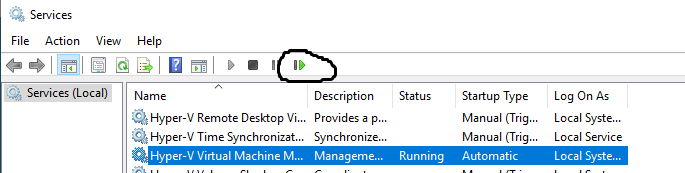
Confirm that the Hyper-V VSS Writer is in a good or stable state by running the following command from a Windows Command or PowerShell prompt:
vssadmin list writers
Affected Products
Avamar, Avamar Plug-in for Hyper-V VSS, Integrated Data Protection Appliance FamilyArticle Properties
Article Number: 000039786
Article Type: Solution
Last Modified: 11 Dec 2025
Version: 5
Find answers to your questions from other Dell users
Support Services
Check if your device is covered by Support Services.