Avamar: SQL AlwaysOn 클러스터 찾아보기 실패
Summary: 이 KB 문서에서는 SQL AlwaysOn 클러스터가 기본이 아닌 포트에서 수신 대기하도록 구성된 경우 네트워크 관련 또는 인스턴스별 오류로 인해 발생하는 SQL(Structured Query Language) AO(AlwaysOn) 클러스터 탐색 및 백업 실패를 해결하는 해결 방법에 대해 설명합니다.
This article applies to
This article does not apply to
This article is not tied to any specific product.
Not all product versions are identified in this article.
Symptoms
SQL AO(AlwaysOn) 클러스터가 탐색 또는 백업하지 못하고 다음과 유사한 오류 메시지가 표시될 수 있습니다.
avsql Error <9072>: sqlconnectimpl_smo::connect Microsoft.SqlServer.Management.Common.ConnectionFailureException: Failed to connect to server EMClistener. ---> System.Data.SqlClient.SqlException: A network-related or instance-specific error occurred while establishing a connection to SQL Server. The server was not found or was not accessible. Verify that the instance name is correct and that SQL Server is configured to allow remote connections. (provider: Named Pipes Provider, error: 40 - Could not open a connection to SQL Server) ---> System.ComponentModel.Win32Exception: The system cannot find the file specifiedCause
SQL AO 수신기는 기본이 아닌 포트에서 수신 대기하도록 구성됩니다. 기본적으로 TCP 포트 1433에서 수신 대기하도록 구성됩니다.
Resolution
Avamar SQL AlwaysOn 가용성 그룹에 대해 지정된 공유 var 폴더에 avsql.cmd 파일을 생성하고 다음 플래그를 추가합니다.
--sqlserver=<availability group listener's IP address>,<listener port>
예:
--sqlserver=172.1.1.1,5123
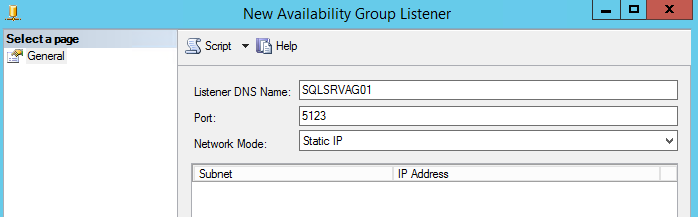
AO 수신기 포트에 대해 구성된 IP 주소 및 포트는 SQL Server Management Studio로 이동하여 찾을 수 있습니다.
Affected Products
Avamar, Avamar Plug-in for SQLArticle Properties
Article Number: 000162984
Article Type: Solution
Last Modified: 23 Sept 2025
Version: 4
Find answers to your questions from other Dell users
Support Services
Check if your device is covered by Support Services.