DPA: Jobmonitor failing for Data Protector with timeout due to "omnicellinfo" command
Summary: Jobmonitor data request failing for Data Protector server with timeout due to "omnicellinfo" command. All other requests are running successfully.
This article applies to
This article does not apply to
This article is not tied to any specific product.
Not all product versions are identified in this article.
Symptoms
Jobmonitor failing for Data Protector server with timeout, DPA is not collecting backup data.
The "dpaagent log" contains the following error:
ERR 9425.9447 20210129:095944 agent.mod.dp - dpRunCmd(): timeout running omnicellinfo against server 'DP_server_hostname'
The History of the jobmonitor request for that Data Protector server typically shows the following: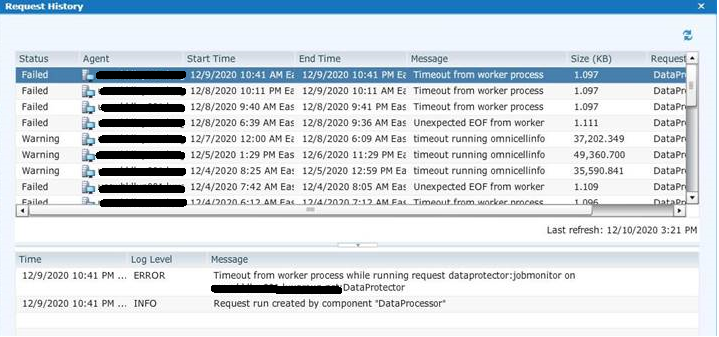
Cause
The current design of the Data Protector module in DPA is to run the "omnicellinfo" command multiple times during data collection.
It tries to run "omnicellinfo" once for each client that ran a backup during the polling period of the request.
If the command takes more than 30-60 s to run, it takes a long time if for example 100 clients ran a backup within that polling timeframe.
Resolution
On the Data Protector server, run the following command and observe how long it takes:
omnicellinfo -server <server hostname> -cell brief
If the command takes longer than 1 minute (ideally it should run under 30 s for optimal performance), Micro Focus should be engaged to reduce the time it takes for "omnicellinfo" to run.
Contact Dell Technical Support for more information.
Affected Products
Data Protection Suite, Data Protection AdvisorArticle Properties
Article Number: 000182957
Article Type: Solution
Last Modified: 20 Jan 2025
Version: 4
Find answers to your questions from other Dell users
Support Services
Check if your device is covered by Support Services.