설치 중에 Windows에서 Dell Optimizer 드라이버를 확인할 수 없음
Summary: 이 문서에서는 Dell Optimizer에서 설치 중인 드라이버를 확인할 수 없는 보안 경고를 해결하는 방법에 대한 정보를 제공합니다.
This article applies to
This article does not apply to
This article is not tied to any specific product.
Not all product versions are identified in this article.
Symptoms
영향을 받는 제품:
- SupportAssist
- Dell Precision Optimizer
Cause
Dell Precision Optimizer를 설치할 때 드라이버 소프트웨어에 대한 Windows 보안 메시지가 경고를 제공할 수 있습니다.
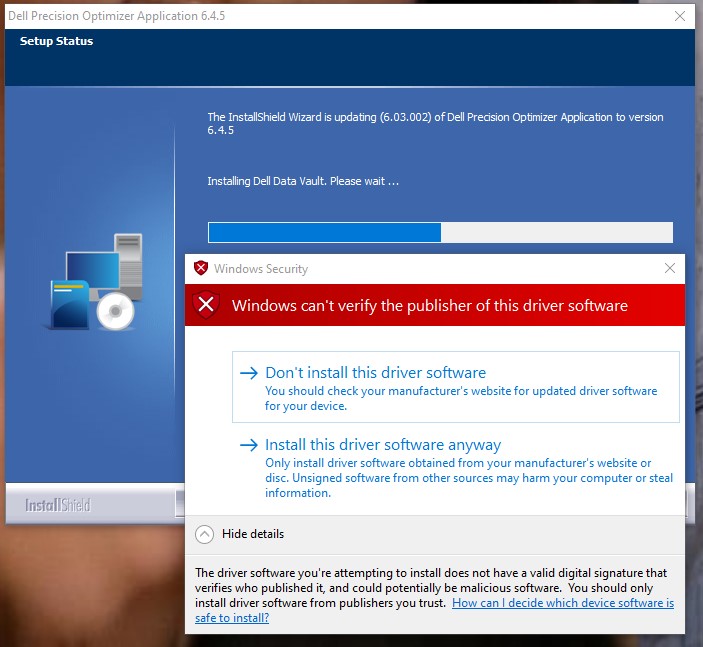
그림 1: (영어로만 제공) Windows 보안 메시지
이 오류는 Dell SupportAssist와 Dell Precision Optimizer 간에 포함된 Dell Data Vault 드라이버 불일치로 인해 발생합니다.
Resolution
Dell Precision Optimizer를 설치하는 동안 이 오류가 표시되면 이 드라이버 소프트웨어를 설치하지 않음을 클릭합니다. Dell Precision Optimizer는 SupportAssist Dell Data Vault 드라이버를 사용하여 작동합니다.
이 드라이버 소프트웨어 설치를 클릭하면 SupportAssist의 Dell Data Vault 드라이버 버전 종속성으로 인해 컴퓨터에 블루 스크린이 발생할 수 있습니다.
블루 스크린을 해결하려면 다음을 수행합니다.
- Windows 안전 모드로 부팅합니다.
- Windows 시작 메뉴를 마우스 오른쪽 버튼으로 클릭한 다음 앱 및 기능을 클릭합니다.
- Dell SupportAssist에서 Uninstall 을 클릭합니다.
- SupportAssist를 제거할 때 Dell Precision Optimizer에서 제거 를 클릭합니다.
- 컴퓨터를 재부팅합니다.
- SupportAssist를 설치합니다.
참고: Dell SupportAssist를 다운로드 하려면 PC용 Dell SupportAssist를 참조하십시오.
- Dell Precision Optimizer를 설치합니다.
- Windows 보안 알림 프롬프트에서 이 드라이버 소프트웨어를 설치하지 않음을 클릭합니다.
참고: Dell Precision Optimizer를 다운로드하려면 Precision 모델을 선택한 다음 Drivers & Downloads를 클릭합니다.
Affected Products
SupportAssist, Dell Precision OptimizerArticle Properties
Article Number: 000187096
Article Type: Solution
Last Modified: 07 May 2024
Version: 5
Find answers to your questions from other Dell users
Support Services
Check if your device is covered by Support Services.