NetWorker: NMC login fails with "There is a problem contacting the server, server_hostname. Please verify that the server is running."
Summary: When trying to log in to the NetWorker Management Console (NMC) server an error message stating "There is a problem contacting the server, server_hostname. Please verify that the server is running". appears ...
This article applies to
This article does not apply to
This article is not tied to any specific product.
Not all product versions are identified in this article.
Symptoms
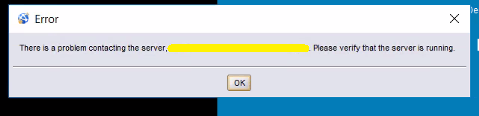
- After attempting to log in to the NetWorker Management Console (NMC) the following error message appears:
There is a problem contacting the server, server_hostname. Please verify that the server is running".
Cause
The NMC server's firewall does not allow incomming connections to TCP ports 9000 and or 9001.
Port 9000 is used by the NMC HTTP process when connecting from NMC client to NMC server.
Port 9001 is used for RPC calls from the Java console to the NMC server.
Port 9000 is used by the NMC HTTP process when connecting from NMC client to NMC server.
Port 9001 is used for RPC calls from the Java console to the NMC server.
Resolution
1. On the NMC server, ensure that the NMC process is running and ports 9000 and 9001 are listening:
2, a. Check if the operating system firewall is enabled.
2, b. If firewall is enabled, temporarily disable it and confirm you can connect to ports 9000 and 9001 from the NMC client:
3. If the operating system firewall must be enabled, configure firewall rules to accept ports 9000 and 9001. These ports are detailed in the NetWorker Security Configuration Guide, available through: https://www.dell.com/support/home/product-support/product/networker/docs
Linux:
systemctl status gst
netstat -apno | grep "9000\|9001"
netstat -apno | grep "9000\|9001"
Windows:
tasklist | findstr gst
netstat -aof | findstr 9000
netstat -aof | findstr 9001
netstat -aof | findstr 9000
netstat -aof | findstr 9001
2, a. Check if the operating system firewall is enabled.
Linux:
firewall-cmd --stat
Windows:
netsh advfirewall show allprofiles state
OR
Search "Check firewall status"
OR
Search "Check firewall status"
NOTE: If the operating system firewall is already disabled, check with network/security team to see if any network firewall exists between the NMC client and NMC server systems.
2, b. If firewall is enabled, temporarily disable it and confirm you can connect to ports 9000 and 9001 from the NMC client:
Linux:
curl -v NMC_servername:port
Windows (PowerShell):
Test-NetConnection -ComputerName NMC_servername -port PORT
NOTE: If the system being used to access the NMC has NetWorker installed you can also use the nsrports command to verify resolution and port connectivity: nsrports -t NMC_servername -p port
NOTE: Refer to operating system vendor documentation for configuring operating system firewall rules as this can vary between distributions. If assistance is required configuring firewall rules engage the System Administrator and local network or security teams.
Article Properties
Article Number: 000203361
Article Type: Solution
Last Modified: 15 Sept 2022
Version: 1
Find answers to your questions from other Dell users
Support Services
Check if your device is covered by Support Services.