NetWorker:NMC 登录失败,并显示“There is a problem contacting the server, server_hostname.请验证服务器是否正在运行。”
Summary: 尝试登录到 NetWorker Management Console (NMC) 服务器时,会显示一条错误消息,指出“There is a problem contacting the server, server_hostname.请验证服务器是否正在运行”。出现
This article applies to
This article does not apply to
This article is not tied to any specific product.
Not all product versions are identified in this article.
Symptoms
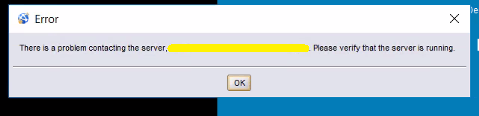
- 尝试登录 NetWorker Management Console (NMC) 后,将显示以下错误消息:
联系服务器时出现问题,server_hostname。请验证服务器是否正在运行”。
Cause
NMC 服务器的防火墙不允许向 TCP 端口 9000 和或 9001 输入连接。
从 NMC 客户端连接到 NMC 服务器时,NMC HTTP 进程使用端口 9000。
端口 9001 用于从 Java 控制台到 NMC 服务器的 RPC 调用。
从 NMC 客户端连接到 NMC 服务器时,NMC HTTP 进程使用端口 9000。
端口 9001 用于从 Java 控制台到 NMC 服务器的 RPC 调用。
Resolution
1.在 NMC 服务器上,确保 NMC 进程正在运行,并且端口 9000 和 9001 正在侦听:
2、a.检查操作系统防火墙是否已启用。
2、b.如果已启用防火墙,请暂时禁用它,并确认您可以从 NMC 客户端连接到端口 9000 和 9001:
3.如果必须启用操作系统防火墙,请将防火墙规则配置为接受端口 9000 和 9001。NetWorker 安全配置指南 中详细介绍了这些端口,可通过以下方式获得 https://www.dell.com/support/home/product-support/product/networker/docs
Linux:
systemctl status gst
netstat -apno | grep “9000\|9001”
netstat -apno | grep “9000\|9001”
Windows:
任务列表 |findstr gst
netstat -aof | findstr 9000
netstat -aof | findstr 9001
netstat -aof | findstr 9000
netstat -aof | findstr 9001
2、a.检查操作系统防火墙是否已启用。
Linux:
firewall-cmd --stat
Windows:
netsh advfirewall 显示 allprofiles 状态
或
搜索“Check firewall status”
或
搜索“Check firewall status”
提醒:如果操作系统防火墙已禁用,请与网络/安全团队确认 NMC 客户端和 NMC 服务器系统之间是否存在任何网络防火墙。
2、b.如果已启用防火墙,请暂时禁用它,并确认您可以从 NMC 客户端连接到端口 9000 和 9001:
Linux:
curl -v NMC_servername:端口
Windows (PowerShell):
Test-NetConnection -ComputerName NMC_servername -port PORT
提醒:如果用于访问 NMC 的系统安装了 NetWorker,您也可以使用 nsrports 命令来验证解析和端口连接: nsrports -t NMC_servername -p 端口
提醒:请参阅操作系统供应商文档以配置操作系统防火墙规则,因为这可能因分发而异。如果需要协助配置防火墙规则,请联系系统管理员和本地网络或安全团队。
Article Properties
Article Number: 000203361
Article Type: Solution
Last Modified: 15 Sept 2022
Version: 1
Find answers to your questions from other Dell users
Support Services
Check if your device is covered by Support Services.