PowerFlex Cloudlinkを使用して外部FTPにバックアップ ジョブを実行すると、バックアップのたびに「Failed to upload backup file to store」という警告メッセージが表示される
Summary: PowerFlex Cloudlinkを使用して外部FTPにバックアップ ジョブを実行すると、すべてのジョブの後にバックアップ ファイルが存在していても、バックアップのたびに「Failed to upload backup file to store」という警告メッセージが表示されます。MD5ハッシュをnoに設定
This article applies to
This article does not apply to
This article is not tied to any specific product.
Not all product versions are identified in this article.
Symptoms
お客様は、FTPを使用してCloudLink Centerの外部(Isilon)バックアップ メディアへのバックアップを構成していました。スケジュールに従ってバックアップ ジョブを実行しているときに、EメールとCloudLinkアラームで「Failed to upload backup file to store」という警告メッセージが表示されます。

Cause
このアラートは、IsilonでMD5ハッシュが有効になっていないことが原因で発生します。Isilon CLIで コマンドを発行して、Md5を確認します。
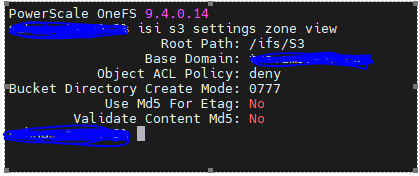
hash #isi s3 settings zone view以下の出力を参照してください。
Resolution
EtagのMD5とContent Md5の検証を yes に設定するか、GUIを使用してCLIコマンドを有効にする
コマンドを次のコマンドに問題します。
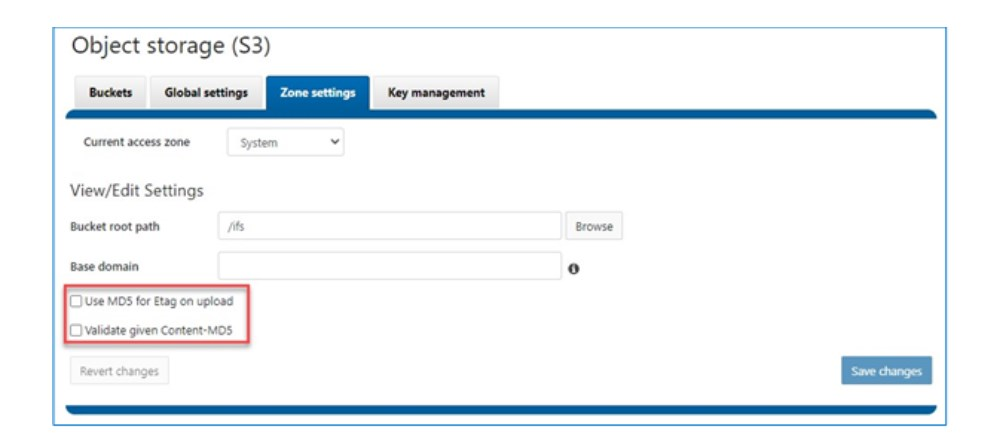
コマンドを次のコマンドに問題します。
# isi s3 settings zone modify --use-md5-for-etag=yes --validate-content-md5=yesGui
Affected Products
CloudLinkArticle Properties
Article Number: 000220088
Article Type: Solution
Last Modified: 22 Dec 2023
Version: 1
Find answers to your questions from other Dell users
Support Services
Check if your device is covered by Support Services.