PowerFlex Cloudlink를 사용하여 외부 FTP에 대한 백업 작업에 모든 백업 후 "Failed to upload backup file to store"라는 경고 메시지가 표시됩니다.
Summary: PowerFlex Cloudlink를 외부 FTP에 사용하는 백업 작업에는 모든 작업 후에 백업 파일이 있는 경우에도 모든 백업 후에 "Failed to upload backup file to store"라는 경고 메시지가 표시됩니다. MD5 해시가 No로 설정됨
This article applies to
This article does not apply to
This article is not tied to any specific product.
Not all product versions are identified in this article.
Symptoms
고객이 FTP를 사용하여 Cloudlink Center를 외부(Isilon) 백업 미디어에 백업하도록 구성했습니다. 예약에 따라 백업 작업을 실행하는 동안 이메일과 Cloudlink 알람에서 "Failed to upload backup file to store"라는 경고 메시지가 표시됩니다.

Cause
이 알림은 Isilon에서 MD5 해시가 활성화되지 않아 발생합니다. Isilon CLI에서 명령을 실행하여 Md5를 확인합니다.

hash #isi s3 settings zone view아래 출력을 참조하십시오.
Resolution
아래 명령을 실행하여 MD5 for Etag를 설정하고 Content Md5를 yes로 검증하거나 GUI를 사용하여 CLI 명령을 활성화
합니다.
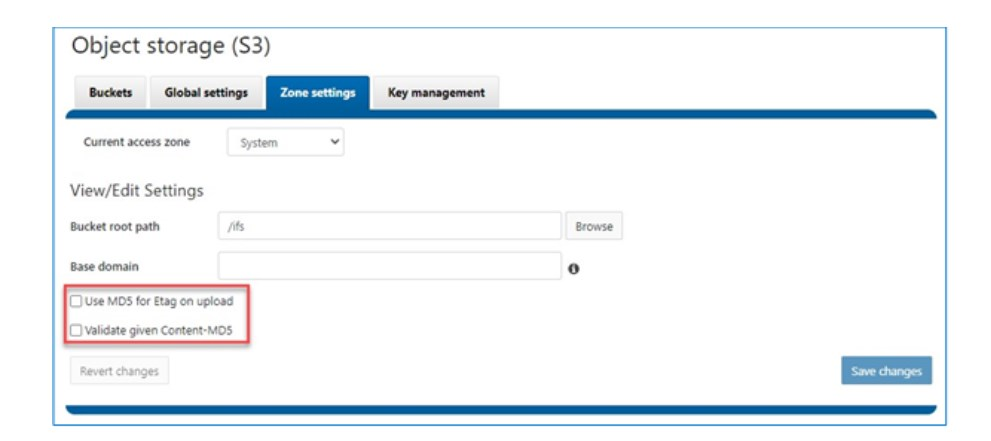
합니다.
# isi s3 settings zone modify --use-md5-for-etag=yes --validate-content-md5=yesGui
Affected Products
CloudLinkArticle Properties
Article Number: 000220088
Article Type: Solution
Last Modified: 22 Dec 2023
Version: 1
Find answers to your questions from other Dell users
Support Services
Check if your device is covered by Support Services.