Backup job using PowerFlex Cloudlink to external FTP shows warning message "Failed to upload backup file to store" after every backup
Summary: Backup job using PowerFlex Cloudlink to external FTP shows warning message "Failed to upload backup file to store" after every backup even though the backup file is present after every job. MD5 hash set to no ...
This article applies to
This article does not apply to
This article is not tied to any specific product.
Not all product versions are identified in this article.
Symptoms
Customer had configured backup of cloudlink center to external(Isilon) backup media using FTP. While running backup job as per schedule they would receive an warning message "Failed to upload backup file to store" by email as well as in Cloudlink Alarms.

Cause
The alert is caused due to MD5 hash not being enabled on Isilon. Issue the command on Isilon CLI to verify the Md5
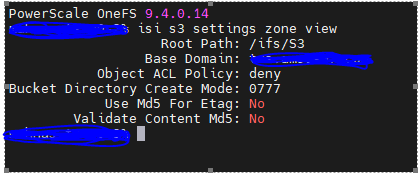
hash #isi s3 settings zone viewSee the output below
Resolution
Issue to below command to set MD5 for Etag and Validate Content Md5 to yes or use GUI to enable
CLI Command
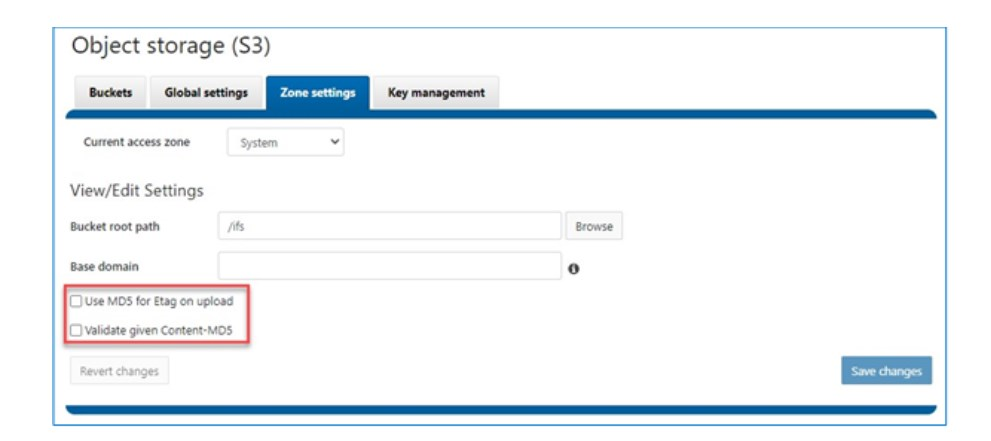
CLI Command
# isi s3 settings zone modify --use-md5-for-etag=yes --validate-content-md5=yesGUI
Affected Products
CloudLinkArticle Properties
Article Number: 000220088
Article Type: Solution
Last Modified: 22 Dec 2023
Version: 1
Find answers to your questions from other Dell users
Support Services
Check if your device is covered by Support Services.