VxRail: iSM "is not running" "running limited functionality," or "is inactive (dead)"
Summary: The iSM is in a state of "is not running" or "running limited functionality." This article describes methods of resolving.
Symptoms
The iDRAC Service Module (iSM) is an important service on hosts to be able to gather information from the iDRAC for monitoring.
This can show up in the iDRAC as the following state.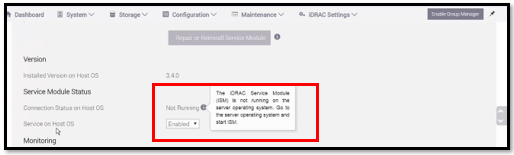
To check the iSM service status:
All VxRail through 7.0.x
/etc/init.d/dcism-netmon-watchdog status
8.0+
/etc/init.d/dellism status
They may have one of the following statuses:
- iSM is active (running)
- This is the fully functional state
- iSM is active (not running)
- iSM is active (running limited functionality)
- iSM is inactive (dead)
Cause
There are many possible causes of this issue. One such example is that the services on the iDRAC are not fully functional, preventing the iSM from talking with it.
Any individual root cause should be investigated under normal technical review (logs, release notes, Knowledge Base articles (KBs), so on) and escalated as necessary using standard processes (CTE, DE, EE).
Resolution
To resolve this issue, follow the steps below:
-
Open an SSH session to each node that has the iSM not running on IDRAC.
Follow the steps below on each of the nodes:
-
First, cold reboot the iDRAC to reboot its operating system. Each of the following methods is ways of accomplishing this task; it is not necessarily to run all three because of this.
/opt/vxrail/tools/ipmitool mc reset cold

SSH into iDRAC (same login as web)
racadm> racreset hard
-
Stop iSM service on the node.
7.0.x and earlier
# /etc/init.d/dcism-netmon-watchdog stop
8.0
# /etc/init.d/dellism stop
-
Install iSMPKIHelper
# cd /opt/dell/srvadmin/iSM/bin
# ./Invoke-iSMPKIHelper -install
-
Start iSM service on node.
7.0.x and earlier
# /etc/init.d/dcism-netmon-watchdog start
8.0
# /etc/init.d/dellism start
-
Set service from 0 to 1
# esxcli system wbem set -e 0
# esxcli system wbem set -e 1
-
Run the SupportAssistCollection script to collect iDRAC logs
# cd /opt/dell/srvadmin/iSM/bin
# ./Invoke-SupportAssistCollection
SupportAssist log Collection is in progress..
[||||||||||||||||||||||||||||||||||||||||||||||||||||||||||||]100%
Downloading the collected log file is in progress..
SupportAssist Collection logs can be found in path /tmp/TSR20190826xxxxxx_xxxxxx.zip
If the iSM is "active (not running)," and cannot recover by "/etc/init.d/dcism-netmon-watchdog restart" or "/etc/init.d/dellism": it may be related to the following service.
Try the following steps.
/etc/init.d/dcism-netmon-watchdog status
/etc/init.d/sfcbd-watchdog stop
/etc/init.d/sfcbd-watchdog start
/etc/init.d/dcism-netmon-watchdog restart
/etc/init.d/dcism-netmon-watchdog status
The following work same as above:
7.0.x and older
/opt/vxrail/tools/ipmitool mc reset cold ; sleep 300 ; /etc/init.d/sfcbd-watchdog stop ; /etc/init.d/dcism-netmon-watchdog stop; /etc/init.d/vxrail-pservice stop; rm /var/run/log/vxps_cache.dat ; sleep 10 ; /etc/init.d/sfcbd-watchdog start ; /etc/init.d/dcism-netmon-watchdog start; sleep 120 ; /etc/init.d/vxrail-pservice start
8.0
/opt/vxrail/tools/ipmitool mc reset cold ; sleep 300 ; /etc/init.d/sfcbd-watchdog stop ; /etc/init.d/dellism stop; /etc/init.d/vxrail-pservice stop; rm /var/run/log/vxps_cache.dat ; sleep 10 ; /etc/init.d/sfcbd-watchdog start ; /etc/init.d/dellism start; sleep 120 ; /etc/init.d/vxrail-pservice start
8.0.3xx:
/opt/platformsvc/bin/ipmitool.sh mc reset cold ; sleep 300 ; /etc/init.d/sfcbd-watchdog stop ; /etc/init.d/dellism stop; esxcli daemon control stop -s platformsvc; rm /var/run/log/vxps_cache.dat ; sleep 10 ; /etc/init.d/sfcbd-watchdog start ; /etc/init.d/dellism start; sleep 120 ; esxcli daemon control start -s platformsvc
If the iSM state is "inactive (dead)," restarting the iSM service does not change its state from dead. Attempting to remove, upgrade, or install over the iSM leads to the following error.
It is not safe to continue. Please reboot the host immediately to discard the unfinished update.
cause = ('DEL-dcism(4.1.0.0.2410-DEL.700.0.0.15843807)', "Failed to unmount tardisk dcism.v00 of VIB DEL_bootbank_dcism_4.1.0.0.2410-DEL.700.0.0.15843807: Error in running [rm /tardisks/dcism.v00]:\nReturn code: 1\nOutput: rm: can't remove '/tardisks/dcism.v00': Device or resource busy\n")
vibs = ['DEL_bootbank_dcism_4.1.0.0.2410-DEL.700.0.0.15843807']
Please refer to the log file for more details.
[root@nl93vh1012:/tardisks] localcli software vib remove -n dcism
Errors:
[LiveInstallationError]
DEL_bootbank_dcism_4.1.0.0.2410-DEL.700.0.0.15843807: Failed to unmount tardisk dcism.v00 of VIB DEL_bootbank_dcism_4.1.0.0.2410-DEL.700.0.0.15843807: Error in running [rm /tardisks/dcism.v00]:
Return code: 1
Output: rm: can't remove '/tardisks/dcism.v00': Device or resource busy
Stop the service to have it release its access to the above tardisk. iSM processes can start backup after this.
/etc/init.d/sfcbd-watchdog stop
Then you can retry the upgrade or immediately update the iSM manually as:
esxcli software vib update -d /vmfs/volumes/vsan\:*/upgradeBundles-*/<ISM version being upgraded to>.zip
Where the vSAN upgradeBundles folders involve UUIDs and the ISM version depends what the VxRail upgrade is being upgraded to.
If this does not resolve the issue, you may have to power drain the node.
It is recommended to first try a virtual power drain as it can be done remotely. Physical power drain requires physical access.
Dell EMC VxRail: How to perform remote auxiliary power drain of node through the iDRAC (Dell Support account is required to view this article)
If issues continue, it is recommended to engage Dell Technical Support for assistance; reference this KB.