Dell Unity XT: Both power supplies in the systems are not supported (User Correctable)
Summary: Dell Unity XT: Both power supplies in the systems are not supported (User Correctable).
Symptoms
Unity XT reported that both power supplies in the systems are not supported: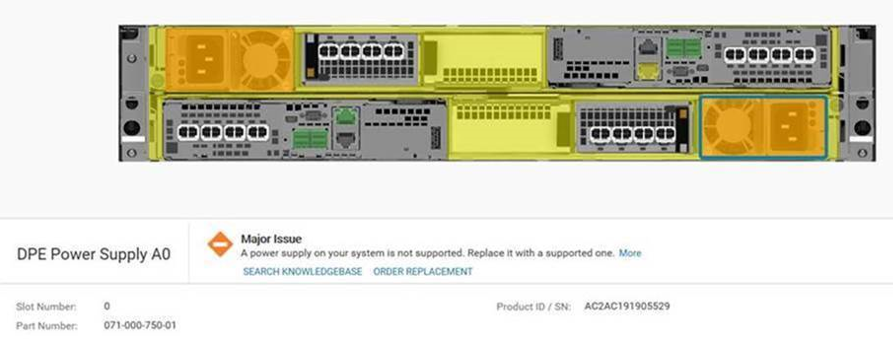
SP logs (Can be found in the Unity support data collection tar file under spX\EMC\backend\log_shared\EMCSystemLogFile.log -- where spX is the primary SP):
B 09/05/19 18:55:14.119 Bus9 Enc0 PowA 1678006 [ERROR] System: Power Supply is Faulted (Unsupported ). B 09/05/19 18:55:14.131 Bus9 Enc0 PowB 1678006 [ERROR] System: Power Supply is Faulted (Unsupported ). A 09/05/19 19:06:18.834 Bus9 Enc0 PowA 1678006 [ERROR] System: Power Supply is Faulted (Unsupported ). A 09/05/19 19:06:18.847 Bus9 Enc0 PowB 1678006 [ERROR] System: Power Supply is Faulted (Unsupported ). |
Fbecli logs (Can be found in the Unity support data collection tar file under spX\cmd_outputs\fbecli_exe_ccollectall.txt -- where spX contains the log for that SP):
spX\cmd_outputs\speclcli_-getall.txt shows the Input Voltage:
SP B [Active SP] PEER SP: PRESENT HW Cache Status: FAILED Reason: PS DPE-SCORP 990 (Bus 99, Pos 0) -OK EnclFaultLedStatus: ON EnclFaultLedReason: PS Fault PS A B FLT (0102) FLT (0102) Bus 99 Enclosure 0 PS Slot 0 Info: Associated SP : SP_A(0) State : OK SubState : NO FAULT Logical Fault : YES PS uniqueId : 0xB004F00(ATLAS 1980W High GEN2 OTS PSU (Acbel)) PS Supported : NO Low Line Input : YES Bus 99 Enclosure 0 PS Slot 1 Info: Associated SP : SP_B(1) State : OK SubState : NO FAULT Logical Fault : YES PS uniqueId : 0xB004F00(ATLAS 1980W High GEN2 OTS PSU (Acbel)) PS Supported : NO Low Line Input : YES ## speclcli getAll ## __ SPA PS0 Status __ Input Voltage : 116 Volts __ SPB PS0 Status __ Input Voltage : 117 Volts |
Another symptom is the following event:
SymptomCode: neo14:601ff
Description: DPE Power Supply B0 does not support low line input
Cause
Unity XT 480/680 supports two types of power supply models:
ATLAS (220V):            PN: 071-000-750-01       Hi-Line
POSEIDON (110V):    PN: 071-000-760-03        Low-Line
If the Unity Power Supply is ATLAS (220V), a hi-line power supply, it does not support low line AC voltage such as from a wall power outlet (110V) will cause the alert.
Conversely, if the Unity PS is POSEIDON (110V), a low-line power supply, it does not support high line AC voltage (220V) and will cause the alert.
Resolution
To address the issue:
- Confirm the input voltage as 110V Low Line) or 220V (Hi-Line)
- Confirm the Power Supply as POSEIDON (110V) or ATLAS (220V)
If Input Voltage is in the 220 Voltage range and the Power Supply is 110V (POSEIDON): change the AC input from 220V to 110V, or replace the Power Supply model from POSEIDON (110V) to ATLAS (220V).
If the Input Voltage is in the 110 Voltage range and the Power Supply is 220V (ATLAS): Change the AC input from 110V to 220V, or replace the Power Supply model from ATLAS to POSEIDON.
The POSEIDON power supply is only used for Low Line power for the Unity XT 480(F) and Unity XT 680(F) where supply voltages to the storage array are in the 100-120V range. To connect the power supply to a wall outlet, select the C19 cable with the specific countries wall outlet connector using the DOC-394778 link below.
The connector on the other end of the cable depends on the specific country or region wall plug type.
Country Specific Wall-Power Cords
NOTE: Order these Country Specific Cords directly from MyQuotes and provide the Dell Model number.
EXAMPLE: The United States uses Dell Model number: C19-PWR-12 Part Number: 038-004-848
Description: C19 PWR CORD W/ NEMA 5-15P PLUG, 125V 15A
IMPORTANT REPLACEMENT NOTE: The Power Supplies (PSs) must be replaced while the array is running. Replace one power supply at a time. Alerts are generated during the swap. Alerts like "Power Supply Intermix" can be ignored or acknowledged. If the array is powered off and the PSs are replaced - the array may not power on. Insert the original Atlas Power supplies, power on the array and replace each PS one at a time.
Additional Information
By default when ordering a new system for Low Line power you will be asked for the Country Specific Wall Cord.
They are also available in the Add-on Hardware section in both the new and upgrade MyQuotes ordering paths.
According to the Unity XT hardware guide, the power requirements are below. When using low line power input, ATLAS PS only supplies 1050W which does not meet the 1450W power requirement to DPE but POSEIDON fully supplies the capacity.
Power specifications per Unity model
Model                     High line      Low line
Unity 480/480F      1800 W        1450 W
Unity 680/680F      1800 W        1450 W
Unity 880/880F      1800 W        1800 W (Step-up transformer required)
ATLAS Specification: GEN2 CFF 1800W HL 1050W LL PSU AC
POSEIDON Specification: GEN2 CFF 1450W LL 2100W HL AC DC PSU AC
Notes:
ATLAS is to be used in all cases where the array is being installed in a cabinet running 220vAC; A sales order with High line power selected and using standard c13/c14 power cables.
POSEIDON will be ordered to run 110vAC along with the use of a country or region or region-specific wall outlet: A sales order with a Low line power selected (you will be asked to select a specific country or region wall outlet cable).
120vAC PDU is being used:
In rare cases where a customer is using a 120V PDU, you may need to special order a C19 to C20 or C19 to C14 power cable if the PDU uses a rack type C19 or C13 connections. It may not have a typical wall outlet connection. These cables would only be needed if the customers 120vAC PDU has rack type C19 or C13 connections.
Special Order:   C20 to C19 cable:

038-004-807 - C20 to C19 1m 14AWG black
038-004-808 - C20 to C19 1m 14AWG gray
~~~~~~~~~~~~~~~~~~~~~~~~~~~~~~~~
Special order C19 to C14 cable:**

TrippLite 14AWG IEC-320-C19 to IEC-320-C14 Heavy-Duty Power Cord - 6 ft
Special order for Dell Part Number: A2812947
Manufacturer Part P047-006
** The above part is not in the L-EMC database and would need to be ordered separately.
Videos
If Input Voltage is in the 110 Voltage range and the Power Supply is 110V (POSEIDON): Does not match this issue.