Customer & device data privacy option
Summary: Error/ Issue: Customer receives SCG showing "TOKEN##" instead of device names in inventory telemetry collection email messages, including the name of the SCG.
Instructions
Error/Issue: Customer receives SCG showing "TOKEN##" instead of device names in inventory telemetry collection email messages, including the name of the SCG.
Examine/Review: check for the below logs
-
Log in to SCG CLI/Putty as root user
-
Collect below logs.
cd /var/lib/docker/volumes/saede_logs/_data/emails/emailsapplication.logcat emailsapplication.log | grep TOKEN
Or
- Check with a customer if a customer has access for winscp.
- Login with the root user and follow the below step
/var/lib/docker/volumes/saede_logs/_data/emails/emailsapplication.log- Collect the emailsapplication.log
-
Search for the word token in the collected logs.
If you find the word token in the logs:
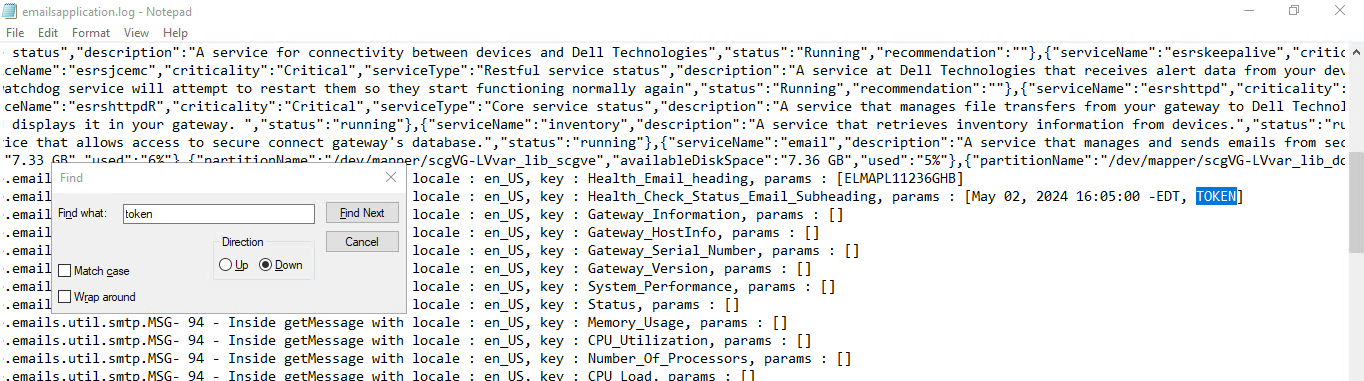
Resolution: Open SCG UI and login as Admin user.
-
Go to Settings > Telemetry Settings.
-
If Customer & device data privacy option disabled, enable that.

Justification and cause: Customer & device data privacy option - feature (Mentioned in SCG user guide page no. 60) https://dl.dell.com/content/manual54603293-secure-connect-gateway-5-x-virtual-edition-user-s-guide.pdf?language=en-us
In the Customer & device data privacy section, by default, the option to include identification information is selected. But, if you do not want to include the information, clear the checkbox. When the checkbox is cleared, the hostname and IP address in your SMTP mails are masked for privacy. NOTE: If you clear the checkbox, the collection of logs and diagnostic data are automatically disabled. Also, some of the data about your company network including the system log is not sent to the backend. This may prevent technical support from resolving issues that may occur on your devices.