NetWorker: Management Console (NMC) is not accessible on dual-NIC NMC server
Summary: The NetWorker Management Console (NMC) server is configured with multiple Network Adapters.
Symptoms
The NetWorker Management Console (NMC) server is deployed or upgraded to one of the following versions (or later):
- 19.11.0.4
- 19.12.0.1
The NMC server has multiple Network Adapters. The adapters have different IP addresses, and in some scenarios, different DNS/hostnames associated with the unique IPs.
The NetWorker Runtime Environment (NRE) NMC launcher uses a specific hostname/IP address to connect to the NMC server, for example:
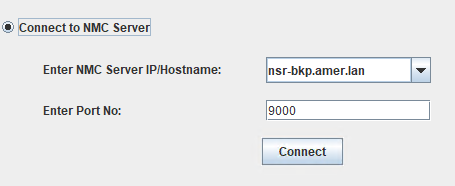
The NMC connection ignores the address specified and connects with another hostname/IP. If the address is not reachable from the host accessing the NMC, the NMC launcher fails:

The address shown in the "Unable to load resource" line is not accessible from the host launching the NMC:

The address used when launching the NMC is accessible:

Cause
The symptoms appear due to code change NETWORKER-105298 which resolves a security concern regarding HTTP host header injection. This is only observed on NMC servers with multiple Network Adapters. The NMC connection is enforced through the hosts primary address and does not allow connection from another network, such as a management or external address.
If the hosts accessing the NMC do not have network access to the the NMC server's primary NIC, the connection fails. The "primary address" is determined by the hostname of the machine.
Resolution
- On the NMC server, make a copy of the following file.
-
- Linux:
/opt/lgtonmc/apache/conf/httpd.conf - Windows (Default):
C:\Program Files\EMC NetWorker\Management\GST\apache\conf\httpd.conf
- Linux:
- Use a text editor to modify the file. Replace the
Servername hostname-of-NIC1:9000with the hostname of the address that you want to use.
Change:
Servername nsr.amer.lan:9000
Servername nsr-bkp.amer.lan:9000
Save the changes.
- Restart the NMC service:
-
- Linux:
systemctl restart gst - Windows:
net stop gstdnet start gstd
- Linux:
- Relaunch the NMC using the hostname that is resolvable from the NMC client:
For example:
The NMC connection is done using the address defined in the NMC server's httpd.conf: