PowerEdge: System hangs at initializing firmware when disk fails in attached MD3060e
Summary: This article offers a solution for an LSI 9207-8e SAS HBA stopping responding at firmware initialization when a hard drive fails in the attached PV MD3060e.
Symptoms
The server stops responding at initializing firmware.
Cause
Resolution
Disable the boot driver on the LSI 9207-8e SAS HBA then replace the faulty drive.
The faulty drive is blinking green and has a different behavior than the rest of the drives.
-
Enter the BIOS Setup by pressing "F2" at system power on.
-
After getting into the BIOS go into "Integrated Devices."
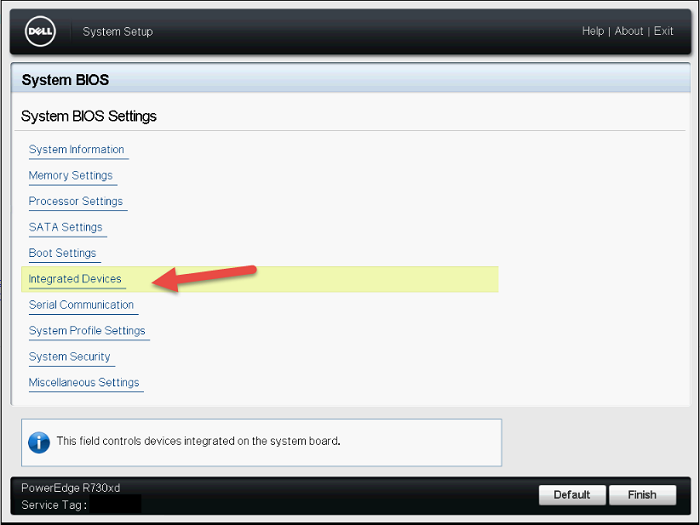
Figure 1: System BIOS Settings -
Scroll down to view the rest of the menu.

Figure 2: System BIOS Integrated Devices (1) -
Click "Slot Disablement."
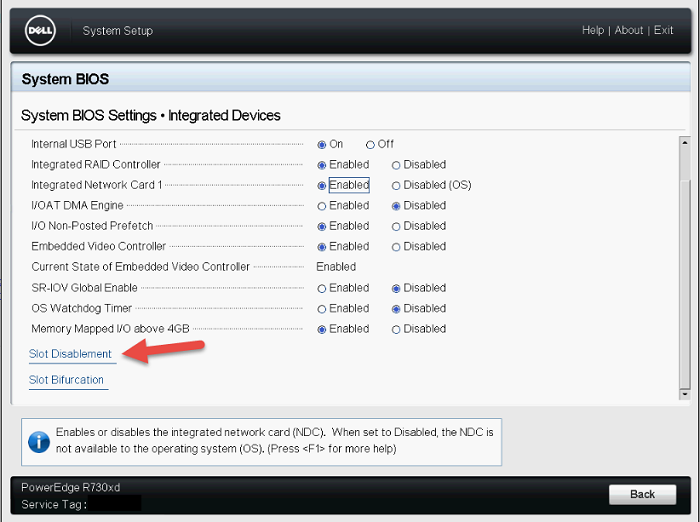
Figure 3: System BIOS Integrated Devices (2) -
Make sure to disable the boot driver for the LSI 9207-8e HBA.
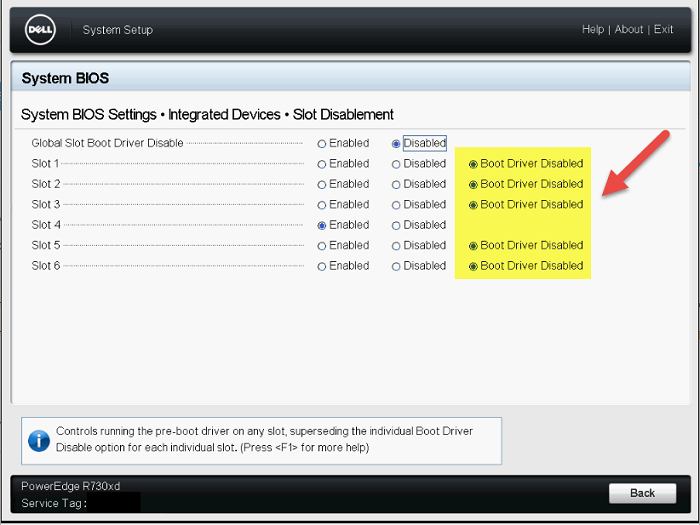
Figure 4: Slot Disablement Menu -
Reboot the system and see if it completes POST.
-
More than likely there is a faulted drive in the MD3060e, which is causing it to stop responding. Replace the faulty drive as needed.