Secure Connect Gateway - виявлені пристрої відображають статус "Помилка"
Summary: У цій статті описано ситуацію, коли стан виявлення пристроїв показує стан «Помилка», а статус «Моніторинг SNMP» показує «Не працює».
This article applies to
This article does not apply to
This article is not tied to any specific product.
Not all product versions are identified in this article.
Symptoms
На екрані інтерфейсу користувача стан виявлених пристроїв показує стан помилки замість успішного, а можливість моніторингу показує погіршення.
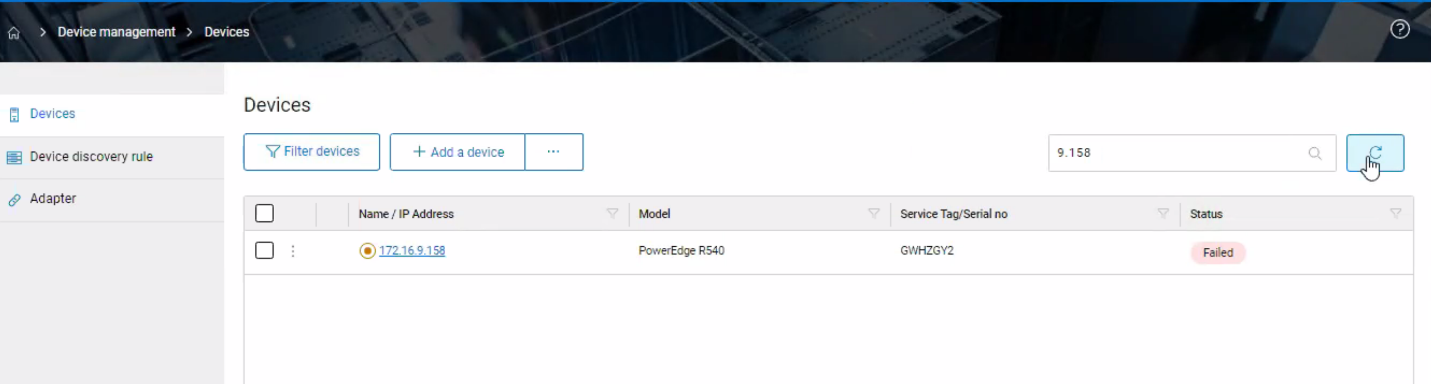

Ця подія реєструється в журналі наступним чином:
Ця подія реєструється в журналі наступним чином:
Date,045 [vert.x-eventloop-thread-1] INFO
com.dell.sae.apigateway.handlers.InventoryAPIRequestHandler- 815 - got error message
response from localization for reason:: {"displayMessage":"We cannot check the
monitoring status of this device as we did not receive the SNMP test
trap.","responseAction":"Configure the SNMP settings for this device, then try again. If
this does not help, contact your secure connect gateway administrator for
assistance.","detailedDescription":null}
Cause
Помилка може бути викликана відсутністю прав адміністратора у користувача, що увійшов у систему на SCG.
Resolution
Дотримуйтесь цього кроку для усунення несправностей:
- Перевірте параметри SNMP на iDRAC0.
- Проведіть повторну перевірку інвентаризації та після завершення перевірте стан пристрою.
- Перевірте послуги SCG та перевірте, чи має користувач, який увійшов до SCG, права адміністратора.
- Перевірте профіль облікових даних на наявність SCG.
Article Properties
Article Number: 000200699
Article Type: Solution
Last Modified: 24 Jul 2024
Version: 2
Find answers to your questions from other Dell users
Support Services
Check if your device is covered by Support Services.