VNXe: How to find the Serial Number on the VNXe array
Summary: How to find Serial Number on VNXe array (User correctable)
This article applies to
This article does not apply to
This article is not tied to any specific product.
Not all product versions are identified in this article.
Instructions
There are three options to find the Serial Number on a VNXe array.
Option 1: EMC Unisphere
- Log in to EMC Unisphere UI.
- Go to Dashboard tab.
- The Serial Number can be found under "System Information" next to Product ID/SN:
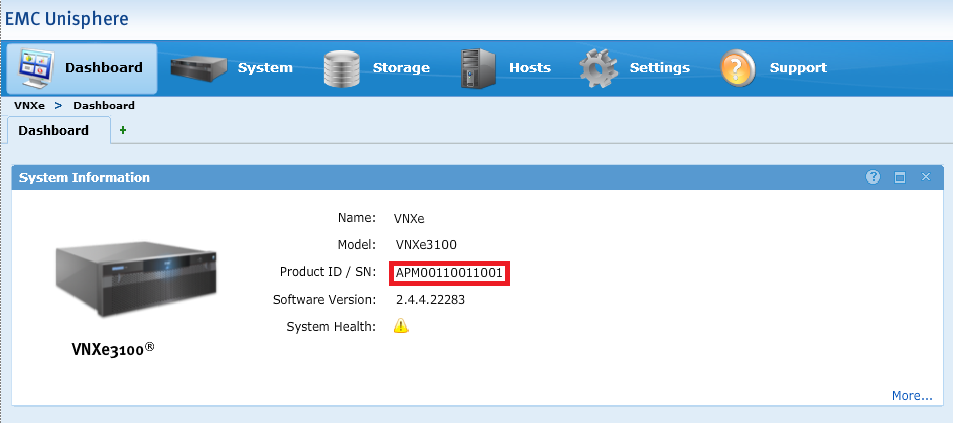
Option 2: EMC Unisphere
- Log in to EMC Unisphere UI.
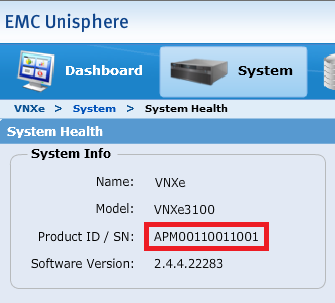
- Go to the System tab and select System Health.
- The Serial Number can be found under "System Info" next to Product ID/SN:
Option 3: Command Line
- Open an SSH session to VNXe.
- Log in using the service account credential.
- Run the following command:
svc_diag
Example:service@(VNXe) spb:~> svc_diag ======== Now executing basic state ======== * System Friendly Host Name is: (VNXe) * System Serial Number is: APM00110011001 * Current Software version: NeoMain-2.4.4.22283-MAGNUM-RETAIL
Affected Products
VNX/VNXeProducts
VNXe1 Series, VNXe2 Series, VNX/VNXeArticle Properties
Article Number: 000019667
Article Type: How To
Last Modified: 09 Oct 2025
Version: 5
Find answers to your questions from other Dell users
Support Services
Check if your device is covered by Support Services.