NVP-vProxy:FLR 還原失敗,並顯示錯誤「無法取得分割區資訊:結束狀態 2」
Summary: VM 檔案層級還原 (FLR) 在掛接作業期間失敗,並顯示錯誤:「無法取得分割區資訊:結束狀態 2」
This article applies to
This article does not apply to
This article is not tied to any specific product.
Not all product versions are identified in this article.
Symptoms
- 執行 FLR 的虛擬機器 (VM) 已將未分割的硬碟新增至該虛擬機器。
- NetWorker VMware Protection 整合是透過 vProxy 裝置進行設定。
- NetWorker 19.7.0.x (vProxy 4.3.0-22) 和先前版本。
- 正在環境中執行虛擬機器 (VM) FLR 還原,失敗並出現以下錯誤:
掛載失敗後卸載:無法取得分割區資訊:結束狀態 2
159373:nsrvproxy_flr: vProxy Log: 2019/01/08 14:56:38 TRACE:  [@(#) Build number: 246] /dev/loop0
159373:nsrvproxy_flr: vProxy Log: 2019/01/08 14:56:38 TRACE:  [@(#) Build number: 246] ====End of output from '/sbin/losetup'.
159373:nsrvproxy_flr: vProxy Log: 2019/01/08 14:56:40 TRACE:  [@(#) Build number: 246] ====Executing [/sbin/blkid -c /dev/null /dev/loop0]
159373:nsrvproxy_flr: vProxy Log: 2019/01/08 14:56:40 TRACE:  [@(#) Build number: 246] /dev/loop0: PTUUID="00041d0c" PTTYPE="dos"
159373:nsrvproxy_flr: vProxy Log: 2019/01/08 14:56:40 TRACE:  [@(#) Build number: 246] ====End of output from '/sbin/blkid'.
159373:nsrvproxy_flr: vProxy Log: 2019/01/08 14:56:40 TRACE:  [@(#) Build number: 246] Attached VMDK 'vm-422-disk-key-2000-flat.vmdk' at '/dev/loop0' with partitions [/dev/loop0p3 /dev/loop0p2 /dev/loop0p1]
159373:nsrvproxy_flr: vProxy Log: 2019/01/08 14:56:40 TRACE:  [@(#) Build number: 246] ====Executing [/sbin/losetup --find --show -P /opt/emc/vproxy/runtime/state/flr/temp/nfs-905033c8-d093-46c7-a8b3-ea9722b76eeb/vm-422-disk-key-2001-flat.vmdk]
159373:nsrvproxy_flr: vProxy Log: 2019/01/08 14:56:40 TRACE:  [@(#) Build number: 246] /dev/loop2
159373:nsrvproxy_flr: vProxy Log: 2019/01/08 14:56:40 TRACE:  [@(#) Build number: 246] ====End of output from '/sbin/losetup'.
159373:nsrvproxy_flr: vProxy Log: 2019/01/08 14:56:42 TRACE:  [@(#) Build number: 246] ====Executing [/sbin/blkid -c /dev/null /dev/loop2]
159373:nsrvproxy_flr: vProxy Log: 2019/01/08 14:56:42 TRACE:  [@(#) Build number: 246] ====Executing [/sbin/losetup -d /dev/loop2]
159373:nsrvproxy_flr: vProxy Log: 2019/01/08 14:56:44 TRACE:  [@(#) Build number: 246] ====Executing [/sbin/losetup --find --show -P /opt/emc/vproxy/runtime/state/flr/temp/nfs-905033c8-d093-46c7-a8b3-ea9722b76eeb/vm-422-disk-key-2001-flat.vmdk]
159373:nsrvproxy_flr: vProxy Log: 2019/01/08 14:56:44 TRACE:  [@(#) Build number: 246] /dev/loop2
159373:nsrvproxy_flr: vProxy Log: 2019/01/08 14:56:44 TRACE:  [@(#) Build number: 246] ====End of output from '/sbin/losetup'.
159373:nsrvproxy_flr: vProxy Log: 2019/01/08 14:56:46 TRACE:  [@(#) Build number: 246] ====Executing [/sbin/blkid -c /dev/null /dev/loop2]
159373:nsrvproxy_flr: vProxy Log: 2019/01/08 14:56:46 TRACE:  [@(#) Build number: 246] Removing 1 temporary loop devices
159373:nsrvproxy_flr: vProxy Log: 2019/01/08 14:56:46 TRACE:  [@(#) Build number: 246] ====Executing [/sbin/losetup -d /dev/loop0]
159373:nsrvproxy_flr: vProxy Log: 2019/01/08 14:56:46 TRACE:  [@(#) Build number: 246] ====Executing [/sbin/pvscan --cache]
159373:nsrvproxy_flr: vProxy Log: 2019/01/08 14:56:46 TRACE:  [@(#) Build number: 246] File descriptor 10 (socket:[4601043]) leaked on pvscan invocation. Parent PID 2560: /opt/emc/vproxy/bin/vflrd
159373:nsrvproxy_flr: vProxy Log: 2019/01/08 14:56:46 TRACE:  [@(#) Build number: 246]   /dev/loop1: read failed after 0 of 4096 at 10737352704: Input/output error
159373:nsrvproxy_flr: vProxy Log: 2019/01/08 14:56:46 TRACE:  [@(#) Build number: 246]   /dev/loop1: read failed after 0 of 4096 at 10737410048: Input/output error
159373:nsrvproxy_flr: vProxy Log: 2019/01/08 14:56:46 TRACE:  [@(#) Build number: 246]   /dev/loop1: read failed after 0 of 4096 at 0: Input/output error
159373:nsrvproxy_flr: vProxy Log: 2019/01/08 14:56:46 TRACE:  [@(#) Build number: 246]   /dev/loop1: read failed after 0 of 4096 at 4096: Input/output error
159373:nsrvproxy_flr: vProxy Log: 2019/01/08 14:56:46 TRACE:  [@(#) Build number: 246] ====End of output from '/sbin/pvscan'.
159373:nsrvproxy_flr: vProxy Log: 2019/01/08 14:56:46 ERROR:  [@(#) Build number: 246] Unable to unmount '/opt/emc/vproxy/runtime/state/flr/temp/nfs-905033c8-d093-46c7-a8b3-ea9722b76eeb': device or resource busy
159373:nsrvproxy_flr: vProxy Log: 2019/01/08 14:56:46 INFO:   [@(#) Build number: 246] Unmounting after mount failure: Unable to get partition information: exit status 2
Cause
VM 有一個未分割/格式化的磁片連接到它。
作業系統命令可用來驗證未格式化的磁片:
作業系統命令可用來驗證未格式化的磁片:
- fdisk -l
- file -sL /dev/sd*
- lsblk
- blkid
<VM_Name>:~ # fdisk -l
Disk /dev/sdb: 10 GiB, 10737418240 bytes, 20971520 sectors
Units: sectors of 1 * 512 = 512 bytes
Sector size (logical/physical): 512 bytes / 512 bytes
I/O size (minimum/optimal): 512 bytes / 512 bytes

Disk /dev/sda: 30 GiB, 32212254720 bytes, 62914560 sectors
Units: sectors of 1 * 512 = 512 bytes
Sector size (logical/physical): 512 bytes / 512 bytes
I/O size (minimum/optimal): 512 bytes / 512 bytes
Disklabel type: dos
Disk identifier: 0x00041d0c

Device     Boot    Start      End  Sectors Size Id Type
/dev/sda1           2048  4208639  4206592   2G 82 Linux swap / Solaris
/dev/sda2  *     4208640 29382655 25174016  12G 83 Linux
/dev/sda3       29382656 62914559 33531904  16G 83 Linux

<VM_Name>:~ #  file -sL /dev/sd*
/dev/sda:  DOS/MBR boot sector
/dev/sda1: Linux/i386 swap file (new style), version 1 (4K pages), size 525823 pages, no label, UUID=0ce67b73-cf94-4511-84f6-572201fd8491
/dev/sda2: DOS/MBR boot sector
/dev/sda3: SGI XFS filesystem data (blksz 4096, inosz 512, v2 dirs)
/dev/sdb:  data
<VM_Name>:~ # lsblk
NAME            MAJ:MIN RM  SIZE RO TYPE MOUNTPOINT
sda               8:0    0   16G  0 disk
├─sda1            8:1    0    1G  0 part /boot
└─sda2            8:2    0   15G  0 part
  ├─centos-root 253:0    0 13.4G  0 lvm  /
  └─centos-swap 253:1    0  1.6G  0 lvm  [SWAP]
sdb               8:16   0    1G  0 disk
sr0              11:0    1 1024M  0 rom

<VM_Name>:~ # blkid
/dev/sda1: UUID="0ce67b73-cf94-4511-84f6-572201fd8491" TYPE="swap" PARTUUID="00041d0c-01"
/dev/sda2: UUID="8375d6ba-626d-43ef-a881-82230d4b84a5" UUID_SUB="b333cada-c2fe-48aa-8a24-f6f839a0c46a" TYPE="btrfs" PTTYPE="dos" PARTUUID="00041d0c-02"
/dev/sda3: UUID="6514e3e9-5bea-467f-8f73-479a71380753" TYPE="xfs" PARTUUID="00041d0c-03"
/dev/sr0: UUID="2017-07-12-03-04-39-00" LABEL="SLE-12-SP3-Server-DVD-x86_640473" TYPE="iso9660" PTUUID="1285b34e" PTTYPE="dos"
在上述命令中,我們可以看到一個裝置 (/dev/sdb) 已連接至虛擬機器,但其沒有格式化、分割區或資料。
Resolution
解決方案:
已發佈程式碼修正程式,以略過未格式化的磁片。
- 將 NetWorker 伺服器升級至 19.7.0.x 或更新版本。
- 將 vProxies 升級到 4.3.0-29 或更新版本。
- 如何升級 vProxy 應用裝置: HTTPs://www.dell.com/support/kbdoc/000197385/
執行 FLR 時,報告其跳過了未格式化的磁片:
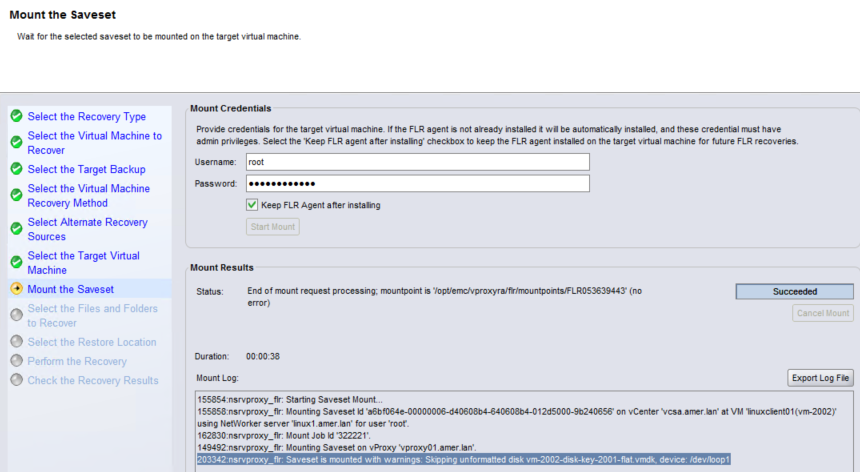
因應措施:
在 NetWorker 19.7.x 和 vProxy 4.3.0-29 之前,執行虛擬機器的即時復原。這會在 Data Domain 系統上建立虛擬機器的暫時 (離線) 複本。需要的磁片可掛接至來源 (線上) 虛擬機器的 NFS,並從 VM 作業系統複製。此程式詳述于:HTTPs://www.dell.com/support/kbdoc/000158482
Affected Products
NetWorkerProducts
NetWorker Family, NetWorker, NetWorker SeriesArticle Properties
Article Number: 000056216
Article Type: Solution
Last Modified: 17 Mar 2025
Version: 5
Find answers to your questions from other Dell users
Support Services
Check if your device is covered by Support Services.