Dell Unity: VMDK turns from eager-zero to lazy-zero on size extension
Summary: IMPACT - Customer may lose access to the VM when a VDM file turns from eager-zero to lazy-zero following an extension. (User Correctable)
This article applies to
This article does not apply to
This article is not tied to any specific product.
Not all product versions are identified in this article.
Symptoms
Customer is running a SQL cluster running in a VMware environment where VMDK eager zero format is a requirement for cluster functionality. Initially, the VMDK can be created on a normal VMFS Unity Datastore as eager zero without issues. However if the customer tries to expand the VMDK on one of the VMs, the VMDK automatically turns to lazy zero which bring the cluster (VMs) down due to the inability to meet cluster criteria.
This issue may be observed for all VMDK disks created on any Unity Datastore type (thin or thick).
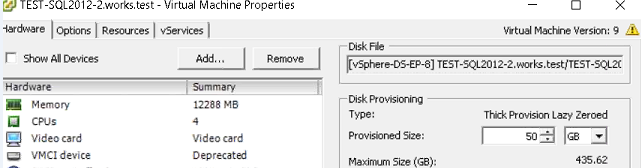
Below is an example. The VMDK disk was 15Gb in size (eager zeroed), then after expansion to 50Gb, it automatically becomes lazy zeroed causing this VM to go down (as the cluster requires an eager zero).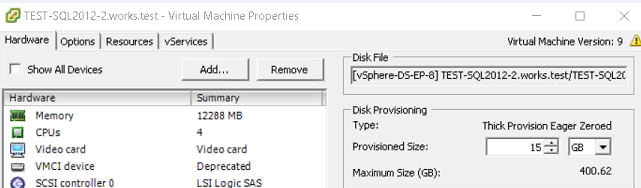
Cause
From VMware KB 2054563:
"If you extend the disk by using UI, you have no control over all the options to extend the disk. As a result, the EagerZeroedThick VMDK automatically becomes LazyZeroedThick."
Resolution
The workaround for this issue, if you must extend a virtual disk in a multiwriter configuration, is to extend the virtual disk by running the "vmkfstools -X" command from the ESXi host command line. This ensures that the virtual disk format stays in the correct "eagerzeroedthick" format.
For example, to extend the size of the virtual disk to 60 GB:
vmkfstools -X 60G -d eagerzeroedthick /vmfs/volumes/Datastore_name/virtual_Machine_folder/virtualmachinedisk.vmdk
Notes:
- In the preceding "vmkfstools -X" example, 60Gb is the total size that you want the disk file to be, is not the size by which you want to extend the disk file.
- VMware recommends that you perform this operation outside of production, as it writes to the disk and takes significant time to complete.
- If the disk is already extended, you can use Storage vMotion to change the disk format.
- For virtual machines that are running Microsoft Cluster Service (MSCS), ensure the disks containing the guest Operating System is not connected to a SCSI controller that is engaged in bus-sharing.
For more information, browse these articles from VMware:

Affected Products
Dell EMC Unity FamilyProducts
Dell Unity 300, Dell EMC Unity 300F, Dell EMC Unity 350F, Dell EMC Unity 400, Dell EMC Unity 400F, Dell EMC Unity 450F, Dell EMC Unity 500, Dell EMC Unity 500F, Dell EMC Unity 550F, Dell EMC Unity 600, Dell EMC Unity 600F, Dell EMC Unity FamilyArticle Properties
Article Number: 000064304
Article Type: Solution
Last Modified: 26 Nov 2025
Version: 3
Find answers to your questions from other Dell users
Support Services
Check if your device is covered by Support Services.