Locating the MAC Address of a NIC in Windows by using the CMD prompt
Summary: Quickly identify the MAC address of your network adapter in Windows. Explore command prompt and ipconfig methods to locate the unique identifier for network management.
This article applies to
This article does not apply to
This article is not tied to any specific product.
Not all product versions are identified in this article.
Symptoms
This article describes how to find the Media Access Control (MAC) address of a network adapter in Windows.
Table of Contents:
- Media Access Control Address
- Locating the MAC Address of a Network Adapter in Windows
- Frequently Asked Questions
Media Access Control Address
A network adapter also called a Network Interface Card or NIC, is equipped with a unique identifier known as the Media Access Control (MAC) address. Routers and switches use it to control access to a network. You may find it useful in some situations to determine the MAC address of a NIC in Windows. The instructions in this article explain how to do so.
Locating the MAC Address of a NIC in Windows
To locate the MAC address of a NIC in Windows, follow these steps:
- Open a command prompt. (Click Start, Run, Type CMD, then right-click CMD.exe on the menu, and click Run as Administrator)
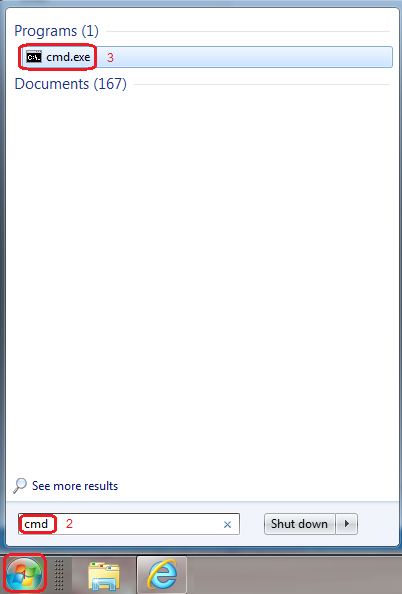
Figure 1: CMD Window - At the prompt in the open command Window: Type getmac /v The MAC address labeled "Physical Address," is displayed in the form xx-xx-xx-xx-xx-xx:
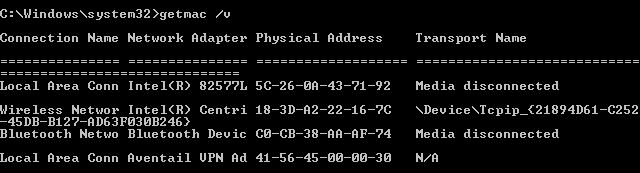
Figure 2: CMD getmac /v command - It is also possible to determine the MAC address of a NIC with the ipconfig /all command. Which returns a large amount of other information as well:
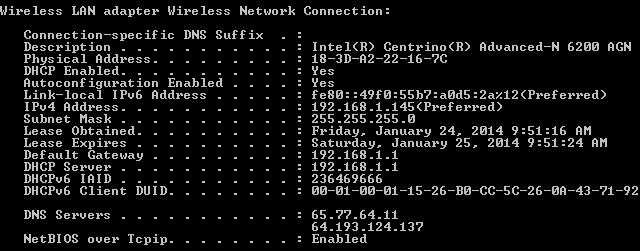
Figure 3: CMD ipconfig /all command - When finished, type Exit then press enter to close the command window.
Frequently Asked Questions
- Q: How do I find my NIC MAC address?
A: See the Locating the MAC Address of a Network Adapter in Windows section for instructions. - Q: What is the MAC address in networking?
A: The MAC address a unique set of 12 alphanumeric characters that are used to identify individual electronic devices on a network. - Q: Does each NIC have its own MAC address?
A: Yes, each NIC has its own MAC address. - Q: What is the size of the MAC address of a NIC?
A: A MAC address consists of 48-bits or 12 alphanumeric character expressed in a hexadecimal format. - Q: How do I find my NIC MAC address using CMD?
A: See the Locating the MAC Address of a Network Adapter in Windows section for instructions. - Q: What is the difference between NIC and MAC address?
A: A NIC is a hardware device that is the interface between a computer or network device and the network itself. The MAC address uniquely identifies the NIC on a network.
NOTE: Many systems have both wired and wireless network interfaces, and each network adapter has a unique MAC address. Be sure to note the addresses of all adapters in the system. Also, the MAC address is bound to the NIC; it changes if the network adapter is replaced.
Helpful Links
- Detailed instructions on how to use the Dell Support Site to identify and install the drivers for your Dell PC
- If the above steps do not resolve the issue, contact Dell Technical Support for assistance
Cause
-
Resolution
-
Article Properties
Article Number: 000123355
Article Type: Solution
Last Modified: 16 May 2024
Version: 8
Find answers to your questions from other Dell users
Support Services
Check if your device is covered by Support Services.