Upgrade of Dell Security Management Server Virtual Fails Due to Time Zone Options
Summary: This article describes an issue where an upgrade of Dell Security Management Server Virtual (formerly Dell Data Protection | Virtual Edition) fails because specific time zone options have been removed. ...
This article applies to
This article does not apply to
This article is not tied to any specific product.
Not all product versions are identified in this article.
Symptoms
Affected Products:
- Dell Security Management Server Virtual
- Dell Data Protection | Virtual Edition
Affected Versions:
- v9.10.x
Cause
If the time zone on the v9.10.x server is not a valid time zone for the v9.11 server, then the upgrade fails with the error:
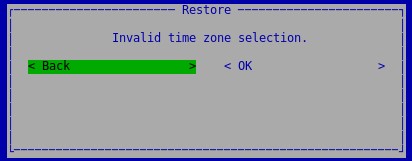
Figure 1: (English Only) Invalid time zone selection
Time zones that no longer exist in Dell Security Management Server Virtual v9.11:
Pacific/Yap
Poland
Portugal
ROC
ROK
Singapore
Turkey
UCT
All-time zones that start with ‘US/’
UTC
Universal
W-SU
WET
Zulu
Resolution
Redeploy the Dell Security Management Server Virtual v9.11 or later.
On the v9.10.x server choose a time zone that matches the time zone on the v9.11 server:
- From the Basic Configuration menu, select Time Zone.
- In the Time Zone screen, use the arrow keys to select your time zone and select Enter.
- At the time zone confirmation prompt, select OK.
To contact support, reference Dell Data Security International Support Phone Numbers.
Go to TechDirect to generate a technical support request online.
For additional insights and resources, join the Dell Security Community Forum.
Affected Products
Dell EncryptionArticle Properties
Article Number: 000124092
Article Type: Solution
Last Modified: 07 May 2024
Version: 11
Find answers to your questions from other Dell users
Support Services
Check if your device is covered by Support Services.