PowerStore: ICM and ICD networks are unreachable when IPv6 is not explicitly configured on the VLAN interface
Summary: ICM and ICD networks are unreachable when IPv6 is not explicitly configured on the VLAN interface.
This article applies to
This article does not apply to
This article is not tied to any specific product.
Not all product versions are identified in this article.
Symptoms
PowerStore installation has completed the initial cluster creation. However, alerts are seen in the PowerStore Manager dashboard indicating no communication on the Intra-Cluster Management (ICM) and Intra-Cluster Data (ICD) networks similar to this:
Status of ICMP reachability of the intra-cluster data network IP addresses from node interfaces. (unreachable)
The following intra-cluster data network addresses are not reachable via ICMP from node network interfaces: (from fd38:d12:7afd::201:44f1:907b:9b65 : fd38:d12:7afd::201:4417:26a:c8a8).
In order to test and confirm, open an SSH session to the cluster IP using the service user. The IPv6 ping fails.
Status of ICMP reachability of the intra-cluster data network IP addresses from node interfaces. (unreachable)
The following intra-cluster data network addresses are not reachable via ICMP from node network interfaces: (from fd38:d12:7afd::201:44f1:907b:9b65 : fd38:d12:7afd::201:4417:26a:c8a8).
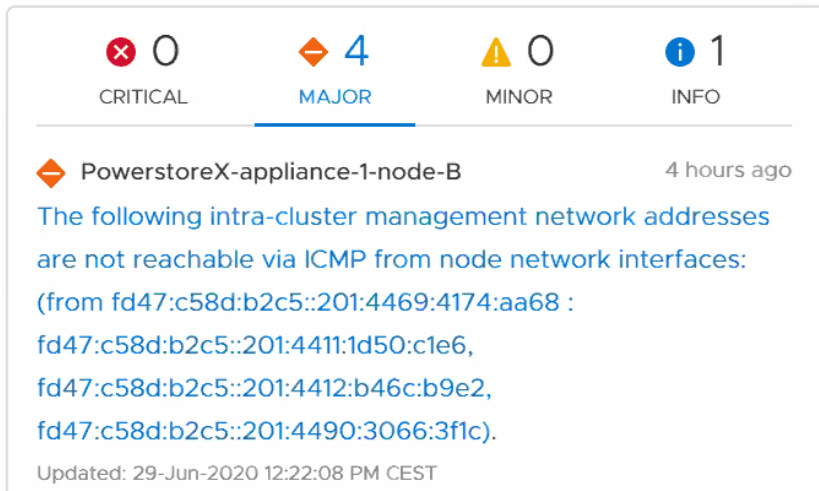
As seen from the PowerStore Manager user interface:
Figure 1: Example message in PowerStore Manager.
In order to test and confirm, open an SSH session to the cluster IP using the service user. The IPv6 ping fails.
[SVC:service@ABCDEFG-A user]$ ping6 -I icm0 fd47:c58d:b2c5::201:4469:4174:aa68 -c 2
PING fd47:c58d:b2c5::201:4469:4174:aa68(fd47:c58d:b2c5::201:4469:4174:aa68) from fdd9:955e:f18b:0:201:4427:b85:1fee icm0: 56 data bytes
From fdd9:955e:f18b:0:201:4427:b85:1fee icmp_seq=1 Destination unreachable: Address unreachable
From fdd9:955e:f18b:0:201:4427:b85:1fee icmp_seq=2 Destination unreachable: Address unreachable
Cause
Some switches require IPv6 to be explicitly configured on the VLAN interface, or switch administrators may have chosen to explicitly disable IPv6.
Resolution
The following is an extract of the running configuration from an Arista DCS-7160 Ethernet switch. Once the configuration for the native VLAN 10 is modified to enable IPv6 support, IPV6 ping works.
In this sample output, the interfaces are using VLAN 10 as the native VLAN.
The command for enabling IPv6 on the Arista switch is:
In this sample output, the interfaces are using VLAN 10 as the native VLAN.
interface Ethernet40
   description PowerStore1
   switchport trunk native vlan 10
   switchport trunk allowed vlan 10,20,30,40,50
   switchport mode trunk
   spanning-tree portfast!
The command for enabling IPv6 on the Arista switch is:
switch(config)#interface vlan 10
switch(config-vl10)#ipv6 enable
For specific commands and options, consult your switch vendors operating manuals or command-line guides.
Do not forget to save the switch configuration after any changes, otherwise the settings are lost if a switch reboots.
With this configuration, change IPv6 pings over ICM network succeed and the alert in PowerStore Manager can be acknowledged.
[SVC:service@ABCDEFG-A user]$ ping6 -I icm0 fd47:c58d:b2c5::201:4469:4174:aa68 -c 2
PING fd47:c58d:b2c5::201:4469:4174:aa68(fd47:c58d:b2c5::201:4469:4174:aa68) from fdd9:955e:f18b:0:201:4427:b85:1fee icm0: 56 data bytes
64 bytes from fd47:c58d:b2c5::201:4469:4174:aa68: icmp_seq=1 ttl=64 time=0.320 ms
64 bytes from fd47:c58d:b2c5::201:4469:4174:aa68: icmp_seq=2 ttl=64 time=0.326 ms
Additional Information
To enable SSH access to the appliance.
The username used when connecting over SSH to the PowerStore appliance management address is service.
References:
Networking Guide for PowerStore T Models
- Go to Settings, and then select SSH Management in the Security section.
- Select the appliance or appliances on which to enable SSH.
- Click ENABLE SSH.
The username used when connecting over SSH to the PowerStore appliance management address is service.
References:
Networking Guide for PowerStore T Models
- For multiappliance cluster configurations, ensure the Internal network as shown above has proper L2 or L3 routing on the native VLAN such that the first two ports of the 4-port card can communicate to other appliances on the network.
- If deploying with file services, IPv6 must be enabled on the ToR switches through the native VLAN.
Affected Products
PowerStoreArticle Properties
Article Number: 000129761
Article Type: Solution
Last Modified: 28 Jun 2024
Version: 9
Find answers to your questions from other Dell users
Support Services
Check if your device is covered by Support Services.