OptiPlex 7071 塔式机:计算机的可视指南
Summary: 本文是 Dell OptiPlex 7071 塔式台式机各种外形规格的外部端口和功能的可视指南。
This article applies to
This article does not apply to
This article is not tied to any specific product.
Not all product versions are identified in this article.
Symptoms
以下文章提供了 OptiPlex 7071 塔式计算机的可视指南,并列出了计算机的外部端口和功能。
Cause
不适用
Resolution
提醒:有关每个位置的更详细描述,请转至系统手册,网址为 www.dell.com/support 。
目录:
前视图
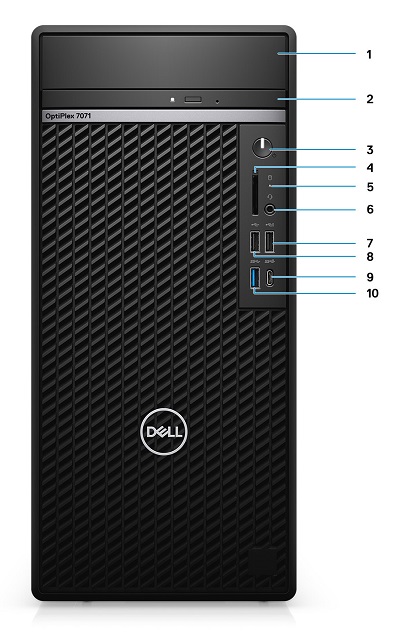
图 1:前视图
| 1 | 硬盘支架护盖 | 2 | 光驱 (ODD) |
| 3 | 电源按钮 | 4 | SD 4.0 读卡器(可选) |
| 5 | 硬盘驱动器活动 LED | 6 | 耳机/通用音频插孔接口 |
| 7 | 带 PowerShare 功能的 USB 2.0 接口 | 8 | USB 2.0 接口 |
| 9 | 带 PowerShare 功能的 USB 3.1 Gen2 Type-C 接口 | 10 | USB 3.1 Gen1 接口 |
后视图
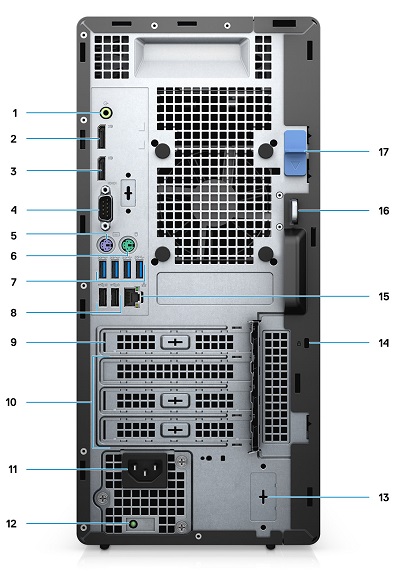
图 2:后视图
| 1 | 线路输出音频连接器 | 2 | DisplayPort v1.2 连接器 x2 |
| 3 | 可选模块(HDMI 2.0、DP、VGA 或 USB Type-C 替代模式) | 4 | 串行接口 |
| 5 | PS/2 键盘接口 | 6 | PS/2 鼠标接口 |
| 7 | USB 3.1 Gen1 接口 x4 | 8 | 带智能 PowerOn x2 的 USB 2.0 连接器 |
| 9 | PCI 扩展槽 | 10 | PCI Express 扩展槽 x3 |
| 11 | 电源接口 | 12 | 电源 (PSU) 诊断 LED |
| 13 | SMA 连接器 x 2(可选) | 14 | Kensington锁 |
| 15 | 网络 (NIC) 以太网连接器 | 16 | 挂锁环 |
| 17 | 释放闩锁 |
其它信息:
Affected Products
OptiPlex 7071 TowerArticle Properties
Article Number: 000175208
Article Type: Solution
Last Modified: 03 Jul 2023
Version: 6
Find answers to your questions from other Dell users
Support Services
Check if your device is covered by Support Services.