Data Domain: Web UI Inaccessible Due to Expired https Certificate
Summary: When the https or "ca trusted-ca" certificate expires on a Data Domain, it causes issues when trying to access the web UI. Generating a new certificate resolves the issue.
This article applies to
This article does not apply to
This article is not tied to any specific product.
Not all product versions are identified in this article.
Symptoms
- The following
404 HTTPerrors or other Apache web service may be seen when the certificate expires:
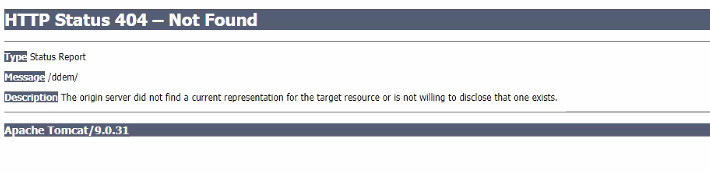
- Other errors may be seen such as resource unavailable.
- In general, the UI is inaccessible.
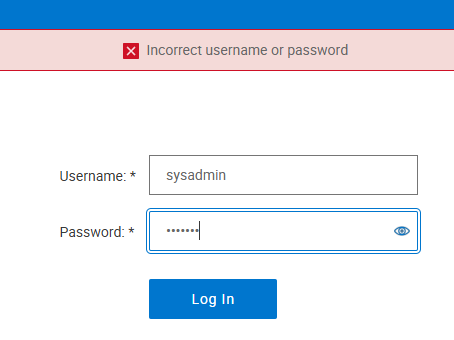
- The issue also presents as a user login failure on the UI.
Cause
When the HTTPS or CA certificate expires on a Data Domain (DD), it causes issues with the Apache web server. It brings the UI down and makes it inaccessible.
Resolution
Note: If the CA certificate is expired, the sysadmin credentials are required for any Data Domain or PowerProtect DD Management Center that previously established trust with this DD. Ensure that the credentials are available before attempting this procedure.
If the Data Domain is in an Integrated Data Protection Appliance or Cyber Recovery vault configuration, consider how those systems monitor the Data Domain using certificates. Support may be required when a certificate expires and then a new certificate is added.
This is not a concern for Data Domains in a DLm solution as the DLm does not require or use HTTP or HTTPS access to communicate with the Data Domain. Certificate updates on the Data Domain may be performed without interruption of the DLm tape mount processing.
- Check if the
HTTPS,CA, or both certificates are expired:
sysadmin@DD6400# adminaccess certificate show
Subject                                              Type            Application   Valid From                 Valid Until                Fingerprint
--------------------------------------------------   -------------   -----------   ------------------------   ------------------------   -----------------------------------------------------------
DD6400.ddsupport                                     host            https         Thu Sep 11 22:30:27 2025   Sun Oct 11 22:30:27 2026   30:89:8A:9D:BD:67:75:DC:D8:98:84:C6:CD:8F:9F:21:34:24:1B:87
DD6400.ddsupport                                     ca              trusted-ca    Tue Oct 08 07:42:22 2024   Mon Oct 07 07:42:22 2030   81:5B:70:A8:36:02:02:FD:55:13:DA:7C:38:BC:FF:1B:EA:92:3E:96
The HTTPS host certificate is valid for 1 year, and the CA certificate is valid for 6 years.
-
If they are not expired, the UI may be down due to the issues below:
-
If the certificate is old enough, it will not meet the new certificate security standards and the user interface will not come up. A new certificate must be generated as in the proceeding steps.
-
- If the CA certificate is expired, check the trusts which are established:
sysadmin@DD6400# adminaccess trust show
Subject                   Type         Valid From                 Valid Until                Fingerprint
-----------------------   ----------   ------------------------   ------------------------   -----------------------------------------------------------
DD6400.ddsupport          trusted-ca   Tue Oct 08 07:42:22 2024   Mon Oct 07 07:42:22 2030   81:5B:70:A8:36:02:02:FD:55:13:DA:7C:38:BC:FF:1B:EA:92:3E:96
DDMCLAB-2.201             trusted-ca   Mon Jul 08 03:02:34 2024   Sun Jul 07 03:02:34 2030   E8:C1:79:5B:B4:2A:02:3A:55:4A:9A:52:AB:FC:D2:01:E7:7A:6C:CA
CorkDDMC.localdomain      trusted-ca   Tue Aug 06 04:29:41 2024   Mon Aug 05 04:29:41 2030   4B:29:2B:D3:DB:3E:62:16:98:D1:6C:36:4C:DF:2F:94:3C:A1:A8:27
DD6900-2.ddsupport.emea   trusted-ca   Sat Feb 03 20:49:25 2024   Fri Feb 01 20:49:25 2030   DC:95:CC:4A:F4:AC:58:58:5E:19:2D:05:F3:99:D9:86:14:32:7F:88
DD9900-HA-P0.ddsupport    trusted-ca   Sat Oct 05 05:08:35 2024   Fri Oct 04 05:08:35 2030   38:FD:E8:B6:C6:2F:30:42:17:93:73:F5:AE:25:3D:53:3E:F5:5C:C4
-----------------------   ----------   ------------------------   ------------------------   -----------------------------------------------------------
The certificate for the current Data Domain (by its hostname) and certificates of other Data Domains or PowerProtect DD Management Center are seen.
If those trusts must be reestablished, a user requires the sysadmin passwords for any Data Domains or Data Domain Management Centers in the trust pair to reestablish after generating a new CA certificate. Some trusts might be stale from old replication contexts and do not require being added back.
- There are additional considerations if there is a PPDM or Cyber Recovery attached to this DD and we need to renew the CA cert:
- Check if the
HTTPScertificate is a self-signed certificate or if the user signs it with a Certificate Authority (CA):
# adminaccess certificate show imported-host application https
If this command returns anything, the user signs the certificate externally with a CA. Otherwise, if there is no imported host certificate, the certificate is self-signed.
Even if the imported certificate is valid and not expired, if the self-signed certificate is expired, it must be renewed as in the next steps. A Self-signed host certificate is also used internally for DD UI to communicate with the SMS service internally.
IMPORTANT NOTE: The self-signed host and CA certs are required to be on the system even if they are not in use. The self-signed certificates cannot be deleted or removed in case the system must fall back to them. This is by design.
- If the
HTTPScertificate is signed externally, generate a new Certificate Signing Request (CSR). The user passes this to their CA for signing and imports the signed certificate back into the Data Domain. Follow the article Data Domain: How to Generate a Certificate Signing Request and Use Externally Signed Certificates.
DDOS supports one host certificate for HTTPS. If the system is using a host certificate including self-signed and the user wants to use a different host certificate, delete the current certificate before adding the new certificate.
Steps:
-
- Log out from the browser session before deleting an
HTTPShost certificate. - Run CLI Command to delete the certificate
adminaccess certificate delete imported-host application https
- Log out from the browser session before deleting an
- If the CA certificate is expired and this is an HA system, support must be engaged to fix the certificates. Otherwise, regenerate a new
HTTPSand CA certificate with this command:
# adminaccess certificate generate self-signed-cert regenerate-ca
Notice that after the generation, the valid starting date for the HTTPS certificate is one month in the past and the CA certificate is one year in the past, this is by design.
Then go to step 8 to restart UI services.
- If the certificate is self-signed and only the
HTTPScertificate is expired and this is an HA system, follow this article: Data Domain: HA System Running in Degraded State, Self-signed Host Certificate is Expired, otherwise, regenerate a newHTTPScertificate with:
# adminaccess certificate generate self-signed-cert
Notice that after the generation, the valid starting date for the HTTPS certificate is one month in the past and it will be valid for 1 year which is by design.
- If the CA certificate was regenerated, a user must reestablish any trust required. The PowerProtect DD Management Center requires trust for monitoring and when replication is configured using the UI. If so, a user must establish a trust for that to work.
- For any Data Domains or Data Domain Management Centers that need trust, run this command to delete the old trust and then reestablish trust with using the new certificate on the current Data Domain (This asks for the sysadmin password on the other Data Domains or Data Domain Management Centers. Ensure that a user has all Data Domains or Data Domain Management Centers or delete the trust for any Data Domains or Data Domain Management Centers that are decommissioned without adding them back.
Use the command without the type mutual when doing this.
# adminaccess trust del host <hostname of other DD/DDMC> type mutual
Then run this command to establish a new trust:
# adminaccess trust add host <hostname of other DD/DDMC> type mutual
For the above example, run the
add and del for ALL the other Data Domains or Data Domain Management Centers in turn.
# adminaccess trust del host sc-dd2500-2.lss.emc.com type mutual
# adminaccess trust add host sc-dd2500-2.lss.emc.com type mutual
If a user must not add the trust back, because the Data Domain is decommissioned:
# adminaccess trust del host dd690.dssupport.emea
- Once the trust is reestablished if needed, restart the UI services:
Note: Starting with version 8.3 and above,
(This can be verified using the "
HTTP is disabled by default. It does not need enabling if it is not used.
(This can be verified using the "
adminaccess show" command - example below.)
HTTPS is the preferred and secure method for accessing the UI.
# adminaccess show
Service       Enabled   Allowed Hosts
-----------   -------   -------------
ssh           yes       -
scp           yes       (same as ssh)
telnet        no        -
ftp           no        -
ftps          no        -
http          no        -
https         yes        -
web-service   yes       N/A
-----------   -------   -------------
This output shows that HTTP is disabled, and HTTPS enabled.
# adminaccess disable https
# adminaccess enable https
-- Or --
# adminaccess disable http
# adminaccess disable https
# adminaccess enable https
# adminaccess enable http
- The user interface should now be accessible.
How to restart HTTP or HTTPS services when the UI is unavailable - Dell Data Domain.
Duration: 00:03:17 (hh:mm:ss)
When available, closed caption (subtitles) language settings can be chosen using the CC icon on this video player.
This video can also be viewed on YouTube.

Affected Products
Data DomainArticle Properties
Article Number: 000198864
Article Type: Solution
Last Modified: 11 Aug 2026
Version: 28
Find answers to your questions from other Dell users
Support Services
Check if your device is covered by Support Services.