PowerStore:安裝 Language Pack 後,無法在 GUI 中變更語言偏好設定
Summary: 安裝 Language Pack 後,使用者無法在 PowerStore Manager GUI 中變更語言偏好設定。
This article applies to
This article does not apply to
This article is not tied to any specific product.
Not all product versions are identified in this article.
Symptoms
安裝 Language Pack 後,使用者會嘗試將語言變更為偏好語言 (例如:GUI 和 GUI 中的巴西葡萄牙文顯示以下錯誤,且該語言未變更: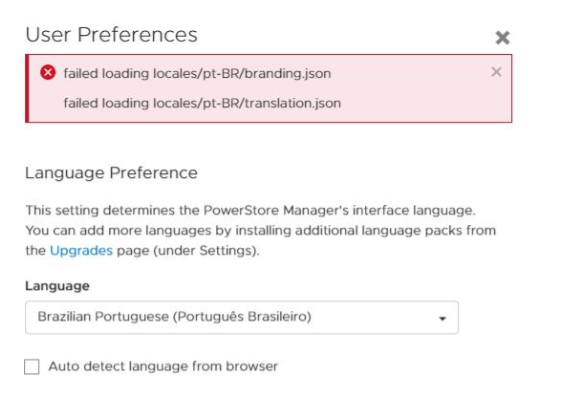
此問題也會影響其他語言。
Cause
PowerStore Manager 一律會偵測瀏覽器偏好的語言,並使用該區域設定載入 files translation.json 和 branding.json。如果未安裝 Language Pack,PowerStore Manager 會嘗試存取該地區設定的 translation.json 和 branding.json。結果依預期為 HTTP 404,結果會快取在 CP 伺服器中。安裝 Language Pack 後未清除 CP 快取時,便會發生此問題。因此,在安裝 Language Pack 之後,當使用者嘗試將語言變更為瀏覽器的偏好語言時,GUI 在載入 translation.json 和 branding.json 時仍會收到 HTTP 404,這會使 GUI 無法變更語言。
Resolution
如果發生此問題,請使用「svc_container_mgmt」服務指令檔在服務容器中重新開機 CP。
svc_container_mgmt restart CP
如果將語言變更為偏好的語言時,CP 重新開機後仍會發生問題,請清除客戶瀏覽器中的快取和 Cookie。
Additional Information
如需有關執行svc_container_mgmt的詳細資料,請參閱《Dell EMC PowerStore 服務腳本指南》。
Affected Products
PowerStoreArticle Properties
Article Number: 000202758
Article Type: Solution
Last Modified: 13 Jun 2025
Version: 6
Find answers to your questions from other Dell users
Support Services
Check if your device is covered by Support Services.