EMC VMAX1、VMAX2 从精简池中耗尽数据设备 (TDAT)
Summary: 本文概述了如何从 VMAX1 和 VMAX 2 阵列精简池中正确耗尽数据设备 (TDAT)。
This article applies to
This article does not apply to
This article is not tied to any specific product.
Not all product versions are identified in this article.
Instructions
目标
有关如何使用 Unisphere for VMAX 或 Symmetrix 命令行界面 (SYMCLI) 从 VMAX1 或 VMAX2 精简池中安全地耗尽数据设备 (TDAT) 的指导准则。事实
- 从 VMAX 精简池中耗尽数据设备 (TDAT) 是一种无中断活动。
- 从精简池中移除 TDAT,而无需取消绑定任何 TDEV 的已分配扩展区驻留在 TDAT 上。
- TDAT 需要具有类似的大小才能成为精简池的一部分
- VMAX1 和 VMAX2
- Unisphere 1.6.x
- Unisphere 8.x.x
- Solution Enabler 7.x.x
- Solutions Enabler 8.x.x
- Enginuity 5875 及更高版本
参考资料:
- Unisphere for VMAX 联机帮助
- Solution Enabler CLI 命令参考指南
symcfg -sid ### show -pool -thin -all
- 将 TDAT 重新分配到另一个池,以帮助重复使用空间以提高效率。
- 将驱动器更换为较新的型号(需要更高的容量),您需要移出驻留在现有驱动器上的任何生产数据,以便为更换做好准备。
释放和移除过程本质上是一个 3 相操作:
- 禁用 TDAT 会有效地启动设备消耗。在池中禁用 TDAT 后,设备上的“已用磁道”将无中断地移至池中剩余的已启用设备。
- 在耗尽过程完成后,TDAT 设备将进入禁用状态。
- 处于禁用状态后,可以从精简池中删除 TDAT。
选择: Storage Tab -> Thin Pool -> Pool_Name> -> Data Volume
此示例演示如何删除设备 ID 0904。
- 选择数据卷 0904,然后单击 禁用 按钮。
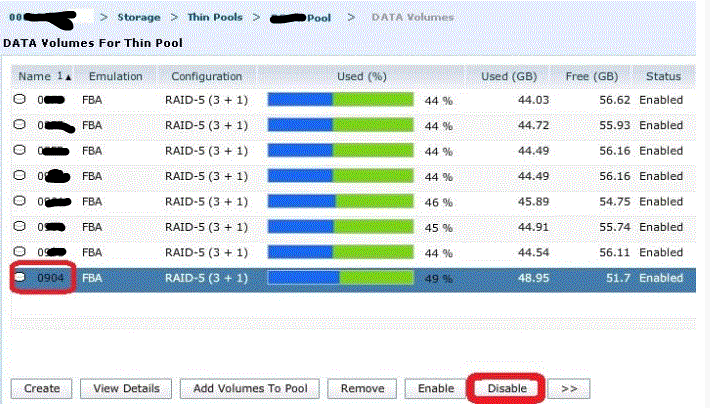
- 从 Unisphere 可以看到释放进度,因为卷 %used、GBused 和 GBfree 在过渡到其他 TDAT 期间更新。

- 数据卷完成释放过程并显示“非活动”状态后,可以安全地按“remove”键。

通过 Symcli 执行 Drain 操作:
1.列出精简池上的 TDAT:
symcfg -sid ### show -pool -thin -all
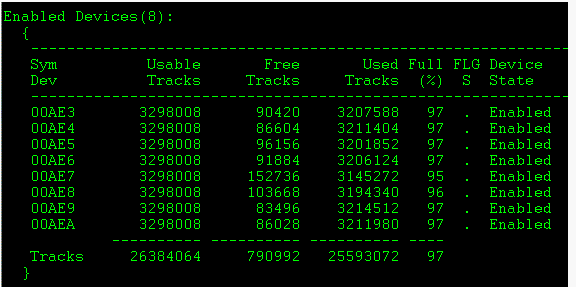
2.要在精简池上耗尽 TDAT,请执行以下操作:
symconfigure -sid ### -cmd “disable dev  in pool , type=thin;” preview
symconfigure -sid ### -cmd “disable dev  in pool , type=thin;” commit
3.使用 symconfigure 命令 禁用数据设备 :
symconfigure -sid ### -cmd “disable dev  in pool , type=thin;” preview
symconfigure -sid ### -cmd “disable dev  in pool , type=thin;” commit
4.使用 symcfg show -pool 命令查看池详细信息,我们可以监视 Drain 操作的进度:
symcfg -sid ### show -pool -thin -all
5.在“Drain”操作完成后移除数据设备:
symconfigure -sid ### -cmd “remove dev  from pool , type=thin;” preview
symconfigure -sid ### -cmd “remove dev  from pool , type=thin;” commit
Affected Products
VMAXArticle Properties
Article Number: 000205820
Article Type: How To
Last Modified: 28 Nov 2022
Version: 1
Find answers to your questions from other Dell users
Support Services
Check if your device is covered by Support Services.