Avamar – VM-Backup schlägt fehl, wenn esxi-Version 5.x aufgrund VixDiskLib_QueryAllocatedBlocks API-Fehlers ist
Summary: Avamar – VM-Backup schlägt fehl, wenn esxi-Version 5.x ist, weil VixDiskLib_QueryAllocatedBlocks API-Fehler aufgetreten ist.
This article applies to
This article does not apply to
This article is not tied to any specific product.
Not all product versions are identified in this article.
Symptoms
VM-Image-Backups schlagen fehl, wenn CBT auf einer nicht unterstützten ESXi-Version 5.x aktiviert ist.
Ich. Das Backupprotokoll zeigt die folgende Zeile an, die darauf hinweist, dass die Ziel-VM auf einer nicht unterstützten VMware-Version ausgeführt wird:
Ich. Das Backupprotokoll zeigt die folgende Zeile an, die darauf hinweist, dass die Ziel-VM auf einer nicht unterstützten VMware-Version ausgeführt wird:
avvcbimage Info : VM Host Name=esxi.example.com(5.5 build-2068190)
II. Das Backupprotokoll zeigt an, dass CBT aktiviert ist, aber das Backup wird ein komplettes Backup auf CBT-Ebene null sein:
avvcbimage Info : A reference to a valid prior backup is not available so this will be a full level zero backup.
ODER
avvcbimage Info : Change block tracking (CTK) is supported for this VM but has been declined. This will increase proxy CPU and IOP consumption. III. Das Backupprotokoll zeigt an, dass ein erfolgreicher Snapshot erstellt werden kann:
avvcbimage Info : Snapshot 'Avamar-16763996243af4ead6dea4e3e0d24ea86d327bebed43a19e42' creation for VM '[datastore1] vmname/vmname.vmx' task completed, moref=snapshot-91273 IV. Das Backupprotokoll zeigt die Festplatte an, die über Hot-Add oder NBD verbunden ist. Zum Beispiel:
avvcbimage Info : Connected with hotadd transport to virtual disk [datastore1] vmname/vmname-000001.vmdk. Time to connect: 16300 msecs ODER
avvcbimage Info : Connected with nbd transport to virtual disk [datastore)] vmname/vmname-000001.vmdk. Time to connect: 1025 msecs V. Das Backupprotokoll zeigt an, dass der VixDiskLib_QueryAllocatedBlocks API-Aufruf erfolgt ist und mit den Fehlern "Illegal message" und "NBD_ERR_GENERIC" fehlschlägt:
avvcbimage Info : VDDK:VixDiskLib: VixDiskLib_QueryAllocatedBlocks: Query allocated blocks.
avvcbimage Warning : VDDK:[NFC ERROR]NfcFssrvrProcessErrorMsg: received NFC error 2 from server: Illegal message during fssrvr session, id = 49
avvcbimage Info : VDDK:DISKLIB-LIB_MISC   : DiskLibGetAllocatedSectorChunksInRangeInt: failed to get allocated sector bitmap with 'NBD_ERR_GENERIC' (290).
avvcbimage Info : VDDK:VixDiskLib: Detected DiskLib error 290 (NBD_ERR_GENERIC).
avvcbimage Info : VDDK:VixDiskLib: VixDiskLibQueryBlockList: Fail to query blocks (offset 0, chunkSize 128, chunkNumber 524288). Error 1 (Unknown error) (DiskLib error 290: NBD_ERR_GENERIC) at 591.
VI. Das Backupprotokoll zeigt eine ordnungsgemäße Beendigung aufgrund VixDiskLib_Read Fehlers in Schritt V an.
avvcbimage Error : [IMG0008] VixDiskLib_Read() (datastore)] vmname/vmname.vmdk) at offset 0 length 128 sectors returned (1) (1)Unknown error
avvcbimage Info : Starting graceful (staged) termination, VixDiskLib_Read returned an error (wrap-up stage)
Cause
"Die VMware ESXi-Version wird nicht unterstützt. Avamar 19.2 und höher verwenden eine neue API namens VixDiskLib_QueryAllocatedBlocks , um nach verwendeten Blöcken eines virtuellen Laufwerks abzufragen. Diese API ist jedoch nicht abwärtskompatibel mit ESXi 5.x-Versionen."
Resolution
Der VMware-Server sollte auf die unterstützte Version aktualisiert werden. ESXi 5.5 wird nicht unterstützt, wie auf dieser VMware-Seite angegeben: Ende des allgemeinen Supports für vSphere 5.5 (51491) (vmware.com)
Als Problemumgehung können Sie das erweiterte Flag "--enable_query_allocated_block" auf "false" setzen.
Hier sind zwei Methoden, um dies zu tun:
Methode 1 (über CMD-Datei)
1. Bearbeiten Sie auf dem Proxy die folgende Datei: /usr/local/avamarclient/var/avvcbimageAll.cmd und ändern oder fügen Sie diese Zeilen hinzu:
Methode 2 (nach Dataset in AUI)
1. Bearbeiten Sie das Dataset, das von der Backup-Policy verwendet wird.
2. Wählen Sie das Windows VMware Image Plug-in > Show Free Form > ADD Key
aus:
[avvcbimage]enable_query_allocated_block
Wert:
FALSE
3. Wählen Sie das Linux VMware Image Plug-in > Show Free Form > ADD
Key aus:
[avvcbimage]enable_query_allocated_block
Wert:
FALSE
Siehe Beispiel unten:
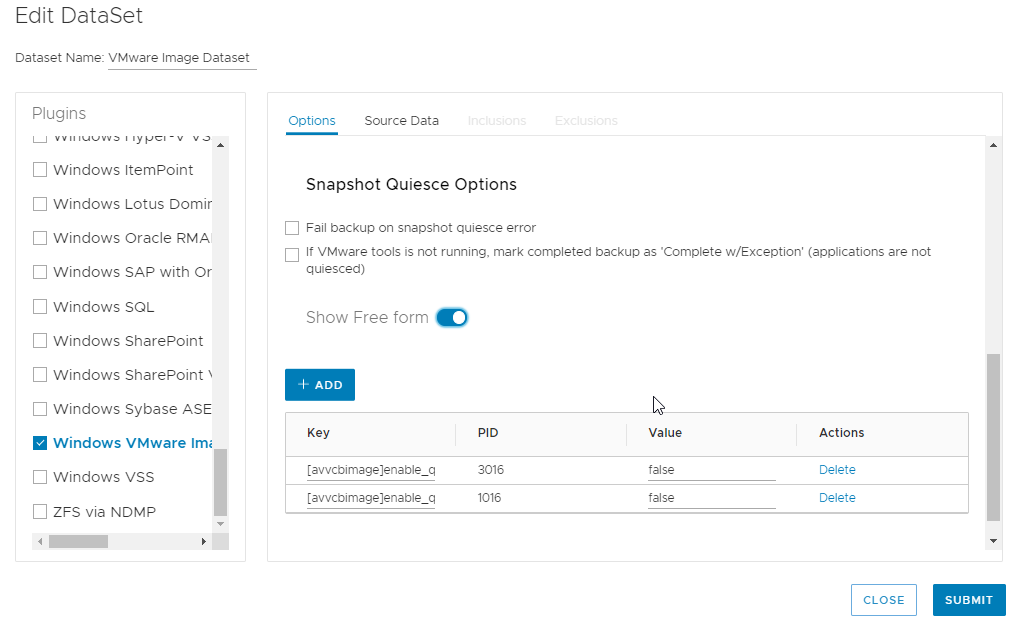
Als Problemumgehung können Sie das erweiterte Flag "--enable_query_allocated_block" auf "false" setzen.
Hier sind zwei Methoden, um dies zu tun:
Methode 1 (über CMD-Datei)
1. Bearbeiten Sie auf dem Proxy die folgende Datei: /usr/local/avamarclient/var/avvcbimageAll.cmd und ändern oder fügen Sie diese Zeilen hinzu:
# If enabled, use QueryAllocatedBlock instead of QueryChangedDiskAreas for full backup/in-use query
#    Default is true.
--enable_query_allocated_block=false
Methode 2 (nach Dataset in AUI)
1. Bearbeiten Sie das Dataset, das von der Backup-Policy verwendet wird.
2. Wählen Sie das Windows VMware Image Plug-in > Show Free Form > ADD Key
aus:
[avvcbimage]enable_query_allocated_block
Wert:
FALSE
3. Wählen Sie das Linux VMware Image Plug-in > Show Free Form > ADD
Key aus:
[avvcbimage]enable_query_allocated_block
Wert:
FALSE
Siehe Beispiel unten:
Affected Products
AvamarArticle Properties
Article Number: 000210227
Article Type: Solution
Last Modified: 17 May 2023
Version: 2
Find answers to your questions from other Dell users
Support Services
Check if your device is covered by Support Services.