Dell VxRail: Fout in VxRail add node - ESXi NTP-instellingen configureren
Summary: Bij het toevoegen van een VxRail-knooppunt, de stap "ESXi NTP-instellingen configureren..." Mislukt. Network Time Protocol (NTP).
This article applies to
This article does not apply to
This article is not tied to any specific product.
Not all product versions are identified in this article.
Symptoms
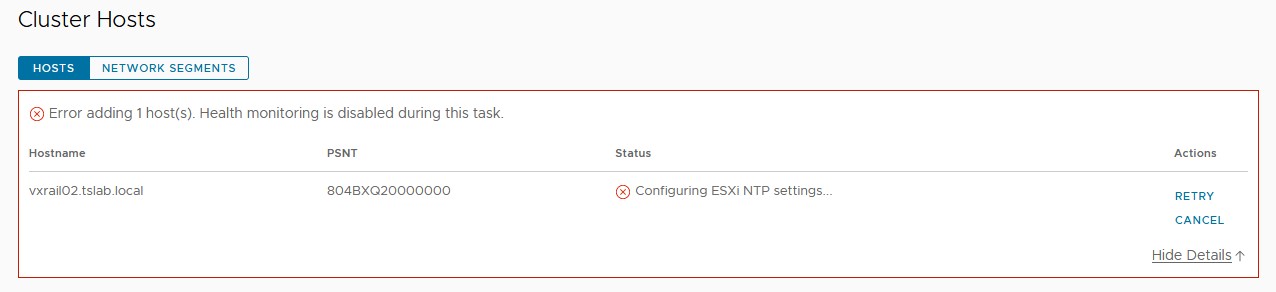
Wanneer u een nieuw VxRail-knooppunt toevoegt met behulp van de VxRM plug-in, wordt de stap "ESXi NTP-instellingen configureren..." Mislukt.
Cause
Dit kan zelfs gebeuren wanneer NTP wordt ingevuld in ntp.conf op vCenter-, VxRail Manager- en ESXi-knooppunten. Tijdens het toevoegen van het knooppunt is de gebruikte instelling aanwezig op de VxRail Manager Rest API. Deze parameter is ingesteld tijdens de implementatie van VxRail Manager.
Resolution
Om dit probleem op te lossen:


- Start een SSH-sessie in VxRail Manager met behulp van mystic user.
- Wijzig bevoegdheden met behulp van SU - en root-wachtwoord.
- Controleer de huidige NTP-instelling op de Rest API met behulp van de volgende opdracht:
curl --unix-socket /var/lib/vxrail/nginx/socket/nginx.sock http://127.0.0.1/rest/vxm/internal/configservice/v1/configuration/keys/system_ntp
- Als de waarde van de laatste opdracht leeg of ongeldig is, wijzigt u deze met behulp van de volgende opdracht en vervangt <u NTP_SERVER> veld door NTP IP-adres of FQDN:
curl -X PUT -H "Content-Type: application/json" -d '{"value":"<NTP_SERVER>"}' --unix-socket /var/lib/vxrail/nginx/socket/nginx.sock http://127.0.0.1/rest/vxm/internal/configservice/v1/configuration/keys/system_ntp
- Klik op 'Retry' in vCenter om verder te gaan met het toevoegen van knooppunten. Als de NTP-server geldig is, mag deze niet mislukken.
Additional Information
Dell VxRail - API gebruikershandleiding: https://dl.dell.com/content/docu91468_VxRail_Appliance_4.5.x,_4.7.x,_and_7.0.x_API_Guide.pdf
Affected Products
VxRailArticle Properties
Article Number: 000211460
Article Type: Solution
Last Modified: 04 Jun 2026
Version: 3
Find answers to your questions from other Dell users
Support Services
Check if your device is covered by Support Services.