Dell VxRail:VxRail 新增節點錯誤 - 進行 ESXi NTP 設定
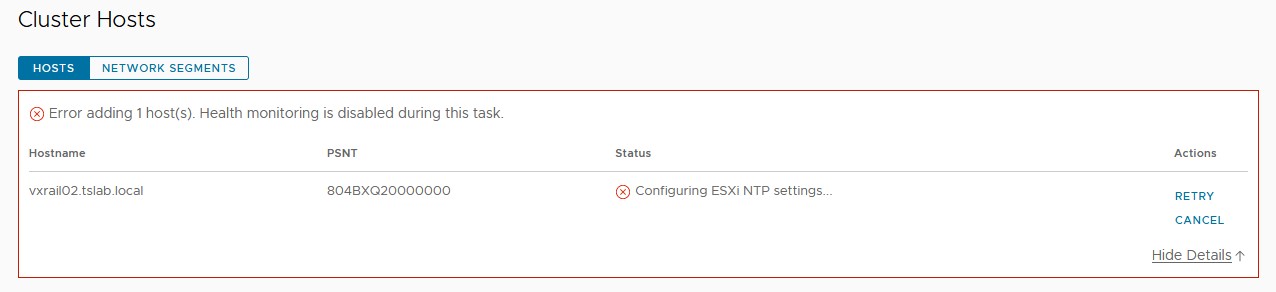
Summary: 新增 VxRail 節點時,步驟「Configuring ESXi NTP settings...」失敗。 網路時間通訊協定 (NTP)。
This article applies to
This article does not apply to
This article is not tied to any specific product.
Not all product versions are identified in this article.
Symptoms
使用 VxRM 附掛程式新增 VxRail 節點時,步驟「Configuring ESXi NTP settings...」失敗。
Cause
即使 vCenter、VxRail Manager 和 ESXi 節點上的 ntp.conf 中填入 NTP,仍可能發生這種情況。在新增節點期間,VxRail Manager Rest API 上會顯示所使用的設定。此參數是在 VxRail Manager 部署期間設定。
Resolution
要解決此問題:


- 使用 Mystic 使用者在 VxRail Manager 上啟動 SSH 會話。
- 使用 SU 和 root 密碼變更許可權。
- 使用下列命令檢查 Rest API 上的目前 NTP 設定:
curl --unix-socket /var/lib/vxrail/nginx/socket/nginx.sock http://127.0.0.1/rest/vxm/internal/configservice/v1/configuration/keys/system_ntp
- 如果最後一個命令的值為空白或無效,請使用下一個命令加以變更,將NTP_SERVER > 欄位替換 <為 NTP IP 位址或 FQDN:
curl -X PUT -H "Content-Type: application/json" -d '{"value":"<NTP_SERVER>"}' --unix-socket /var/lib/vxrail/nginx/socket/nginx.sock http://127.0.0.1/rest/vxm/internal/configservice/v1/configuration/keys/system_ntp
- 按一下 vCenter 上的「Retry」以繼續新增節點。如果 NTP 伺服器有效,則不應失敗。
Additional Information
Dell VxRail - API 使用者指南:HTTPs://dl.dell.com/content/docu91468_VxRail_Appliance_4.5.x,_4.7.x,_and_7.0.x_API_Guide.pdf
Affected Products
VxRailArticle Properties
Article Number: 000211460
Article Type: Solution
Last Modified: 04 Jun 2026
Version: 3
Find answers to your questions from other Dell users
Support Services
Check if your device is covered by Support Services.