Dell VxRail:VxRail add node error - Configuring ESXi NTP settings(VxRailノード追加エラー - ESXi NTP設定の構成)
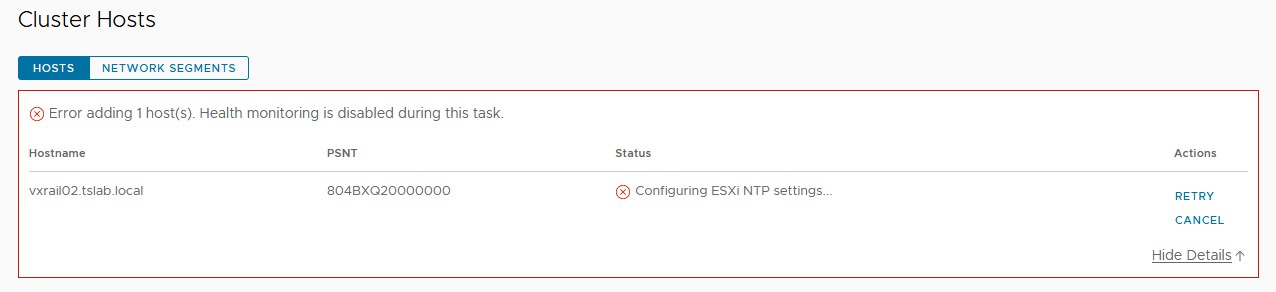
Summary: VxRailノードを追加する場合は、「ESXi NTP設定の構成...」のステップを実行します。失敗。 ネットワーク タイム プロトコル(NTP)。
This article applies to
This article does not apply to
This article is not tied to any specific product.
Not all product versions are identified in this article.
Symptoms
VxRMプラグインを使用して新しいVxRailノードを追加する場合は、「ESXi NTP設定の構成...」の手順を実行します。失敗。
Cause
これは、vCenter、VxRail Manager、ESXiノードの ntp.conf にNTPが設定されている場合でも発生する可能性があります。ノードの追加中に使用される設定は、VxRail Manager Rest APIに存在します。このパラメーターは、VxRail Managerの導入時に設定されます。
Resolution
この問題を解決するには、次の手順に従います。


- VxRail Managerで、ユーザーを使用してSSHセッションを開始します。
- SUパスワードとrootパスワードを使用して権限を変更します。
- 次のコマンドを使用して、Rest APIの現在のNTP設定を確認します。
curl --unix-socket /var/lib/vxrail/nginx/socket/nginx.sock http://127.0.0.1/rest/vxm/internal/configservice/v1/configuration/keys/system_ntp
- 最後のコマンドの値が空または無効な場合は、次のコマンドを使用して変更し、NTP_SERVER>フィールドを<NTP IPアドレスまたはFQDNに置き換えます。
curl -X PUT -H "Content-Type: application/json" -d '{"value":"<NTP_SERVER>"}' --unix-socket /var/lib/vxrail/nginx/socket/nginx.sock http://127.0.0.1/rest/vxm/internal/configservice/v1/configuration/keys/system_ntp
- vCenterで[Retry]をクリックして、ノードの追加を続行します。NTPサーバーが有効な場合は、失敗しないでください。
Additional Information
Dell VxRail - APIユーザー ガイド:https://dl.dell.com/content/docu91468_VxRail_Appliance_4.5.x,_4.7.x,_and_7.0.x_API_Guide.pdf
Affected Products
VxRailArticle Properties
Article Number: 000211460
Article Type: Solution
Last Modified: 04 Jun 2026
Version: 3
Find answers to your questions from other Dell users
Support Services
Check if your device is covered by Support Services.