Dell VxRail:VxRail 添加节点错误 - 配置 ESXi NTP 设置
Summary: 添加 VxRail 节点时,步骤“配置 ESXi NTP 设置...”失败。 网络时间协议 (NTP)。
This article applies to
This article does not apply to
This article is not tied to any specific product.
Not all product versions are identified in this article.
Symptoms
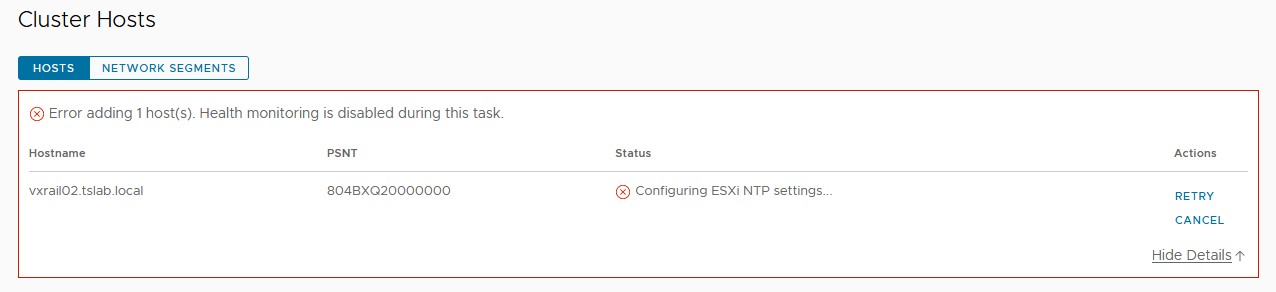
使用 VxRM 插件添加新 VxRail 节点时,步骤“配置 ESXi NTP 设置...”失败。
Cause
即使在 vCenter、VxRail Manager 和 ESXi 节点上的 ntp.conf 中填充 NTP 时,也会发生这种情况。在添加节点期间,VxRail Manager Rest API 上存在使用的设置。此参数在 VxRail Manager 部署期间设置。
Resolution
要解决此问题:


- 使用 mystic 用户在 VxRail Manager 上启动 SSH 会话。
- 使用 SU 和 root 密码更改权限。
- 使用以下命令检查 Rest API 上的当前 NTP 设置:
curl --unix-socket /var/lib/vxrail/nginx/socket/nginx.sock http://127.0.0.1/rest/vxm/internal/configservice/v1/configuration/keys/system_ntp
- 如果最后一个命令上的值为空或无效,请使用下一个命令进行更改,将NTP_SERVER>字段替换<为 NTP IP 地址或 FQDN:
curl -X PUT -H "Content-Type: application/json" -d '{"value":"<NTP_SERVER>"}' --unix-socket /var/lib/vxrail/nginx/socket/nginx.sock http://127.0.0.1/rest/vxm/internal/configservice/v1/configuration/keys/system_ntp
- 单击 vCenter 上的“重试”以继续添加节点。如果 NTP 服务器有效,则不应失败。
Additional Information
Dell VxRail - API 用户指南:https://dl.dell.com/content/docu91468_VxRail_Appliance_4.5.x,_4.7.x,_and_7.0.x_API_Guide.pdf
Affected Products
VxRailArticle Properties
Article Number: 000211460
Article Type: Solution
Last Modified: 04 Jun 2026
Version: 3
Find answers to your questions from other Dell users
Support Services
Check if your device is covered by Support Services.