NetWorker Microsoft 模块:无法从节点的控制面板卸载或移除 NetWorker Microsoft 模块
Summary: 无法从控制面板中删除 NetWorker Microsoft Module (NMM)。
This article applies to
This article does not apply to
This article is not tied to any specific product.
Not all product versions are identified in this article.
Symptoms
无法从节点卸载或卸下 NetWorker Microsoft Module (NMM) 模块。
卸载向导将启动,但在过程结束时未完成。
卸载向导将启动,但在过程结束时未完成。
Cause
有几个原因可能会导致此症状:
- 当前安装的底层问题
- 64 位操作系统上的注册表项损坏
- 控制更新数据的注册表项损坏
Resolution
使用 Microsoft 程序安装和卸载
 来删除程序。
故障排除程序可帮助解决以下问题:

图 1:启动 Microsoft 故障排除程序工具

图 2:询问问题是否与安装或卸载有关。
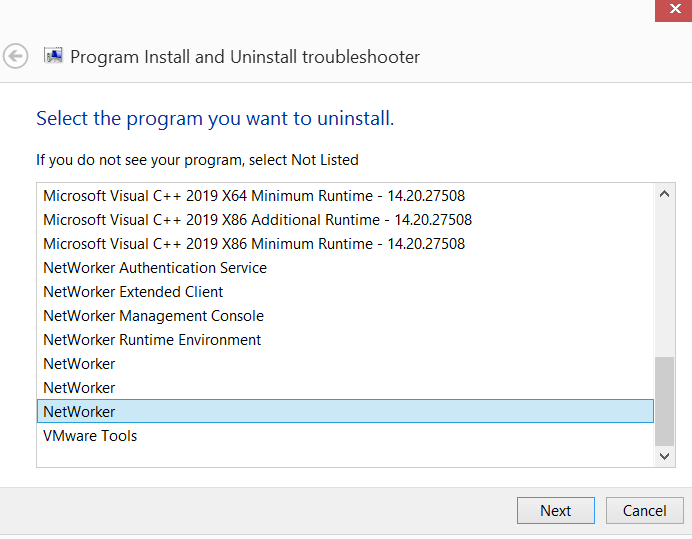
图 3:选择卸载后,询问要卸载哪个程序

图 4:选择 Type of Repairs Trying to Perform 。
来删除程序。
故障排除程序可帮助解决以下问题:
- 64 位操作系统上的注册表项损坏
- 控制更新数据的注册表项损坏
- 阻止安装新程序
- 防止卸载或更新现有程序
- 阻止通过控制面板中的 添加或删除程序(或程序和功能)卸载程序
- 打开 Microsoft 程序安装和卸载工具。
图 1:启动 Microsoft 故障排除程序工具
- 在工具中选择 安装 或 卸载 程序 。
图 2:询问问题是否与安装或卸载有关。
- 选择要卸载的程序。
图 3:选择卸载后,询问要卸载哪个程序
- 选择要执行的修复类型。
图 4:选择 Type of Repairs Trying to Perform 。
Additional Information
通过控制面板卸载未卸载软件包的另一种方法是通过 Windows Management Instrumentation Command (WMIC):
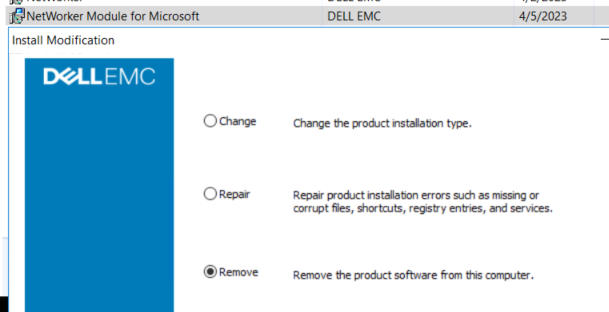
图 5:NMM 程序和功能安装修改
卸载应返回成功:
图 6:成功返回计划卸载
- 在客户端上打开管理命令提示符。
- 运行以下 Windows Management Instrumentation 命令以获取安装的 Dell 软件的列表:
wmic product where "Vendor = 'Dell EMC'" get name, IdentifyingNumber, PackageName示例:
C:\Windows\system32>wmic product where "Vendor = 'Dell EMC'" get name, IdentifyingNumber, PackageName IdentifyingNumber Name PackageName {A5BACAB0-12BC-42B0-9293-090BE5C40BF8} NetWorker Extended Client NwExtClientMsi.msi {B8D7B32E-28B3-49E2-B951-E7BD0A0C4CC8} NetWorker Module for Microsoft NMM.msi {CF37E77E-6EFE-4A46-B645-F3179661C617} NetWorker NwClientMsi.msi
提醒:上述命令会为查询的每个软件返回一个 IdentifyingNumber。IdentifyingNumber 可用于从 CLI 中删除软件。
- 使用 WMIC 使用 NMM 标识号卸载软件:
wmic product where "IdentifyingNumber = '{IdentifyingNumber}'" call uninstall 示例:
C:\Windows\system32>wmic product where "IdentifyingNumber = '{B8D7B32E-28B3-49E2-B951-E7BD0A0C4CC8}'" call uninstall Executing (\\WINSRVR2K16\ROOT\CIMV2:Win32_Product.IdentifyingNumber="{B8D7B32E-28B3-49E2-B951-E7BD0A0C4CC8}",Name="NetWorker Module for Microsoft",Version="19.8.0.0")->Uninstall() Method execution successful. Out Parameters: instance of __PARAMETERS { ReturnValue = 0; };
- 转至 控制面板 >程序和功能 ,然后卸载 NetWorker Module for Microsoft:
图 5:NMM 程序和功能安装修改
卸载应返回成功:
图 6:成功返回计划卸载
Affected Products
NetWorker, NetWorker Module for MicrosoftArticle Properties
Article Number: 000212077
Article Type: Solution
Last Modified: 19 Apr 2023
Version: 2
Find answers to your questions from other Dell users
Support Services
Check if your device is covered by Support Services.