NetWorker Microsoft Module: Unable to Uninstall or Remove the NetWorker Microsoft Module from the Node's Control Panel
Summary: NetWorker Microsoft Module (NMM) is not removeable from the control panel.
This article applies to
This article does not apply to
This article is not tied to any specific product.
Not all product versions are identified in this article.
Symptoms
Unable to uninstall or remove the NetWorker Microsoft Module (NMM) module from the node.
Uninstall Wizard starts but does not complete at the end of the procedure.
Uninstall Wizard starts but does not complete at the end of the procedure.
Cause
There are several causes which may factor into this symptom:
- Underlying issue with current installation
- Corrupt registry keys on 64-bit operating systems
- Corrupt registry keys that control the update data
Resolution
Remove the programs by using the Microsoft Program Install and Uninstall
 .
.
The troubleshooter helps address issues that:

Figure 1: Starting the Microsoft Troubleshoot Program Tool

Figure 2: Asking if Issue is with Installing or Uninstalling.

Figure 3: After Selecting Uninstall, Asks which Program to Uninstall

Figure 4: Select the Type of Repairs Trying to Perform.
.
The troubleshooter helps address issues that:
- Corrupt registry keys on 64-bit operating systems
- Corrupt registry keys that control the update data
- Prevent new programs from being installed
- Prevent existing programs from being uninstalled or updated
- Block uninstalling a program through Add or Remove Programs (or Programs and Features) in Control Panel
- Open the Microsoft Program Install and Uninstall tool.
Figure 1: Starting the Microsoft Troubleshoot Program Tool
- Select either Installing or Uninstalling a program in the tool.
Figure 2: Asking if Issue is with Installing or Uninstalling.
- Select the program to be uninstalled.
Figure 3: After Selecting Uninstall, Asks which Program to Uninstall
- Select the type of repairs to perform.
Figure 4: Select the Type of Repairs Trying to Perform.
Additional Information
Another method to uninstall packages which do not uninstall through the Control Panel is through Windows Management Instrumentation Command (WMIC):
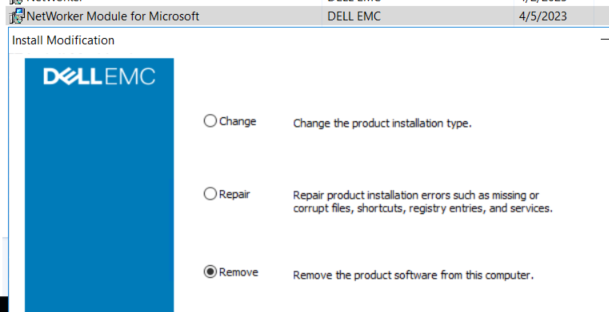
Figure 5: NMM Program and Features Installation Modification
The uninstall should return successful:

Figure 6: Successful Return of Program Uninstallation
- Open an Administrative command prompt on the client.
- Run the following Windows Management Instrumentation Command to get a list of Dell software installed:
wmic product where "Vendor = 'Dell EMC'" get name, IdentifyingNumber, PackageNameExample:
C:\Windows\system32>wmic product where "Vendor = 'Dell EMC'" get name, IdentifyingNumber, PackageName IdentifyingNumber Name PackageName {A5BACAB0-12BC-42B0-9293-090BE5C40BF8} NetWorker Extended Client NwExtClientMsi.msi {B8D7B32E-28B3-49E2-B951-E7BD0A0C4CC8} NetWorker Module for Microsoft NMM.msi {CF37E77E-6EFE-4A46-B645-F3179661C617} NetWorker NwClientMsi.msi
NOTE: The above command returns an IdentifyingNumber for each software queried. The IdentifyingNumber can be used to remove the software from CLI.
- Use WMIC to uninstall the software using the NMM Identifying Number:
wmic product where "IdentifyingNumber = '{IdentifyingNumber}'" call uninstall Example:
C:\Windows\system32>wmic product where "IdentifyingNumber = '{B8D7B32E-28B3-49E2-B951-E7BD0A0C4CC8}'" call uninstall Executing (\\WINSRVR2K16\ROOT\CIMV2:Win32_Product.IdentifyingNumber="{B8D7B32E-28B3-49E2-B951-E7BD0A0C4CC8}",Name="NetWorker Module for Microsoft",Version="19.8.0.0")->Uninstall() Method execution successful. Out Parameters: instance of __PARAMETERS { ReturnValue = 0; };
- Go to Control Panel >Programs and Features and uninstall the NetWorker Module for Microsoft:
Figure 5: NMM Program and Features Installation Modification
The uninstall should return successful:
Figure 6: Successful Return of Program Uninstallation
Affected Products
NetWorker, NetWorker Module for MicrosoftArticle Properties
Article Number: 000212077
Article Type: Solution
Last Modified: 19 Apr 2023
Version: 2
Find answers to your questions from other Dell users
Support Services
Check if your device is covered by Support Services.