NetWorker: External Authority Configuration Failed with Error: LDAP Error 49, data 52e
Summary: External authority configuration failed with Authentication Authority provider modification failed. An authentication error occurred while accessing the naming or directory service. LDAP error 49, data 52e ...
This article applies to
This article does not apply to
This article is not tied to any specific product.
Not all product versions are identified in this article.
Symptoms
External authority configuration failed with the following error:
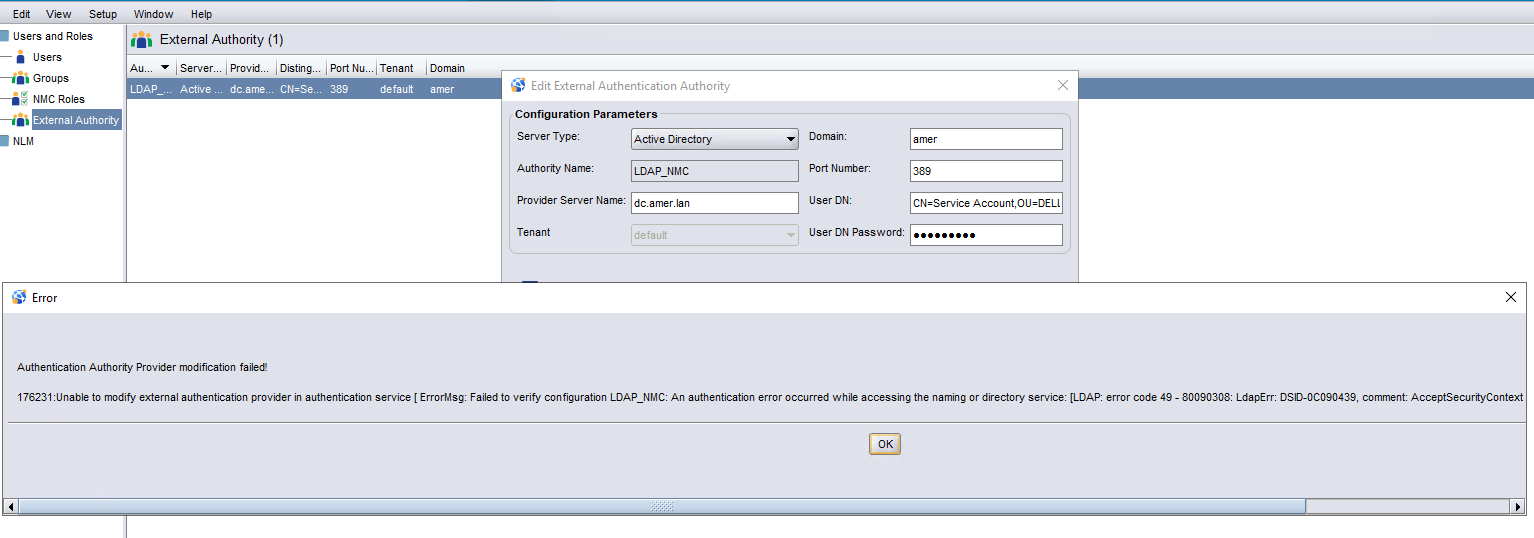
Figure 1: External authority configuration failed with Authentication Authority provider modification failed.

Figure 2: An authentication error occurred while accessing the naming or directory service. LDAP error 49, data 52e
The bind account's Distinguished Name and password are correct.
The Active Directory Service Provider is also correct.
NetWorker can connect to the Active Directory server.
Figure 1: External authority configuration failed with Authentication Authority provider modification failed.
Figure 2: An authentication error occurred while accessing the naming or directory service. LDAP error 49, data 52e
The bind account's Distinguished Name and password are correct.
The Active Directory Service Provider is also correct.
NetWorker can connect to the Active Directory server.
Cause
In the NetWorker Management Console (NMC) - External Authority configuration window, the domain supplied is the alias of the domain instead of the full domain name. For example, if the domain is "amer.local," the entry given was only "amer."
Resolution
When configuring external authority from the NMC UI, enter the full domain name in the NMC - External Authority - Domain field. See example below.
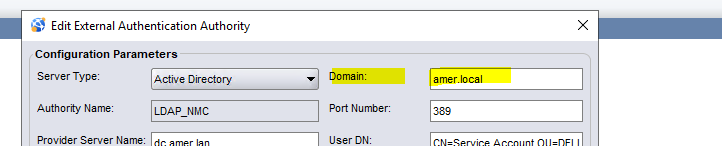
Figure 3: Configuring External Authority Using Full Domain Name
To use the domain "alias" instead of the full domain name, configure the external authority using the script supplied with NetWorker. The script method is detailed in:
Figure 3: Configuring External Authority Using Full Domain Name
To use the domain "alias" instead of the full domain name, configure the external authority using the script supplied with NetWorker. The script method is detailed in:
- Article 158322: NetWorker: How To Set up LDAP/AD using authc_config scripts
- NetWorker Security Configuration Guide available through Dell Support NetWorker Product Page
Affected Products
NetWorkerProducts
NetWorker Family, NetWorker SeriesArticle Properties
Article Number: 000213297
Article Type: Solution
Last Modified: 02 Mar 2026
Version: 6
Find answers to your questions from other Dell users
Support Services
Check if your device is covered by Support Services.