PowerProtect: VMware Instant Access Restore and FLR fails Mount failed
Summary: Virtual Machine (VM) Instant Access (IA) or File Level Recovery (FLR) fails with error "Mount failed: Unable to complete Sysinfo operation"
This article applies to
This article does not apply to
This article is not tied to any specific product.
Not all product versions are identified in this article.
Symptoms
- VM FLR and IA failing with Network File System (NFS) mount error "
Mount failed: Unable to complete Sysinfo operation - VM restores as new option succeeds.
- There is no issue with VM backups.
- Confirmed ESXI to DD communicate is working as per PowerProtect Data Manager: Virtual Machine Restore Is Not Using the PowerProtect DD IP Interface Expected
Instant Access Restore or FLR fails with the following error in the VM Direct Engine (VMDE) mount log.
Log: mount-xxxxxxxxxx.log
Log Location: (Embedded VMDE) /opt/emc/vproxy/runtime/logs/recycle/vproxyd/ | /opt/emc/vproxy/runtime/logs/recycle/vbackupd/ (External VMDE)
YYYY-MM-DDThh:mm:ss.270Z NOTICE: [8d389cdc46ece06b;96ae9dbd0918a908] "Text": "Session '07fae483-61e9-43da-acca-b32f48656db0' is unsuccessful: Unable to create datastore: Unable to create datastore 'DELL-vProxy-ppdm01.fqdn 1682513359' using '*.*.*.*:/data/col1/Dev-Test-ppdm01-71b45/PLCTLP-XXXX/Restores/yyyy/zzzz-zzzz/1683583862592975399/1682025362/vProxy-ppdm01.fqdn xxxxxxx': ServerFaultCode: An error occurred during host configuration. Operation failed, diagnostics report: Mount failed: Unable to complete Sysinfo operation. Please see the VMkernel log file for more details.: Unable to query remote mount point's attributes",In newer versions of PowerProtect Data Manager, 19.18 or 19.19 for example, there will be no mount log created and the failure below can be observed on the restore job.

The PowerProtect Data Manager vmdm log contains the following failure error.
Log: vmdm.log
Log Location: /var/log/brs/vmdm
2025-04-11T11:58:16.470Z WARN [] [request-dispatch-service-1] [][][][][] [c.e.b.v.r.c.StreamCountService.exchange(282)] - Exception Response Body {"code":500,"reason":"Cannot invoke \"com.emc.brs.datadomain.
ddboost.DdConnectionInfo.getConnDesc()\" because \"ddConnection\" is null","remediation":null,"timestamp":1744372696467,"path":"/api/v2/copies/a33f6343-85a8-4044-a992-dc4b8487d9fe/recovery-stream-counts","ex
tendedInfo":null}
2025-04-11T11:58:16.471Z ERROR [] [request-dispatch-service-1] [][][][][] [c.e.b.v.r.d.InstantAccessDispatchService.isRequestDispatchable(75)] - Exception checking allowance
com.emc.brs.vmdm.error.ComponentException: Cannot invoke "com.emc.brs.datadomain.ddboost.DdConnectionInfo.getConnDesc()" because "ddConnection" is null
        at com.emc.brs.vmdm.vpe.service.clients.RestClientBase.exchange(RestClientBase.java:284)
        at com.emc.brs.vmdm.vpe.service.clients.RestClientBase.get(RestClientBase.java:201)
        at com.emc.brs.vmdm.recovery.clients.StreamCountService.getStreamCounts(StreamCountService.java:51)
        at com.emc.brs.vmdm.recovery.dispatch.InstantAccessSessionService.exceedsAllowance(InstantAccessSessionService.java:90)
        at com.emc.brs.vmdm.recovery.dispatch.InstantAccessDispatchService.isRequestDispatchable(InstantAccessDispatchService.java:73)
        at com.emc.brs.vmdm.recovery.dispatch.InstantAccessDispatchService.isRequestDispatchable(InstantAccessDispatchService.java:31)
        at com.emc.brs.vmdm.recovery.dispatch.BaseRequestDispatchService.getRequestFromWaiting(BaseRequestDispatchService.java:301)
        at com.emc.brs.vmdm.recovery.dispatch.BaseRequestDispatchService.getRequest(BaseRequestDispatchService.java:232)
        at com.emc.brs.vmdm.recovery.dispatch.BaseRequestDispatchService.checkRequests(BaseRequestDispatchService.java:120)
        at com.emc.brs.vmdm.recovery.dispatch.BaseRequestDispatchService.lambda$startChecking$2(BaseRequestDispatchService.java:101)
        at java.base/java.util.concurrent.Executors$RunnableAdapter.call(Executors.java:539)
        at java.base/java.util.concurrent.FutureTask.runAndReset(FutureTask.java:305)
        at java.base/java.util.concurrent.ScheduledThreadPoolExecutor$ScheduledFutureTask.run(ScheduledThreadPoolExecutor.java:305)
        at java.base/java.util.concurrent.ThreadPoolExecutor.runWorker(ThreadPoolExecutor.java:1136)
        at java.base/java.util.concurrent.ThreadPoolExecutor$Worker.run(ThreadPoolExecutor.java:635)
        at java.base/java.lang.Thread.run(Thread.java:840)
Cause
The restore failure is related to the NFS configuration enabled on the PowerProtect DD (DD). ESXi host is unable to mount the NFSv4 export. At the time of this article the ESXi host can mount only NFSv3 or NFSv4.1 exports.
Scenario One:
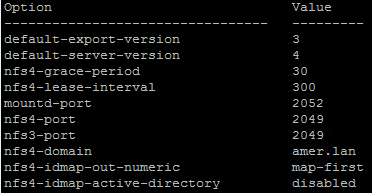
DD has both NFSv3 and NFSv4 versions enabled, and NFSv4 is set as the default on DD.

The DD command shows the default server.
nfs option show
Scenario Two:
DD has only NFSv4 enabled.
Resolution
Depending on the current DD NFS configuration, either enable NFSv3 and ensure the default NFS export version on the DD to NFSv3:
- Connect to DD over SSH.
- Confirm your current NFS configuration.
nfs option showExample NFSv3 enabled, but NFS default server is NFSv4.
- If disabled, enable NFSv3.
nfs disable version 3-
- If NFS is version 4, set to NFSv3.
nfs option set default-server-version 3- Perform Instant Access or File Level Restore again.
Affected Products
PowerProtect Data Manager Appliance, PowerProtect Data Manager, PowerProtect Data Manager SoftwareArticle Properties
Article Number: 000214971
Article Type: Solution
Last Modified: 18 Jul 2025
Version: 3
Find answers to your questions from other Dell users
Support Services
Check if your device is covered by Support Services.