PowerProtect Data Manager:如何手动装载文件系统代理备份
Summary: 本文介绍如何使用 ddfsrc 命令手动装载 PowerProtect Data Manager 文件系统代理备份。
This article applies to
This article does not apply to
This article is not tied to any specific product.
Not all product versions are identified in this article.
Instructions
在对 PowerProtect Data Manager FileSystem 代理备份的恢复进行故障排除期间,如果由于 PowerProtect Data Manager UI 失败或停止响应而无法从 PowerProtect Data Manager UI 执行 FLR 恢复,则用户可以使用命令手动尝试装载备份并执行以下步骤:
在必须从中恢复数据的源客户端上运行的命令:

本地备份查询:
在必须从中恢复数据的源客户端上运行的命令:
- 从您想要恢复数据的位置连接到源服务器。
- 使用以下命令查询本地或远程存储的备份相关信息:
ddfsadmin
提示:建议将每个命令的输出重定向到 .txt 文件,以便可以从生成的新文件收集请求的数据。作为执行的故障排除步骤的一部分,这些文件还应附加到 SR。
查询密码箱信息:
运行以下命令以标识现有的 Data Domain IP 或名称、用于备份的存储单元和 DDBoost 用户:
运行以下命令以标识现有的 Data Domain IP 或名称、用于备份的存储单元和 DDBoost 用户:
ddfsadmin lockbox -query
图 1:命令 ddfsadmin lockbox -query 的结果屏幕截图
命令选项:
ddfsadmin

usage: ddfsadmin backup [options]
   query -help: to print the help.
   query -local [-v=] [-t=[h = hour,d = days,w = weeks,m = months]: query the local record file for listing backups.
   query -remote -d= -s= -u= [-p=
- ] [-c=] [-v=] [-t=[h = hour,d = days,w = weeks,m = months]: query the record file on PowerProtect DD System for listing backups. Example: ddfsadmin backup query -local -v="C:\\" -t=5d
本地备份查询:
运行以下命令以获取本地数据库上存储的此客户端的现有备份的列表:
这些备份是本地报告的备份,可能与 Data Domain 本身报告的备份不同。请参阅下一个命令,因为某些现有备份可能已正确过期并已从 Data Domain 端删除,但本地数据库尚未更新。


要在执行恢复的主机上运行的命令:
必须在执行恢复的主机上运行以下命令:
使用 ddfsrc 手动装载所选备份:
以下命令用于在运行 命令的主机上手动装载备份,从而使备份在装载点上可用和可浏览,默认情况下,装载点位于文件夹下:

这些备份是本地报告的备份,可能与 Data Domain 本身报告的备份不同。请参阅下一个命令,因为某些现有备份可能已正确过期并已从 Data Domain 端删除,但本地数据库尚未更新。
ddfsadmin backup query -local
图 2:命令 ddfsadmin backup query -local 的结果屏幕截图
文件是 localbck.txt (这是可以通过重定向上一个命令的输出生成的文件:
ddfsadmin backup query -local > localbck.txt.
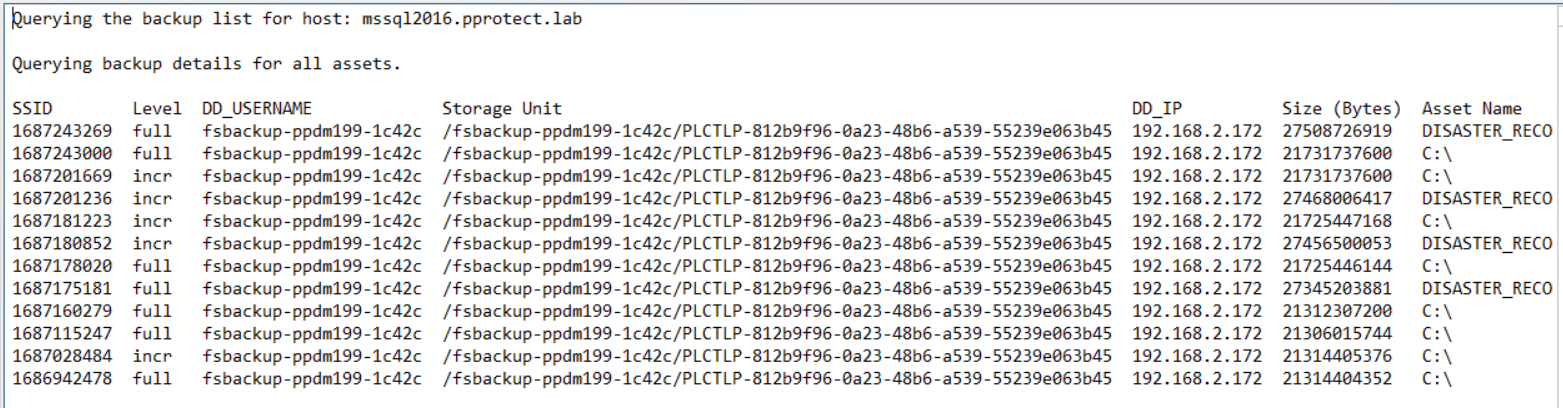
图 3:所有资产的备份详细信息屏幕截图
远程备份查询:
运行以下命令以获取存储在 Data Domain 上指定存储单元下的此客户端的现有备份的列表:
运行以下命令以获取存储在 Data Domain 上指定存储单元下的此客户端的现有备份的列表:
ddfsadmin backup query -remote -d=DD_name_IP -s=SU_name -u=DDBoost_user
示例
使用先前收集的 lockbox.txt 命令的输出:
ddfsadmin backup query -remote -d=192.168.2.172 -s=/fsbackup-ppdm199-1c42c/PLCTLP-812b9f96-0a23-48b6-a539-55239e063b45 -u=fsbackup-ppdm199-1c42c
图 4:命令 ddfsadmin backup query -remote 的结果屏幕截图
要在执行恢复的主机上运行的命令:
必须在执行恢复的主机上运行以下命令:
- 要恢复客户端 A 上的客户端 A,请在客户端 A 上运行 命令。
- 要恢复客户端 B 上的客户端 A,请在客户端 B 上运行 命令,并确保定义 ddfsrc -c clientA。
使用 ddfsrc 手动装载所选备份:
以下命令用于在运行 命令的主机上手动装载备份,从而使备份在装载点上可用和可浏览,默认情况下,装载点位于文件夹下:
DPSAPPS_install_dir/fsagent/tmp/BBB
ddfsrc command options
   Usage: ddfsrc [OPTION]... STRING
      STRING can be a file path string, key=value string, or a flag string.

   -c
      Specifies the client index name, such as a hostname or clustername.

   -d
      Specifies the destination directory into which files are recovered. Combined with -I, specifies the file level recovery.

   -h  [=]
      DFA_SI_DD_HOST=hostname         Data target hostname is mandatory.
      DFA_SI_DD_USER=username         Data target username is mandatory.
      DFA_SI_DEVICE_PATH=device_path         A device path is mandatory.
      DFA_SI_DD_LOCKBOX_PATH=lockbox_path     If credentials were not added in the default lockbox path, a lockbox path is mandatory. Default lockbox path is C:\Program Files\DPSAPPS\fsagent\lockbox.
      DDBOOST_COMPRESSED_RESTORE=TRUE|FALSE     Specifies whether to compress the data transfer. The TRUE setting specifies the compressed data transfer. The default value is FALSE.

   -i  [nNoOrRyY]
      N or n                     Specifies to discard (do not overwrite) identical files during recovery.
      O or o                     Specifies to overwrite, but if the file is locked, not overwrite at reboot.
      R or r                     Specifies to rename if the recovered file is identical.
      Y or y                     Specifies to overwrite and replace at reboot if file is locked.

   -I
      Specifies the file from which to extract the restored file names. Combined with -d, specifies the file level recovery.
   -r
      Specifies the target directory into which files are recovered, such as local disk C:\ or D:\, directory E:\restore_directory on Windows, or directory /restore_directory on Linux.

   -S
      Specifies the backup ID that will be used to perform recovery.

   -g
      Specifies to discard upward folder hierarchy during file level recovery.
ddfsrc mount/unmount command syntax

ddfsrc -c source_client_from_which_backup_will_be_restored -S backup_id/SSID -h DFA_SI_DD_HOST=DD_name/IP -h DFA_SI_DD_USER=DDBoostUser DFA_SI_DEVICE_PATH=Storage_Unit -k mount/unmount
示例
使用以前使用 ddfsadmin 命令查询收集的信息:
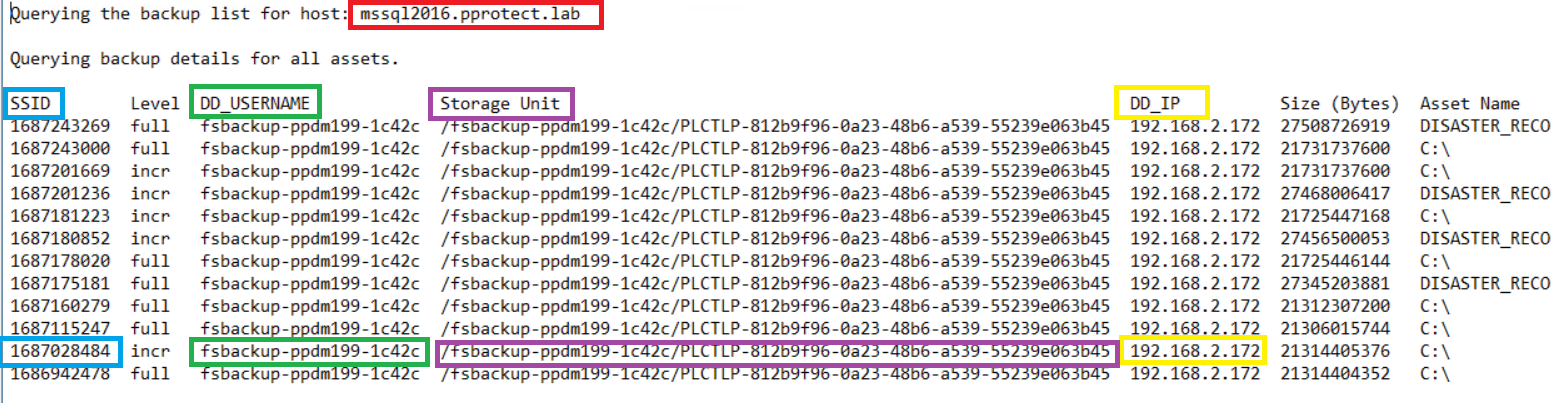
图 5:ddfsadmin 命令查询的详细信息屏幕截图
ddfsrc -c MSSQL2016.pprotect.lab -S 1687028484 -h DFA_SI_DD_HOST=192.168.2.172 -h DFA_SI_DD_USER=fsbackup-ppdm199-1c42c -h DFA_SI_DEVICE_PATH=/fsbackup-ppdm199-1c42c/PLCTLP-812b9f96-0a23-48b6-a539-55239e063b45 -k mount
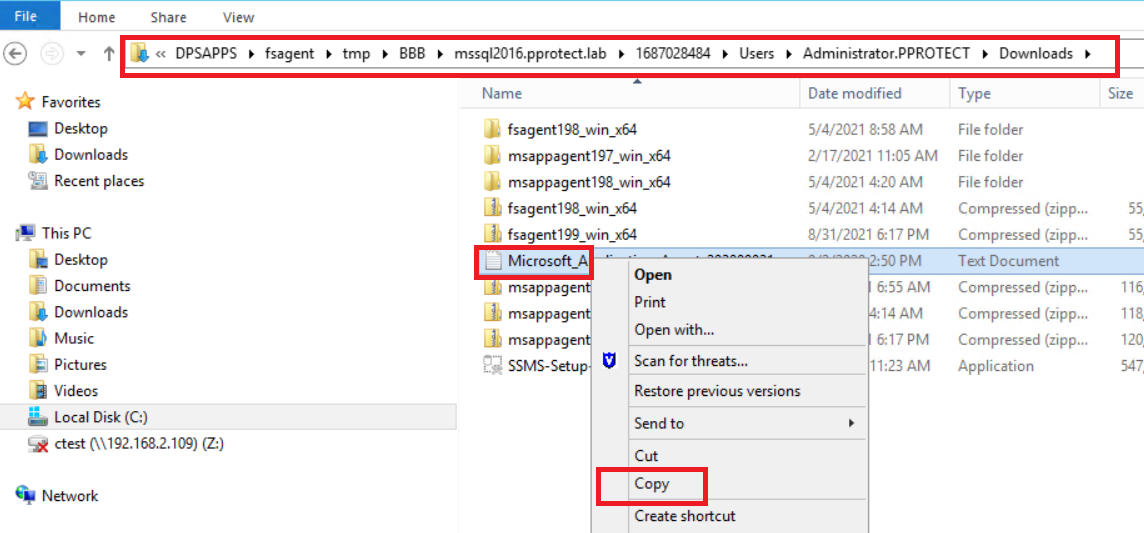
上述命令将装载在默认装载路径文件夹下选择的增量备份,然后可以使用普通文件资源管理器访问这些文件:
图 6:文件地址
图 7:屏幕截图 文件地址位置
可以手动将文件或文件夹从已装载的备份拷贝到所选的任何恢复路径。
提示:以上命令还可用于调试文件系统备份装载问题,方法是将 -D [0-9] 标记添加到命令 ddfsrc -D9。
操作完成后,请记住通过使用 -k 卸载运行相同的命令来卸载备份:
ddfsrc -c MSSQL2016.pprotect.lab -S 1687028484 -h DFA_SI_DD_HOST=192.168.2.172 -h DFA_SI_DD_USER=fsbackup-ppdm199-1c42c -h DFA_SI_DEVICE_PATH=/fsbackup-ppdm199-1c42c/PLCTLP-812b9f96-0a23-48b6-a539-55239e063b45 -k unmount
Affected Products
PowerProtect SoftwareArticle Properties
Article Number: 000215181
Article Type: How To
Last Modified: 05 Jul 2023
Version: 2
Find answers to your questions from other Dell users
Support Services
Check if your device is covered by Support Services.