PowerProtect Data Manager VM Backup Fails with Code AVB0016 SyncInProgress
Summary: PowerProtect Data Manager virtual machine (VM) backup fails with code AVB0016. "SyncInProgress" "Cannot start full sync due to existing active snapshot."
This article applies to
This article does not apply to
This article is not tied to any specific product.
Not all product versions are identified in this article.
Symptoms
PowerProtect Data Manager UI shows the following messages for the failure:
ABV0016: VM Direct engine 'localhost' is unable to back up the virtual machine 'VM1' on vCenter 'vcsa01' because of a vCenter API issue.

The VM Direct engine cannot complete the backup of this virtual machine because a vCenter API operation did not complete successfully.
To troubleshoot this issue:

     *Verify that the vCenter can be reached.
     *If the vCenter is busy, wait for some activities to complete and then retry the operation.
     *Verify that the virtual machine exists on the vCenter.
----
Read Less
The error cannot be retried. Unable to successfully complete SDM Delta Sync operation. Unsuccessful after 'xx' attempts over 5m0.627607105s The vCenter task for 'SDM Snapshot Sync deltaSync' completed with state 'error': DPD Sync in progress
Failure 1:
PowerProtect Data Manager vmdm.log has the following error messages:
Result: {
  "sessionId" : "61e7c5f0-bb85-4474-a23f-95c990c917d6",
  "state" : "Failure",
  "logFile" : "/opt/emc/vmdirect/runtime/logs/vpod/BackupJobSessions-61e7c5f0-bb85-4474-a23f-95c990c917d6.log",
  "error" : "The error cannot be retried.  Unable to successfully complete SDM Delta Sync operation.  Unsuccessful after 70 attempts over 5m1.694291645s.  The vCenter task for 'SDM Snapshot Sync deltaSync' completed with state 'error':  DPD Sync in progress (500)",
  "proxyHostName" : "localhost",
  "errorCode" : "ABV0016"
dpd.log (on ESXi) has the following error:
dpd.log:YYYY-MM-DDTHH:MM:SSZ error dpd[16520988] [Originator@6876 sub=Task opID=1d0ce776-e77a] Task 'Dp.Task.Sync.475.b2616635-352a-4726-986e-e42be7e94bac-1.52f20afe-9cef-83ec-b147-ce7acd07c2ca' failed with error: (dp.fault.SyncInProgress)
Failure 2:
Another variation of this failure is below:
PowerProtect Data Manager vmdm.log:
Result: {
  "sessionId" : "126c6bcf-635f-4579-97d7-8dd831a22048",
  "state" : "Failure",
  "logFile" : "/opt/emc/vmdirect/runtime/logs/vpod/BackupJobSessions-126c6bcf-635f-4579-97d7-8dd831a22048.log",
  "error" : "Unable to successfully complete SDM Full Sync operation.  Unsuccessful after 39 attempts over 10m14.630663716s.  The vCenter task for 'SDM Snapshot Sync fullSync' completed with state 'error':  DPD Sync in progress (500)",
  "proxyHostName" : "localhost",
  "errorCode" : "ABV0016"
dpd.log (ESXi host)
YYYY-MM-DDTHH:MM:SSZ error dpd[2216236] [Originator@6876 sub=Snapshot opID=055f891e-8923] StartFullSyncIpc: Failed for disk '2d21e5b0-15a9-469e-1bbf-03d75e771c31': error 'Cannot start full sync due to existing active snapshot'
Cause
Issue in VMware's Data Protection Daemon (DPD) service.
Resolution
Workaround failure 1:
For failure 1 where DPD returns a SyncInProgress message, restart the DPD service on the affected ESXi host as below:
- From vSphere UI, locate the affected VM and find the ESXi host that the VM resides on.
- Restart the DPD service:
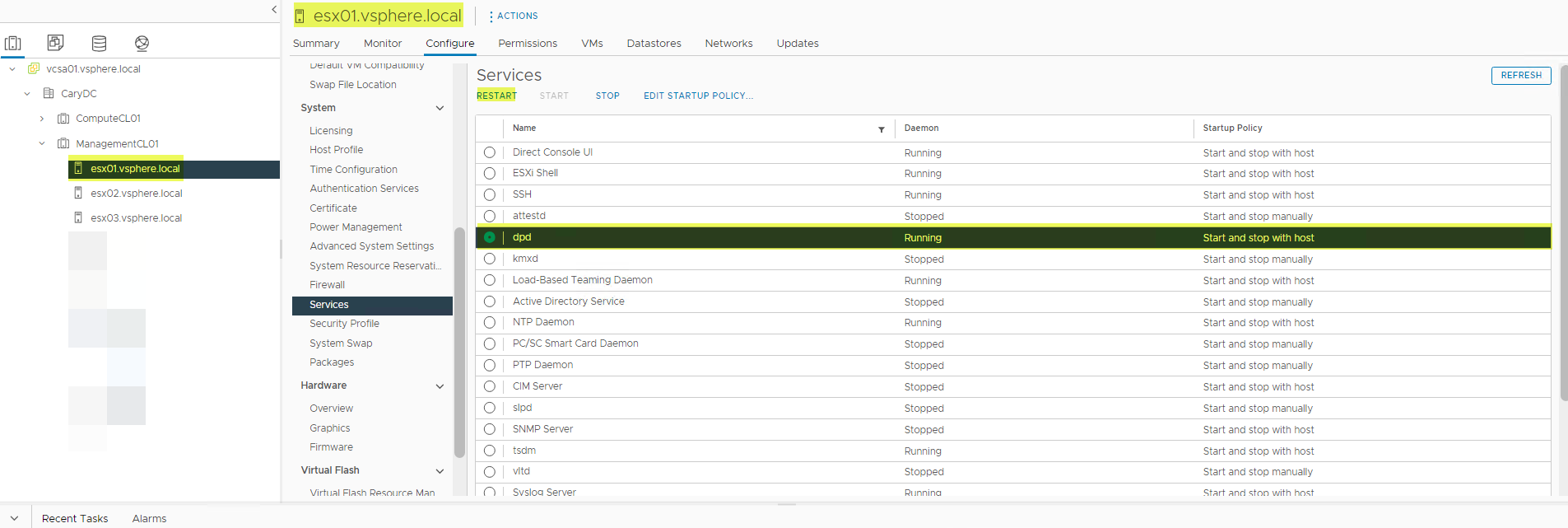
- You may get an error when restarting DPD service. If you do, restart TSDM service first, then restart DPD service.
- Restart TSDM service.
- Retry the failed backup.
Solution
Affected Versions:
vSphere 7.0.3 (all), 8.0.0
Fix expected in a future release of vSphere for affected vSphere versions.
Workaround for Failure 2:
For failure 2 where DPD returns the message "Cannot start full sync due to existing active snapshot'," the workaround is to reset LWD. LWD can be reset as below:
Method 1:
-
Change the Protection Mechanism on the VM from VAPD and back to LWD as below:

- Change the protection mechanism back to Transparent Snapshots:

Method 2:
Remove the VM from the protection policy and re-add it. If thevVersion of PowerProtect Data Manager is 19.12, then use either Method 1 or Method 3. Method 2 does not work with PowerProtect Data Manager 19.12.
Method 3:
Disable and reenable LWD using the vmconfig tool.
Solution:
Affected Versions:
7.0.3 (all) and 8.0.0
The root cause for this issue is still under investigation by VMware.
Affected Products
PowerProtect Data ManagerArticle Properties
Article Number: 000217246
Article Type: Solution
Last Modified: 16 Feb 2024
Version: 4
Find answers to your questions from other Dell users
Support Services
Check if your device is covered by Support Services.