PowerStore: PowerStore Manager에서 시스템 검사를 실행하면 "Fireman Command Failed" 오류와 함께 완료되지 않을 수 있습니다.
Summary: PowerStore Manager에서 시스템 검사를 실행해도 "Fireman command failed" 오류가 표시되어 완료되지 않을 수 있습니다. (0xE0F010200004)
This article applies to
This article does not apply to
This article is not tied to any specific product.
Not all product versions are identified in this article.
Symptoms
이 오류는 아래와 같이 메시지와 함께 표시됩니다.
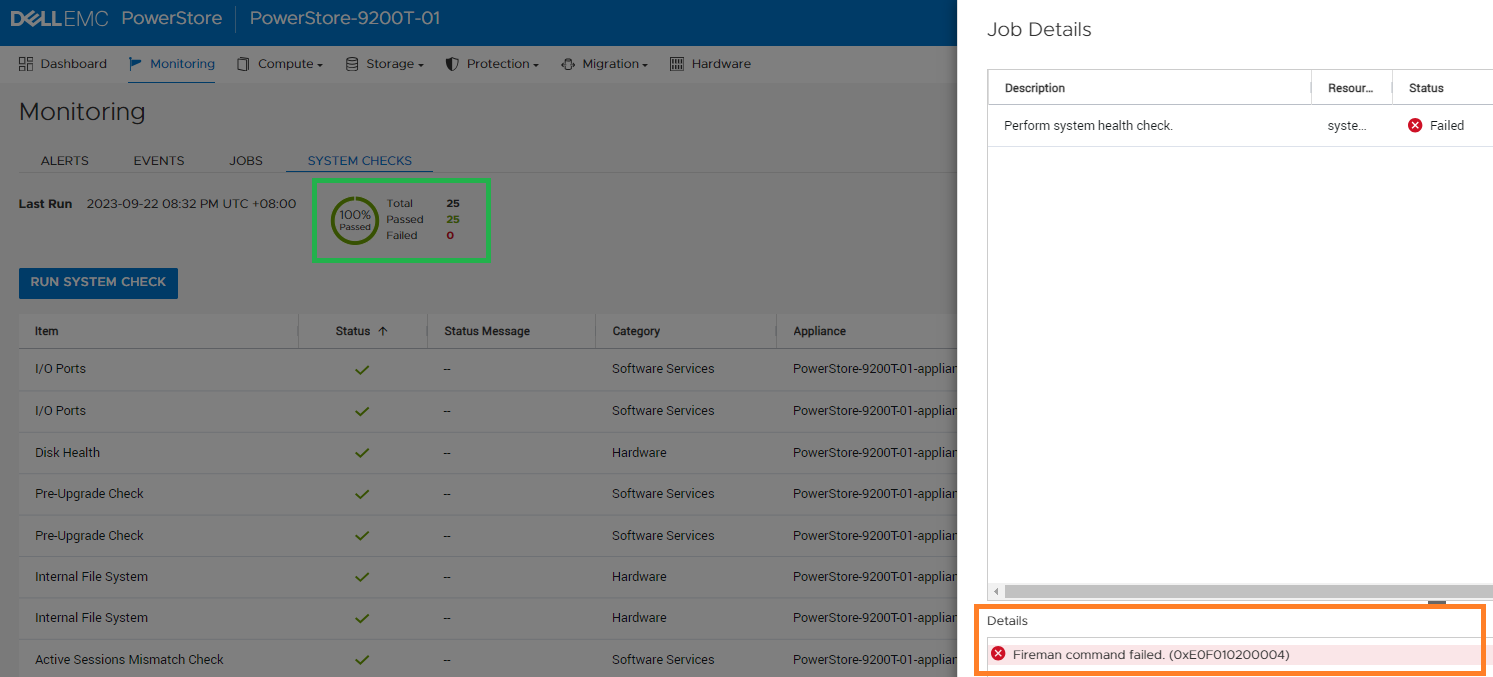
그림 1: "Fireman command failed"라는 오류 메시지 스크린샷
Fireman command failed. (0xE0F010200004)
그림 1: "Fireman command failed"라는 오류 메시지 스크린샷
Cause
운영 체제 3.2.x 이하를 실행하는 일부 PowerStore 시스템의 경우 시스템 검사의 기본 시간이 360초이므로 검사를 완료하기에 충분하지 않습니다. 이로 인해 상태 점검 작업이 실패합니다.
Resolution
해결 방법:
- 서비스 컨테이너에서 다음 서비스 명령을 사용하여 상태 점검 결과를 확인합니다.
svc_health_check run
- 검사 중 오류가 보고된 경우 실패한 검사의 상태를 확인합니다.
- 다음 서비스 명령을 다시 실행하여 모든 테스트가 통과했는지 확인한 다음 계속 진행합니다.
svc_health_check run
참고: 이 문제는 PowerStore Manager에서 시작하는 상태 점검 시간 초과 값을 360초에서 600초로 늘려 PowerStoreOS 3.5.0에서 해결되었습니다.
Affected Products
PowerStoreArticle Properties
Article Number: 000219217
Article Type: Solution
Last Modified: 15 Nov 2023
Version: 2
Find answers to your questions from other Dell users
Support Services
Check if your device is covered by Support Services.