PowerProtect: How to Identify the Software Serial ID to Open a Support Case
Summary: Where to find the software serial number for PowerProtect Data Manager (PPDM) when opening a Support case.
This article applies to
This article does not apply to
This article is not tied to any specific product.
Not all product versions are identified in this article.
Instructions
For the PPDM MA check procedure, we ask for either: SWID and PPDM hostname OR license file.
Below are the steps to collect the SWID and hostname from the PPDM UI.
The hostname or IP address can be found on the website page.
The following steps are for v19.14.
See the latest product administration guide for other versions.
SWID: PPDM -> Setting -> License -> SWID
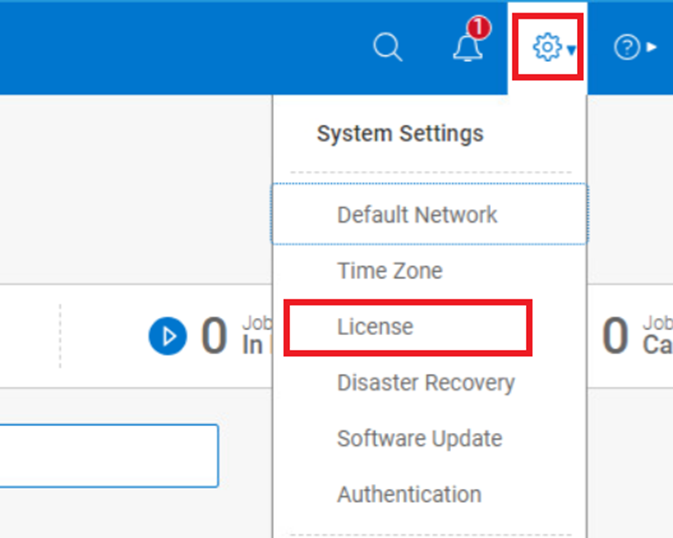

Below are the steps to collect the SWID and hostname from the PPDM UI.
The hostname or IP address can be found on the website page.
The following steps are for v19.14.
See the latest product administration guide for other versions.
SWID: PPDM -> Setting -> License -> SWID
Additional Information
The examples for each product are based on a certain version.
If there is any difference or update on the steps, see the latest product administration guide. Alternatively, contact the Support team.
If there is any difference or update on the steps, see the latest product administration guide. Alternatively, contact the Support team.
Article Properties
Article Number: 000220371
Article Type: How To
Last Modified: 27 Dec 2023
Version: 1
Find answers to your questions from other Dell users
Support Services
Check if your device is covered by Support Services.