Dell Pro Wired Headset WH3024 Usage and Troubleshooting Guide
Summary: The following article provides information about the Dell Pro Wired Headset WH3024. You can reference each section to learn more about the features of the Dell Pro Wired Headset WH3024 and how to use it. ...
This article applies to
This article does not apply to
This article is not tied to any specific product.
Not all product versions are identified in this article.
Instructions
hr>
Table of Contents:
- What is in the Dell Pro Wired Headset WH3024 box
- Dell Pro Wired Headset WH3024 Overview
- Setting up your Dell Pro Wired Headset WH3024
- Troubleshooting
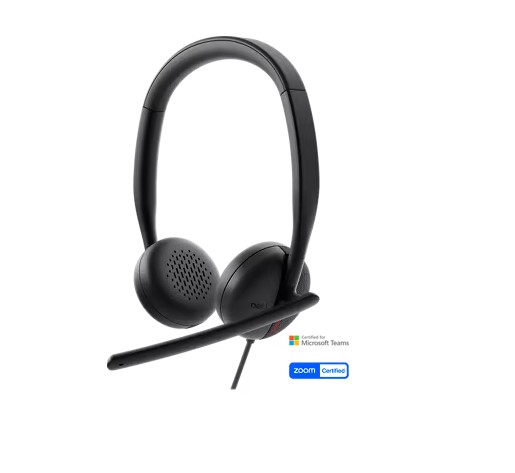
(Figure.1 Work faster and smarter with the Dell Pro Wired Headset WH3024
What is in the Dell Pro Wired Headset WH3024 box
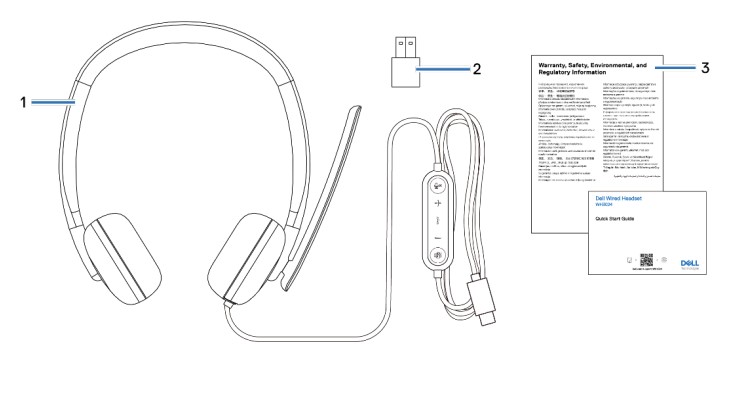
(Figure.2 Dell Pro Wired Headset WH3024 Box Contents)
| 1 | Dell Pro Wired Headset WH3024 | 2 | USB-A adapter (drop in box) |
| 3 | Documentations |
Dell Pro Wired Headset WH3024 Overview
Overview
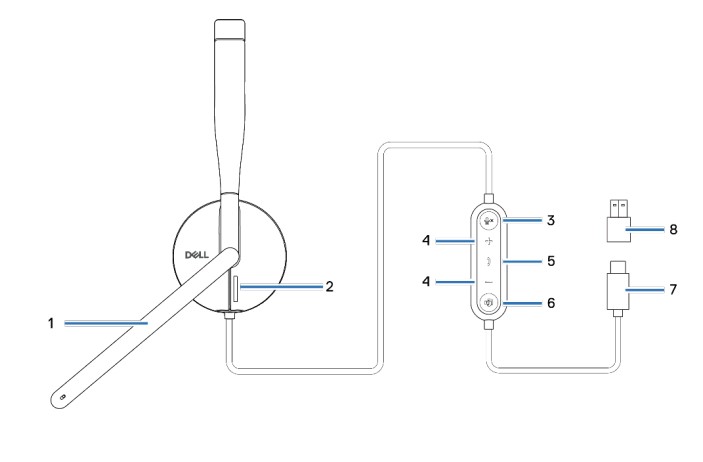
(Figure.3 Dell Pro Wired Headset WH3024 Product Overview)
| 1 | Boom microphone | 2 | Busy light LED |
| 3 | Microphones mute button with LED | 4 | Volume control button |
| 5 | Call the control button | 6 | Microsoft Teams button with LED |
| 7 | USB-C connector | 8 | USB-A adapter |
Setting up your Dell Pro Wired Headset WH3024
Power and setup
Power on your headset by plugging the cable into the USB-C port on the computer. A USB-A adapter is also provided as an alternative for connection to the USB-A port.
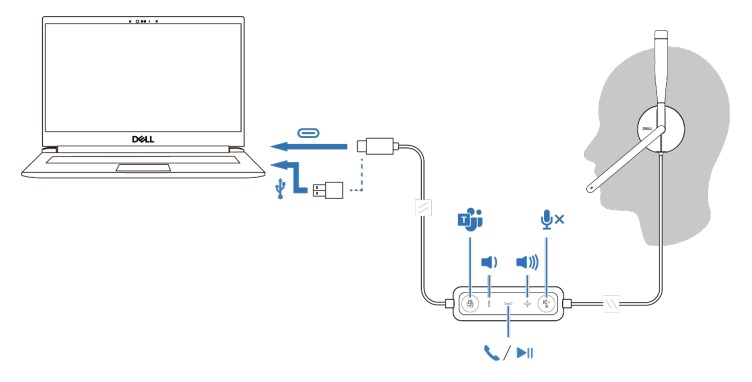
(Figure.4 Dell Pro Wired Headset WH3024 Power and Setup)
Adjust the headband.
The headset can be worn on both the left and right sides. Lengthen or shorten the band until it fits comfortably. The ear cup can be adjusted to ±90 degrees at most. The cushions should sit comfortably over the center of your ears.
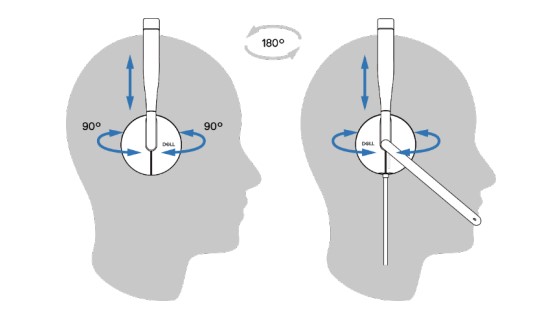
(Figure.5 Dell Pro Wired Headset WH3024 Adjust the headband)
Position the boom.
Flip the boom mic arm down to unmute and flip up to mute. You hear voice commands mic unmute and mic mute, that indicate the status of the mic. The headset automutes or unmutes when the boom mic is flipped down 100 degrees or over, the full deployment angle is 130 degrees. You are unable to mute or unmute when the boom mic is not flipped down.

(Figure.6 Dell Pro Wired Headset WH3024 Position the boom)
Caution: To avoid breaking the boom microphone, do not rotate over ±130°.
The guides are located on our support site:
Troubleshooting
| Problems | Possible solutions |
|---|---|
| I cannot hear the caller. |
|
| Callers are unable to hear me. |
|
| The audio in the headset is experiencing distortion, and I am hearing an echo. |
|
| The other headset that I was using to listen to music on my system/laptop does not work anymore. |
|
| My computer is not able to detect the presence of the headset or establish a proper connection with it. |
|
When I mute or unmute the microphone using the Windows system control panel settings, the following issue or set of issues arises:
|
|
| The sound coming through the headset appears to be at a lower or quieter level when I open the system control panel for audio devices. |
|
Affected Products
Dell Pro Wired Headset WH3024Article Properties
Article Number: 000220743
Article Type: How To
Last Modified: 08 Apr 2025
Version: 3
Find answers to your questions from other Dell users
Support Services
Check if your device is covered by Support Services.