NetWorker:無法在 NMC 或 NWUI 中載入 XML 型授權
Summary: 無法在 NetWorker 管理控制台 (NMC) 或 NetWorker Web 使用者介面 (NWUI) 中載入 XML 型授權。
This article applies to
This article does not apply to
This article is not tied to any specific product.
Not all product versions are identified in this article.
Symptoms
無法在 NetWorker 管理控制台 (NMC) 或 NetWorker Web 使用者介面 (NWUI) 載入 XML 型授權。
Error: 「已選取無效的檔案」
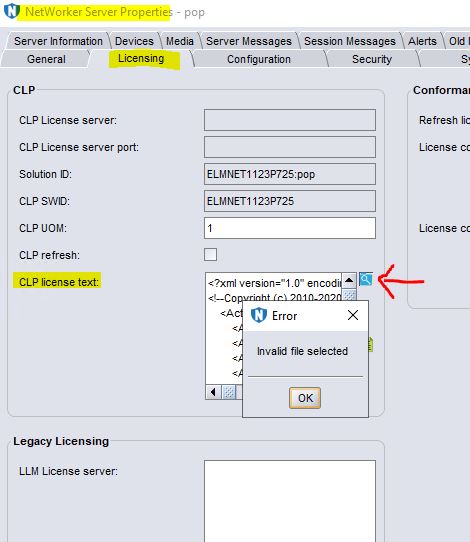 licspec.properties 已根據 《NetWorker 授權指南》進行更新。
license.technology 已設為 XML。
license.path 設為 dpa.xml。
Error: 「已選取無效的檔案」
license.technology 已設為 XML。
license.path 設為 dpa.xml。
Cause
不支援以 NMC 或 NWUI 格式以 XML 格式瀏覽授權。
Resolution
因應措施是:
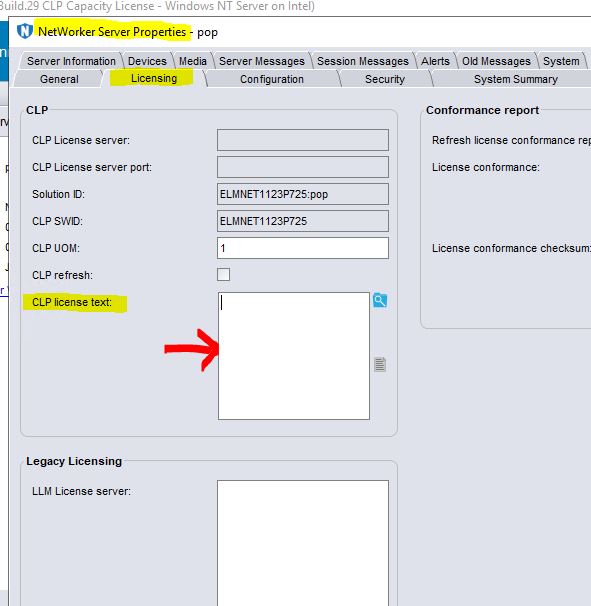
將授權複製為dpa.xml。產生的dpa.xml應置於預設的授權路徑中,即 C:\Program Files\EMC NetWorker\nsr\lic。
- 在 CLP 授權欄位中複製並貼上授權。
或
將授權複製為dpa.xml。產生的dpa.xml應置於預設的授權路徑中,即 C:\Program Files\EMC NetWorker\nsr\lic。
- 重新啟動 NetWorker 服務。
Linux: systemctl restart networker

Windows: net stop nsrd && net start nsrd
Article Properties
Article Number: 000221353
Article Type: Solution
Last Modified: 02 Feb 2024
Version: 2
Find answers to your questions from other Dell users
Support Services
Check if your device is covered by Support Services.