NetWorker SNMPV3 Configuration
Summary: NetWorker SNMPV3 Configuration
This article applies to
This article does not apply to
This article is not tied to any specific product.
Not all product versions are identified in this article.
Instructions
Des instructions sont fournies dans le NetWorker Administration Guide pour la configuration des traps SNMPV3. Il doit être utilisé pour la configuration initiale, ainsi que pour la base de connaissances : Configuration de NetWorker pour l’utilisation de SNMP.
L’article ci-dessous fournit un exemple de travail pour les fichiers de configuration sur le système d’exploitation Linux.
Vous trouverez ci-dessous un exemple de configuration, fourni à un client, qui a permis à un environnement de trap SNMPV3 non fonctionnel de fonctionner correctement.
/etc/snmp/snmpd.conf
/etc/snmp/snmptrapd.conf
de débogage Démarrez une deuxième session Putty à partir du NetWorker Server et exécutez :
L’article ci-dessous fournit un exemple de travail pour les fichiers de configuration sur le système d’exploitation Linux.
Vous trouverez ci-dessous un exemple de configuration, fourni à un client, qui a permis à un environnement de trap SNMPV3 non fonctionnel de fonctionner correctement.
/etc/snmp/snmpd.conf
# Please see /usr/share/doc/packages/net-snmp/EXAMPLE.conf for a
# more complete example and snmpd.conf(5).
#
# Writing is disabled by default for security reasons.  If you'd like
# to enable it uncomment the rwcommunity line and change the community
# name to something nominally secure (keeping in mind that this is
# transmitted in clear text).

# don't use ' < > in strings for syslocation or syscontact
# Note that if you define the following here you won't be able to change
# them with snmpset
# syslocation Server Room
# syscontact Sysadmin (root@localhost)

# These really aren't meant for production use.  They include all MIBS
# and can use considerable resources.  See snmpd.conf(5) for information
# on setting up groups and limiting MIBS.
rocommunity public 127.0.0.1

# sec.name source community
traptest snmpv3_user 192.168.xxx.xxx/24 public

# sec.model sec.name
group incremental usm snmpv3_user
rouser traptest
/etc/snmp/snmptrapd.conf
###########################################################################
#
# snmptrapd.conf
#
#- created by the snmpconf configuration program
#
###########################################################################
# SECTION: Authentication options
#
#   Authentication options
# ignoreauthfailure: Ignore authentication failure traps
#   arguments: (1|yes|true|0|no|false)
#authCommunity log,net,execute public
#disableAuthorization yes
#snmpTrapdAddr udp:162
createUser -e 3136353137373138 traptest MD5 password123 DES password123
authUser log traptest
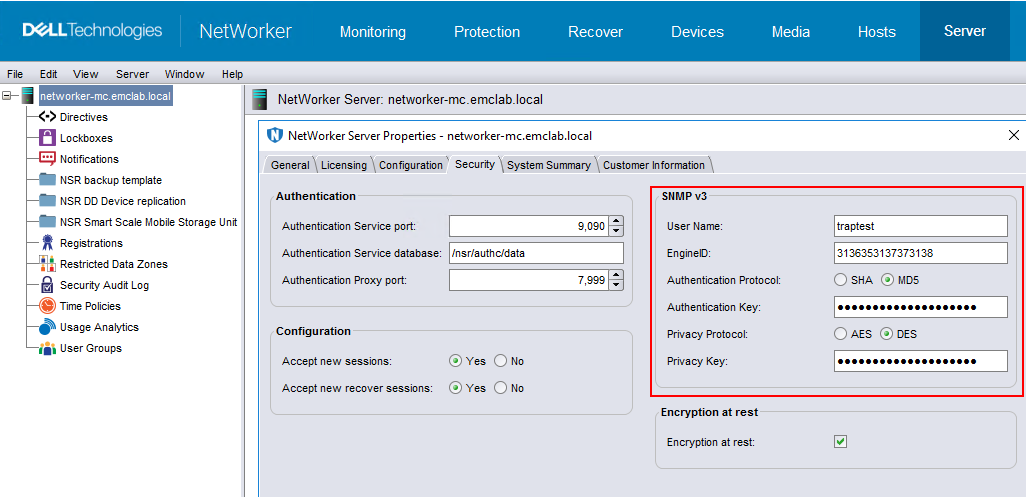
Les valeurs mises en surbrillance sont obtenues et définies à partir des propriétés du serveur NSR :
Remarque : Toute modification apportée aux fichiers de configuration nécessite un redémarrage de snmpd et snmptrapd.
Test
Démarrez une session Putty sur l’hôte récepteur de trap (qui peut également être le NetWorker Server) et exécutez :snmptrapd -f -C -c /etc/snmp/snmptrapd.conf -Le -M /usr/share/snmp/mibs -m NETWORKER-MIB *Note: Ajout d’un commutateur -D pour la sortie
de débogage Démarrez une deuxième session Putty à partir du NetWorker Server et exécutez :
nsrtrap -i 3 -v trapreceiver_hostname
This is a V3 Test
ctrl <D>
En cas de succès, vous devriez voir dans le journal de votre première session de mastic ;
2024-03-01 13:10:45 nwserv1 [UDP: [192.168.xxx.xxx]:33276->[192.168.xx.xxx]:162]:
SNMPv2-SMI::mib-2.1.3.0 = Timeticks: (7254049) 20:09:00.49      SNMPv2-SMI::snmpModules.1.1.4.1.0 = OID: NETWORKER-MIB::nwServerNotification    SNMPv2-SMI::mib-2.1.1.0 = STRING: "This is a V3 Test"
Configuration des notifications de sauvegarde :
Sur le serveur trap SNMP, exécutez la commande suivante :
snmptrapd -f -C -c /etc/snmp/snmptrapd.conf -Le -M /usr/share/snmp/mibs -m NETWORKER-MIB &
Note;
- La configuration de la sauvegarde au niveau d’action prend uniquement en charge SNMPv2
- La configuration de la sauvegarde au niveau de la politique prend en charge SNMPv2 et v3
/usr/sbin/nsrtrap trapreceiver_hostname -i 3

Le dossier /var/log/snmptrap.log contient :
root@networker-mc:~# tail -n 71 /var/log/snmptrap.log
SNMPv2-SMI::mib-2.1.3.0 = Timeticks: (301392549) 34 days, 21:12:05.49   SNMPv2-SMI::snmpModules.1.1.4.1.0 = OID: NETWORKER-MIB::nwServerNotification    SNMPv2-SMI::mib-2.1.1.0 = STRING: "--- Server Backup Action Report ---
Policy name:Server Protection
Workflow name:Server backup
Action name:Server db backup
Action status:succeeded
Action start time:03/05/24 13:23:22
Action duration:0 hours 0 minutes 25 seconds
--- Successful Server Backup Save Sets ---
        3102171936/1709663008 networker-mc.emclab.local: index:networker-mc.emclab.local level=1, 53 MB, 62 files
        ...(removed for brevity)...
        2917622576/1709663024 networker-mc.emclab.local: bootstrap level=full, 9692 KB, 294 files
--- Bootstrap backup report ---
      date     time       ssid        volume            device                      access info
  02/05/2024 10:00:24 AM  3485530120  ddveBootstrap.002 ddve.emclab.local_Bootstrap ddve.emclab.local:/networker-mc/Bootstrap
  ...(removed for brevity)...
  03/05/2024 01:23:44 PM  2917622576  ddveBootstrap.002 ddve.emclab.local_Bootstrap ddve.emclab.local:/networker-mc/Bootstrap
--- Failed Server Backup Save Sets ---
        none"
2024-03-05 13:23:49 networker-mc.emclab.local [UDP: [192.168.25.10]:54540->[192.168.25.10]:162]:
SNMPv2-SMI::mib-2.1.3.0 = Timeticks: (301392681) 34 days, 21:12:06.81   SNMPv2-SMI::snmpModules.1.1.4.1.0 = OID: NETWORKER-MIB::nwServerNotification    SNMPv2-SMI::mib-2.1.1.0 = STRING: "---Summary notification report---
Policy name:Server Protection
        Workflow name:Server backup, Workflow status:succeeded, Workflow start time:03/05/24 13:23:22, Duration:0 hours 0 minutes 26 seconds
                Action name:Server db backup, Action status:succeeded, Action start time:03/05/24 13:23:22, Duration:0 hours 0 minutes 25 seconds
                Action name:Expiration, Action status:succeeded, Action start time:03/05/24 13:23:47, Duration:0 hours 0 minutes 1 seconds"
Additional Information
Vous trouverez des informations supplémentaires sur les traps SNMP dans le NetWorker Administration Guide : https://www.dell.com/support/home/product-support/product/networker/docs
Affected Products
NetWorker FamilyArticle Properties
Article Number: 000222671
Article Type: How To
Last Modified: 05 Mar 2024
Version: 1
Find answers to your questions from other Dell users
Support Services
Check if your device is covered by Support Services.