NetWorker: Rabbitmq does not start after update to NetWorker 19.10 on a Windows server.
Summary: rabbitmq does not start after update to NetWorker 19.10 on a Windows NetWorker server.
This article applies to
This article does not apply to
This article is not tied to any specific product.
Not all product versions are identified in this article.
Symptoms
rabbitmq does not start after update to NetWorker 19.10 on a Windows NetWorker server.
Errors logged in the C:\Program Files\EMC NetWorker\nsr\logs\daemon.log
Running rabbitmqctl status returns the following message.
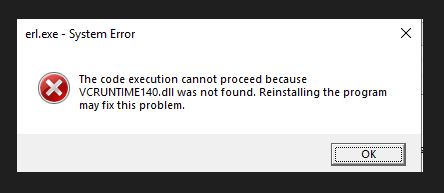
Errors logged in the C:\Program Files\EMC NetWorker\nsr\logs\daemon.log
nsrctld NSR notice Daemon rmq terminated.
nsrctld NSR error Scheduling restart of daemon rabbitmq-server.bat in 5 seconds
nsrctld NSR critical Failed to start all daemons; shutting down...
nsrctld NSR critical Shutdown due to error: Process rabbitmq-server.bat exited in less than 10 seconds at startup: exit code 0
nsrctld NSR notice rmq: Unable to load emulator DLL
nsrctld NSR notice rmq: (<path-to>\nsr\rabbitmq-server-3.11.16\erts-13.2\bin\beam.smp.dll)
Running rabbitmqctl status returns the following message.
Cause
An outdated version of Microsoft Visual C++ Redistributable is installed on the NetWorker server.
Resolution
Install the latest Microsoft Visual C++ 2015-2022 Redistributable on the NetWorker server.

MSVC can be downloaded from https://learn.microsoft.com/en-us/cpp/windows/latest-supported-vc-redist?view=msvc-170
MSVC can be downloaded from https://learn.microsoft.com/en-us/cpp/windows/latest-supported-vc-redist?view=msvc-170
Article Properties
Article Number: 000222929
Article Type: Solution
Last Modified: 08 Apr 2024
Version: 1
Find answers to your questions from other Dell users
Support Services
Check if your device is covered by Support Services.