Dell Networking SONiC Comment utiliser l’adresse IP dans un VRF dans MCLAG Lien keepalive (adresse IP source et adresse IP homologue)
Summary: Cet article explique comment utiliser l’adresse IP dans un VRF dans le lien Keepalive MCLAG (adresse IP source et adresse IP homologue) dans Dell Networking SONiC.
This article applies to
This article does not apply to
This article is not tied to any specific product.
Not all product versions are identified in this article.
Instructions
Configuration requise Nous utilisons une dénomination d’interface standard pour démontrer les concepts. Voir l’article Dell Networking série S : Basic Interface Configuration – SONIC 4.0pour plus d’informations sur la dénomination des interfaces. |
Le lien homologue MCLAG synchronise l’état homologue et est utilisé pour transporter une pulsation entre deux homologues. Nous pouvons utiliser l’adresse IP attribuée au VLAN, à l’interface, à l’interface de gestion à cette fin.
À partir de la version Dell SONiC 4.2, nous pouvons utiliser l’adresse IP dans un VRF autre que celui par défaut.
Remarque :
| - Assurez-vous que l’adresse IP homologue est accessible pour l’adresse IP source lors de la configuration en tant que lien Keepalive. Utilisez la commande ping pour vérifier la connectivité. - Pour VRF par défaut, n’utilisez pas la commande session-vrf. - Nous pouvons utiliser l’adresse IP attribuée dans l’interface VLAN ou Layer 3 pour le lien Keepalive - Lors de l’utilisation du VLAN comme lien de keepalive, assurez-vous d’utiliser mclag-separate-ip dans la configuration. Pour plus d’informations, reportez-vous à la section Quand « mclag-separate-ip » doit être utilisé dans Dell Networking Enterprise SONiC OS MF-CLI. Exemple de configuration
|
Syntaxe de configuration
| Configuration | Explication |
|---|---|
admin@ DELLSONiC:~$ sonic-cli |
Connectez-vous à Dell MF-CLI |
DELLSONiC# configure |
Accéder au mode de configuration. |
DELLSONiC(config)# mclag domain <Domain ID> |
Définissez l’ID de domaine MCLAG. 1-4095 |
DELLSONiC(config-mclag-domain-1)# peer-ip <IP address> |
Configurer l’adresse IP homologue pour le keepalive |
DELLSONiC(config-mclag-domain-1)# source-ip <IP address> |
Configurer l’adresse IP source pour le keepalive |
DELLSONiC(config-mclag-domain-1)# session-vrf <VRF-NAME> |
(Facultatif) Pour le VRF par défaut, cette configuration n’est pas requise. |
DELLSONiC(config-mclag-domain-1)# session-vrf mgmt |
(Facultatif) Utilisez cette commande si nous utilisons mgmt. VRF. |
Exemple de configuration
Objectif: Permet de configurer le lien Keepalive dans un commutateur homologue MCLAG 2. Le port de gestion hors bande est configuré dans le VRF de gestion avec l’adresse IP 192.168.1.2. L’adresse IP homologue est 192.168.1.1.
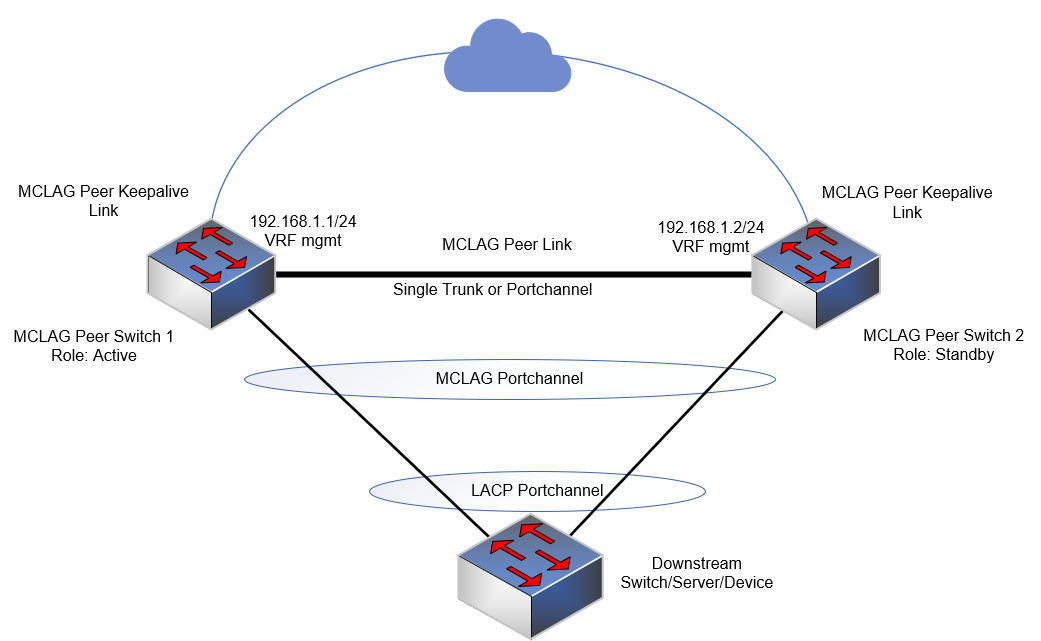
Supposons que le port de gestion (hors bande) se trouve dans vrf mgmt et que nous l’utilisons comme lien Keepalive.
DELLSONiC# show ip vrf VRF-NAME INTERFACES ---------------------------------------------------------------- default mgmt Management0 |
Permet d’attribuer session-vrf en tant que mgmt dans le domaine mclag.
admin@DELLSONiC:~$ sonic-cli DELLSONiC# configure DELLSONiC(config)# mclag domain 1 DELLSONiC(config-mclag-domain-1)# source-ip 192.168.1.2 DELLSONiC(config-mclag-domain-1)# peer-ip 192.168.1.1 DELLSONiC(config-mclag-domain-1)# session-vrf mgmt DELLSONiC(config-mclag-domain-1)# exit DELLSONiC(config)# exit DELLSONiC# |
Faisons un test ping pour nous assurer que nous avons une connectivité entre l’adresse IP source 192.168.1.2 et l’adresse IP homologue 192.168.1.1 dans la gestion du VRF.
DELLSONiC# ping vrf mgmt 192.168.1.1 -I 192.168.1.2 sudo: unable to resolve host DELLSONiC: Temporary failure in name resolution PING 192.168.1.1 (192.168.1.1) from 192.168.1.2 : 56(84) bytes of data. 64 bytes from 192.168.1.1: icmp_seq=1 ttl=64 time=4.73 ms 64 bytes from 192.168.1.1: icmp_seq=2 ttl=64 time=1.13 ms 64 bytes from 192.168.1.1: icmp_seq=3 ttl=64 time=0.846 ms 64 bytes from 192.168.1.1: icmp_seq=4 ttl=64 time=4.71 ms 64 bytes from 192.168.1.1: icmp_seq=5 ttl=64 time=4.75 ms 64 bytes from 192.168.1.1: icmp_seq=6 ttl=64 time=1.03 ms ^C --- 192.168.1.1 ping statistics --- 6 packets transmitted, 6 received, 0% packet loss, time 5023ms rtt min/avg/max/mdev = 0.846/2.867/4.746/1.865 ms |
Vérifions le statut de la session. Utilisez la commande show mclag brief ci-dessous.
DELLSONiC# show mclag brief Domain ID : 1 Role : standby Session Status : up ======>We can see keepalive session is up Peer Link Status : up Source Address : 192.168.1.2 Peer Address : 192.168.1.1 Session Vrf : mgmt ======>The Keepalive session use mgmt vrf Peer Link : Eth1/1 Keepalive Interval : 1 secs Session Timeout : 30 secs Delay Restore : 300 secs System Mac : 0c:de:4c:81:00:0a Mclag System Mac : Number of MLAG Interfaces:1 ----------------------------------------------------------- MLAG Interface Local/Remote Status ----------------------------------------------------------- PortChannel1 up/up DELLSONiC# |
Affected Products
PowerSwitch E3200-ON Series, Dell EMC Networking N3200-ON, PowerSwitch S5212F-ON, PowerSwitch S5224F-ON, PowerSwitch S5232F-ON, PowerSwitch S5248F-ON, PowerSwitch S5296F-ON, PowerSwitch Z9100-ON, PowerSwitch Z9264F-ON, PowerSwitch Z9332F-ON
, PowerSwitch Z9432F-ON
...
Article Properties
Article Number: 000222932
Article Type: How To
Last Modified: 11 Mar 2024
Version: 2
Find answers to your questions from other Dell users
Support Services
Check if your device is covered by Support Services.