독립 디스크로 인한 PowerProtect VM 백업 실패
Summary: PowerProtect Data Manager VM(Virtual Machine) 보호 솔루션이 독립 디스크로 VM을 보호하지 못합니다.
This article applies to
This article does not apply to
This article is not tied to any specific product.
Not all product versions are identified in this article.
Symptoms
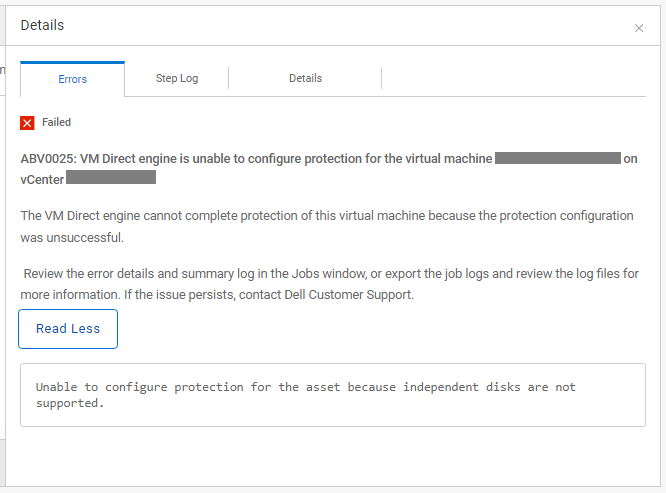
PowerProtect Data Manager는 vSphere 환경을 보호하는 데 사용됩니다. TSDM(Transparent Snapshot Data Mover) 및 VM(Virtual Machine) Direct 솔루션이 특정 VM을 보호하지 못합니다. VM 구성 작업 및 백업 작업이 실패하고 자산에 독립 디스크가 포함되어 있음을 나타냅니다. "JobsSystem > Jobs" 아래의 VM 구성 작업 및 "JobsProtection > Jobs" 아래의 VM 백업 작업은 다음을 보여 줍니다.
ABV0025: VM Direct engine is unable to back up the virtual machine 'my-vm-name' on vCenter 'my-vcenter'.

The VM Direct engine cannot complete protection of this virtual machine because the protection configuration was unsuccessful.

Review the error details and summary log in the Jobs window, or export the job logs and review the log files for more information. If the issue persists, contact Dell Customer Support.

Read Less
Unable to configure protection for the asset because independent disks are not supported.
Cause
PowerProtect Data Manager VMware Protection 솔루션은 PowerProtect Data Manager 가상 머신 사용자 가이드에 설명되어 있는 독립 디스크를 지원하지 않습니다. 편의를 위해 최신 버전의 PowerProtect Data Manager 설명서를 Dell 지원 웹사이트에서도 다운로드할 수 있습니다.
Resolution
나머지 디스크는 보호하기 위해 독립적인 디스크를 보호에서 제외할 수 있습니다. 다음은 독립 디스크를 식별하고 보호에서 제외하는 개요입니다.
- vSphere Web Client 인터페이스에 인증합니다.
- 인벤토리에서 영향을 받는 VM을 선택한 다음 "ActionsEdit >Settings"를 선택합니다.
- 하드 디스크를 확장하여 디스크 모드가 독립(영구 또는 비영구)인 디스크를 확인합니다.

- PowerProtect Data Manager 인터페이스를 인증합니다.
- "InfrastructureAssetsVirtual >>Machines"로 이동합니다.
- 영향을 받는 VM을 선택하여 "Disk Excluded" 열 아래에 하이퍼링크를 표시합니다.
- 하이퍼링크를 클릭하면 "디스크 제외" 속성 페이지가 열립니다.
- 독립 디스크를 보호에서 제외하려면 토글 버튼을 선택합니다.

- 보호 정책을 실행하여 나머지 디스크에 대한 VM 구성을 자동으로 트리거합니다.
Article Properties
Article Number: 000225183
Article Type: Solution
Last Modified: 21 Nov 2025
Version: 2
Find answers to your questions from other Dell users
Support Services
Check if your device is covered by Support Services.