VxRail: User Cannot Access vCenter UI After Changing the Password
Summary: User cannot access vCenter UI after a user changed the password.
This article applies to
This article does not apply to
This article is not tied to any specific product.
Not all product versions are identified in this article.
Symptoms
The user changed the account password, and now cannot access the vCenter web client.
Tried another admin account to log in, and updated the previous account password, but the account locks immediately.
Error seen in
Tried another admin account to log in, and updated the previous account password, but the account locks immediately.
Error seen in
vmdird.syslog.log:
2024-06-20T14:00:26.712034+08:00 err vmdird  t@139659879360256: Bind Request Failed (127.0.0.1) error 49: Protocol version: 3, Bind DN: "CN=issue account,CN=Users,DC=vsphere,DC=local", Method: SASL
2024-06-20T14:00:29.227039+08:00 info vmdird  t@139660030363392: Modify Entry (cn=AssetEntity_host-103-b47a319e-6554-4483-b5f9-6cd31fe54e39,cn=LicenseService,cn=services,dc=vsphere,dc=local, EID 3484)(from )(by )(via Rep)(USN 599050,596449)
2024-06-20T14:00:29.230438+08:00 info vmdird  t@139660030363392: Modify Entry (cn=AssetEntity_host-112-b47a319e-6554-4483-b5f9-6cd31fe54e39,cn=LicenseService,cn=services,dc=vsphere,dc=local, EID 3487)(from )(by )(via Rep)(USN 599051,596450)
2024-06-20T14:00:29.232652+08:00 info vmdird  t@139660030363392: Modify Entry (cn=AssetEntity_host-124-b47a319e-6554-4483-b5f9-6cd31fe54e39,cn=LicenseService,cn=services,dc=vsphere,dc=local, EID 3491)(from )(by )(via Rep)(USN 599052,596451)
2024-06-20T14:00:29.234951+08:00 info vmdird  t@139660030363392: Modify Entry (cn=AssetEntity_host-127-b47a319e-6554-4483-b5f9-6cd31fe54e39,cn=LicenseService,cn=services,dc=vsphere,dc=local, EID 3492)(from )(by )(via Rep)(USN 599053,596452)
2024-06-20T14:00:29.236921+08:00 info vmdird  t@139660030363392: Modify Entry (cn=AssetEntity_host-34-b47a319e-6554-4483-b5f9-6cd31fe54e39,cn=LicenseService,cn=services,dc=vsphere,dc=local, EID 3449)(from )(by )(via Rep)(USN 599054,596453)
2024-06-20T14:00:29.239273+08:00 info vmdird  t@139660030363392: Modify Entry (cn=AssetEntity_host-52-b47a319e-6554-4483-b5f9-6cd31fe54e39,cn=LicenseService,cn=services,dc=vsphere,dc=local, EID 3455)(from )(by )(via Rep)(USN 599055,596454)
2024-06-20T14:00:29.244296+08:00 info vmdird  t@139660030363392: Modify Entry (cn=vcenter_FQDN02.customer.domain,cn=Servers,cn=Default-First-Site,cn=Sites,cn=Configuration,dc=vsphere,dc=local, EID 3501)(from )(by )(via Int)(USN 599056,0)
2024-06-20T14:00:29.247953+08:00 info vmdird  t@139660030363392: Modify Entry (labeledURI=ldap://vcenter_FQDN01.customer.domain,cn=Replication Agreements,cn=vcenter_FQDN02.customer.domain,cn=Servers,cn=Default-First-Site,cn=Sites,cn=Configuration,dc=vsphere,dc=local, EID 3503)(from )(by )(via Int)(USN 599057,0)
2024-06-20T14:00:29.248020+08:00 info vmdird  t@139660030363392: Replication supplier ldap://vcenter_FQDN01.customer.domain USN range (596446,596454) processed.
2024-06-20T14:00:32.215827+08:00 err vmdird  t@139659879360256: SASLSessionStep: sasl error (-13)(SASL(-13): authentication failure: client evidence does not match what we calculated. Probably a password error)
2024-06-20T14:00:32.216088+08:00 warning vmdird  t@139659879360256: Lockout policy check - account lockout. (cn=issue account,cn=users,dc=vsphere,dc=local)
2024-06-20T14:00:32.216125+08:00 err vmdird  t@139659879360256: VmDirSendLdapResult: Request (Bind), Error (LDAP_INVALID_CREDENTIALS(49)), Message ((49)(SASL step failed.)), (0) socket (127.0.0.1)
Cause
The user disabled the
See details in Broadcom article "LDAP Error Code 49"/Error (49) error in vmdird logs in vCenter Server
administrator@vsphere.local account. The account was removed from the SystemConfiguration.Administrators group. If the administrator@vsphere.local is disabled, and no other account has the same permissions, the account locks. Account updates fail to update passwords.
See details in Broadcom article "LDAP Error Code 49"/Error (49) error in vmdird logs in vCenter Server
Resolution
To address this issue:
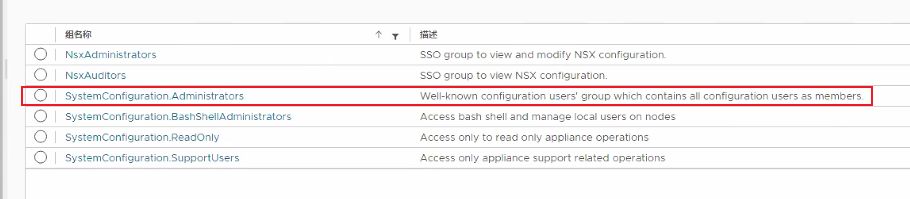
- Use another management account to log in to vCenter web client. Enable
administrator@vsphere.local. - If it is already removed from
SystemConfiguration.Administrators, add it back to group. - Use
administrator@vsphere.localto log in to vCenter web client, remove the problem account, and re-create it.
Article Properties
Article Number: 000226405
Article Type: Solution
Last Modified: 26 Jun 2024
Version: 1
Find answers to your questions from other Dell users
Support Services
Check if your device is covered by Support Services.