VMware View fails with error "Unable to fetch data from vCenter: TCP/UDP IP error -1"
Summary: The NetWorker VMware Protection (NVP) integration is configured with the vProxy Appliance. The VMware View started failing to refresh with "TCP/UDP IP error -1."
This article applies to
This article does not apply to
This article is not tied to any specific product.
Not all product versions are identified in this article.
Symptoms
The NetWorker Management Console (NMC) VMware View refresh execution generates the following error message:

The rendered /nsr/logs/daemon.raw logs shows:
MM/DD/YYYY HH:MM:SS 2992023296 2127139 0 my-nsr.domain.com nsrdisp_nwbg NSR notice MM/DD/YYYY HH:MM:SS 0 16 nsrdisp_nwbg-D0 Running nsrvim....
MM/DD/YYYY HH:MM:SS 2992023296 2127139 0 my-nsr.domain.com nsrdisp_nwbg RAP notice 33 job 'nsrvim' progress message: nsrvim starting on my-nsr.domain.com (process 212775).
MM/DD/YYYY HH:MM:SS 2992023296 2127139 0 my-nsr.domain.com nsrdisp_nwbg RAP notice 33 job 'nsrvim' progress message: Connecting to NetWorker on 'my-nsr.domain.com'.
MM/DD/YYYY HH:MM:SS 2992023296 2127139 0 my-nsr.domain.com nsrdisp_nwbg RAP notice 33 job 'nsrvim' progress message: Querying NSR hypervisor resource 'my-vcenter.domain.com'
MM/DD/YYYY HH:MM:SS 2992023296 2127139 0 my-nsr.domain.com nsrdisp_nwbg RAP notice 33 job 'nsrvim' progress message: Connecting to service at https://my-vcenter.domain.com/sdk
MM/DD/YYYY HH:MM:SS 2992023296 2127139 0 my-nsr.domain.com nsrdisp_nwbg RAP notice 33 job 'nsrvim' progress message: TCP/UDP IP error -1
MM/DD/YYYY HH:MM:SS 2992023296 2127139 0 my-nsr.domain.com nsrdisp_nwbg RAP notice 33 job 'nsrvim' progress message: nsrvim exiting on my-nsr.domain.com (process 212775).
MM/DD/YYYY HH:MM:SS 2992023296 2127139 0 my-nsr.domain.com nsrdisp_nwbg RAP error 37 Unable to fetch data from vCenter: TCP/UDP IP error -1
MM/DD/YYYY HH:MM:SS 2992023296 2127139 0 my-nsr.domain.com nsrdisp_nwbg RAP error 37 Unable to fetch data from vCenter: TCP/UDP IP error -1
MM/DD/YYYY HH:MM:SS 2300032768 2127235 0 my-nsr.domain.com nsrdisp_nwbg NSR warning 96 Unable to get the latest environment for my-vcenter.domain.com Hypervisor resource from previous run of 'nsrvim'.
NetWorker: How to use nsr_render_log to render .raw log files
The name resolution (Short name, fully qualified domain name, and IP address) between the NetWorker Server and vCenter server is working as expected. The port connectivity tests show a successful connection from the NetWorker Server to the vCenter over port 443:
[root@my-nsr /]# nsrports -t my-vcenter.domain.com -p 443
Forward lookup for my-vcenter.domain.com
Query time:              0.001 sec
Canonical name (CNAME):  my-vcenter.domain.com
Address (A):             192.168.9.1
Connect to port 443:     Succeeded (0.000 sec)

Reverse lookup for 192.168.9.1
Query time:              0.000 sec
Name:                    my-vcenter.domain.com

[root@my-nsr /]# curl -v my-vcenter.domain.com:443
*   Trying 192.168.9.1:443...
* Connected to my-vcenter.domain.com (192.168.9.1) port 443 (#0)
> GET / HTTP/1.1
> Host: my-vcenter.domain.com:443
> User-Agent: curl/7.76.1
> Accept: */*
>
* Empty reply from server
* Closing connection 0
curl: (52) Empty reply from server
[root@nsr logs]#
The NetWorker VMware Inventory Manager (nsrvim) binary execution with debug level 9 shows:
[root@my-nsr /]# nsrvim --names my-vcenter.domain.com -D 9
...
MM/DD/YYYY HH:MM:SS nsrvim-D1 Virtualization library fault 'TCP/UDP IP error -1' [get host by name failed in tcp_connect()].
...
MM/DD/YYYY HH:MM:SS nsrvim-D1 nsrvim finished with code: 2
Cause
The NetWorker Server VMware View workflow first tries to resolve the vCenter using the /etc/hosts file before using Domain Name System (DNS). There is corruption in the Linux OS /etc/hosts file that prevents the NetWorker VMware View workflow from getting the proper vCenter details. In one instance, the Linux /etc/hosts file had extra special characters not typically in a default file: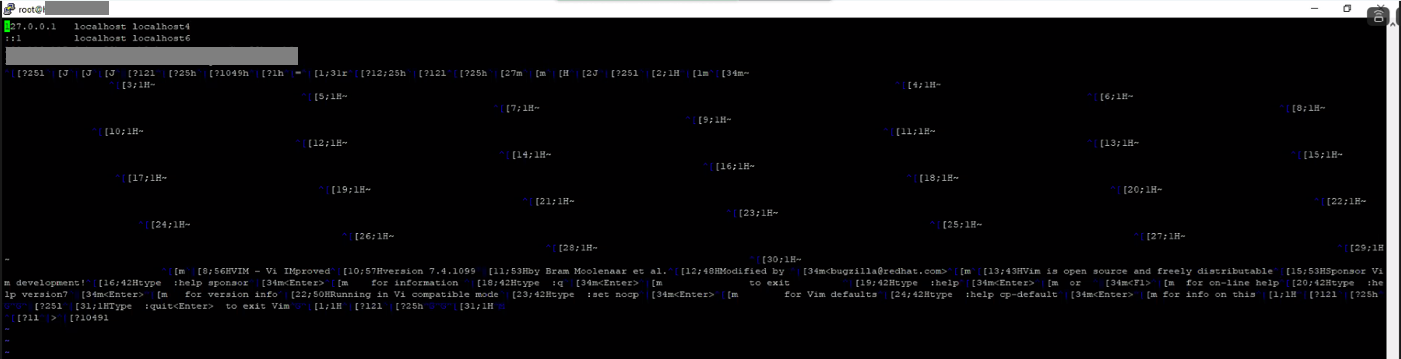
Resolution
The /etc/hosts file should be updated to reflect the contents of a standard file. Ensure that a backup of the /etc/hosts file is taken before running any updates. If more assistance is required, contact Linux OS Distribution Support.
Affected Products
NetWorkerArticle Properties
Article Number: 000227855
Article Type: Solution
Last Modified: 04 Nov 2025
Version: 2
Find answers to your questions from other Dell users
Support Services
Check if your device is covered by Support Services.