Dell 筆記型電腦攝影機無法在 Teams、Zoom 和 Windows 相機應用程式中運作
Summary: 本文提供驅動程式遺失或不正確的相關資訊。這會導致使用行動產業處理器介面 (MIPI) 攝影機的 Dell 筆記型電腦上的筆記型電腦網路攝影機停止運作。
This article applies to
This article does not apply to
This article is not tied to any specific product.
Not all product versions are identified in this article.
Symptoms
下表 1 中所列的筆記型電腦可能配有高效能 MIPI 攝影機。這些筆記型電腦需要的驅動程式集合與配備傳統網路攝影機的筆記型電腦不同。缺少驅動程式或不正確的驅動程式可能會導致相機問題,其中集成的相機或網路攝像頭停止在 Teams、Zoom、Discord 和其他應用程式中工作。
其他症狀可能包括:
- Windows 相機應用程式中出現錯誤:(見第一張圖片)
We cannot find your camera
- Intel AVStream 攝影機或攝影機感應器,或裝置管理員中的 Intel 控制邏輯出現黃色驚嘆號
- 有時,裝置管理員中不會看到任何錯誤
- 在藍牙和 Device → Camera 下未偵測到攝影機 (請參閱第二張圖片)
- 網路攝影機無法在 Teams、Zoom、Discord 或其他應用程式中運作
注意:開機前診斷不支援 MIPI 攝影機。沒有相機功能測試,也沒有列出硬體ID。這並不表示硬體故障。

有時裝置管理員中沒有異常的裝置,但可能無法在 藍牙和裝置 → 相機下偵測到您的攝影機。

| Dell 筆記型電腦 | Dell Pro 筆記型電腦 | Dell Pro Max 筆記型電腦 |
|---|---|---|
| Dell 14 高階DA14250 | Dell Pro 14 高階PA14250 | Dell Pro Max 14 MC14250 |
| Dell 16 Premium DA16250 | Dell Pro 13 高階PA13250 | Dell Pro Max 14 Premium MA14250 |
| Dell Pro 16 Plus PB16250 | Dell Pro Max 16 MC16250 | |
| Dell Pro 14 Plus PB14250 | Dell Pro Max 16 Premium MA16250 | |
| Dell Pro 13 Plus PB13250 |
| Latitude 筆記型電腦 | Precision 行動工作站 | XPS 筆記型電腦 |
|---|---|---|
| Latitude 9450 二合一 | Precision 5690 | XPS 16 9640 |
| Latitude 9440 二合一 | Precision 5680 | XPS 13 9350 |
| Latitude 9430 | Precision 5490 | XPS 14 9440 |
| Latitude 9330 | Precision 5480 | XPS 13 9340 |
| Latitude 9420 | Precision 5470 | XPS 13 Plus 9320 |
| Latitude 7650 | XPS 13 9315 | |
| Latitude 7450 | XPS 13 9315 二合一 | |
| Latitude 7350 Detachable | ||
| Latitude 7350 | ||
| Latitude 7640 | ||
| Latitude 7440 | ||
| Latitude 7340 | ||
| Latitude 7030 Rugged Extreme | ||
| Latitude 7230 Rugged Extreme | ||
| Latitude 7320 Detachable | ||
| Latitude 9450 二合一 |
Cause
Windows 更新、Norton 更新程式和其他公用程式可能會推送不正確或不完整的驅動程式。重新安裝作業系統、部署企業作業系統映像或手動安裝驅動程式時,也可能會發生此情況。必須按特定順序安裝其他英特爾驅動程式的依賴項。
Resolution
注意:必須有筆記型電腦上的系統管理員權限,才能安裝驅動程式和應用程式,或是設定作業系統。
- Dell 知識文章:如何下載和安裝 Dell 驅動程式
-
請確定已填入 BIOS 中啟用相機旁的核取方塊。

-
安裝最新的
Intel 2D Imaging, MCU, Visual Sensing Controller Driver for Camera執行可執行檔,以執行 Dell 網站。注意:Dell 下載網站上的驅動程式套件包含可移除舊驅動程式檔案的公用程式。整個程序可能需要一到兩分鐘,且不會顯示進度列。等待新視窗開啟,確認驅動程式已成功安裝。Windows Update 完成的自動更新不包含移除公用程式。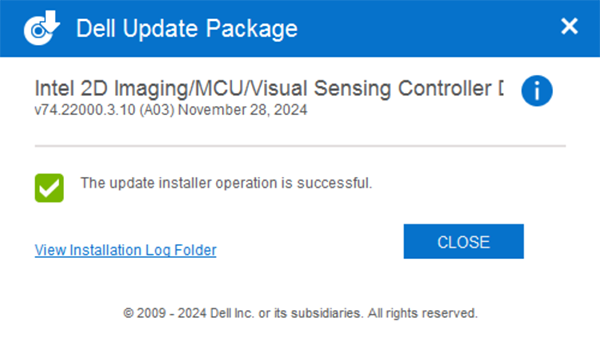
-
重新開機並使用 Windows 相機應用程式確認攝影機正常運作。
-
如果攝影機仍無法運作,請更新所有 相關的驅動程式 和 BIOS。有兩個選項:
- (強烈推薦)執行 Windows Update、Dell Command Update (商業平台)、Dell Update (消費者平台) 或 SupportAssist (所有平台),將所有驅動程式更新至最新版本:如何在我的 Dell 電腦上更新驅動程式。
- 從 Dell 網站手動下載並安裝這些驅動程式的最新版本。所有這些驅動程式都是相機正常工作所必需的。
- Intel 晶片組裝置軟體
- Intel Graphics 或 Arc Graphics 驅動程式
- Intel Integrated Sensor Solution 驅動程式 (與 Intel Visual Sensing Controller (Intel Clover Falls (CVF) 或使用者用戶偵測 (UPD) 相關)。
- Intel 序列 I/O 驅動程式
- Intel 管理引擎元件安裝程式
- 5更新至最新版的可用 BIOS
- 安裝所有驅動程式後,請重新開機您的筆記型電腦,以確認問題已解決。
- 是,問題已解決。不需要進一步的動作。
- 否,問題未解決。如需其他協助,請聯絡 Dell 技術支援部門。
Affected Products
Dell 14 Premium DA14250, Dell 16 Premium DA16250, Dell Pro Max 14 Premium MA14250, Dell Pro Max 14 MC14250, Dell Pro Max 16 MC16250, Dell Pro 13 Premium PA13250, Dell Pro 14 Premium PA14250, Dell Pro 13 Plus PB13250, Dell Pro 14 Plus PB14250
, Dell Pro 16 Plus PB16250, Latitude 7030 Rugged Extreme Tablet, Latitude 7230 Rugged Extreme Tablet, Latitude 7320 Detachable, Latitude 7340, Latitude 7350, Latitude 7350 Detachable, Latitude 9330, Latitude 5455, Latitude 7440, Latitude 7450, Latitude 9420, Latitude 9430, Latitude 9440 2-in-1, Latitude 9450 2-in-1, Latitude 7640, Latitude 7650, Precision 5470, Precision 5480, Precision 5490, Precision 5680, Mobile Precision 5690, XPS 13 9315 2-in-1, XPS 13 9315, XPS 13 Plus 9320, XPS 13 9340, XPS 13 9350, XPS 14 9440, XPS 16 9640
...
Products
Dell Pro Max 16 Premium MA16250Article Properties
Article Number: 000248760
Article Type: Solution
Last Modified: 27 Nov 2025
Version: 22
Find answers to your questions from other Dell users
Support Services
Check if your device is covered by Support Services.