Dell Pro 14 Plus PB14255 Laptop Errors after Running SupportAssist Touchpad Diagnostics
Summary: The following article provides information about an error with the Dell Pro 14 Plus PB14255 after running the diagnostics. This happens if you press fail or cancel while running the SupportAssist Touchpad diagnostics. ...
This article applies to
This article does not apply to
This article is not tied to any specific product.
Not all product versions are identified in this article.
Symptoms
Running the SupportAssist Touchpad Diagnostics causes the Laptop touchpad buttons to fail
Have you run the SupportAssist Touchpad Diagnostics on your Dell Pro 14 Plus PB14255 laptop? Have you mistakenly selected either Fail or Cancel during the functional test?
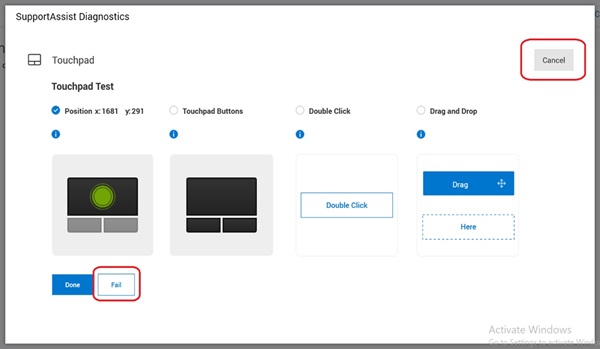
It reports a false error if you have.
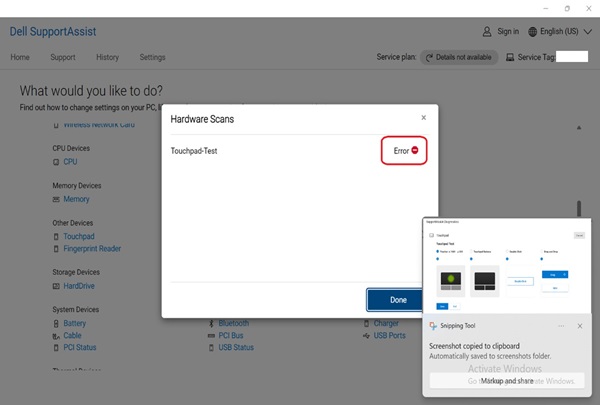
Cause
The SupportAssist team advises that they have corrected the issue of it not handling the test progress correctly.
Resolution
Note: You must have administrator rights on your laptop to make any operating system changes or update any software.
The latest version of SupportAssist resolves this messaging issue. Connect to the Internet and run the SupportAssist automatic update to the latest version 4.8.x.

Affected Products
Dell Pro 14 Plus PB14255Article Properties
Article Number: 000299568
Article Type: Solution
Last Modified: 22 May 2025
Version: 3
Find answers to your questions from other Dell users
Support Services
Check if your device is covered by Support Services.