No Chassis Intrusion Tripped or Reset Log Event Viewer
Summary: A Chassis Intrusion error is not seen in Event Viewer after removing the cover or clearing the chassis intrusion warning on a Dell Pro 14 Plus PB14255.
This article applies to
This article does not apply to
This article is not tied to any specific product.
Not all product versions are identified in this article.
Symptoms
Windows Event Viewer does not show a Chassis Intrusion tripped or reset error after removing the cover. This also occurs after selecting Clear Chassis Intrusion Warning in the BIOS.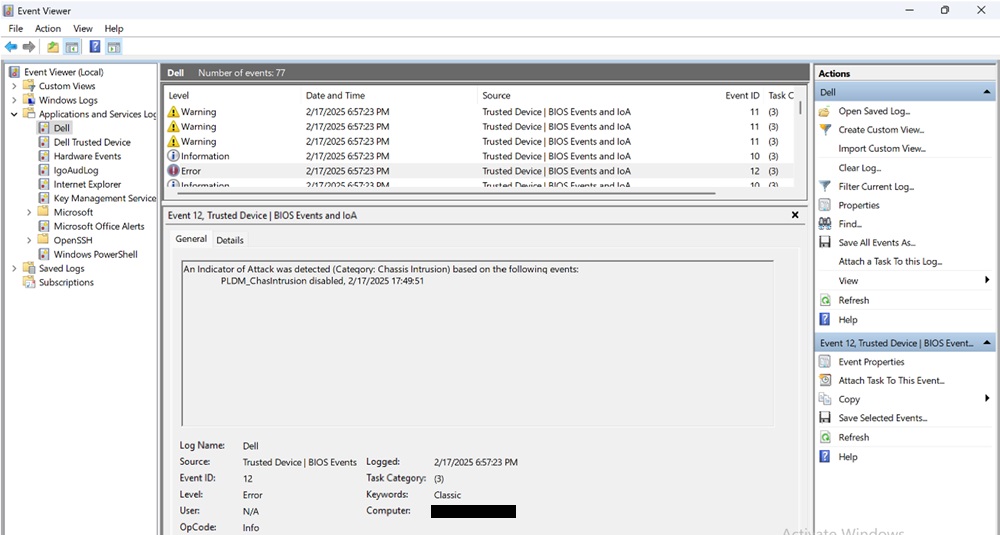
Affected Platforms:
- Dell Pro 14 Plus PB14255
Cause
Dell Trusted Device 6.5 causes this behavior.
Resolution
Updating to BIOS version 7.0.3.0 or later on the computer resolves the issue. To download and install the BIOS, refer to Dell BIOS and UEFI Update Download and Installation Guide.
Affected Products
Dell Pro 14 Plus PB14255Article Properties
Article Number: 000309805
Article Type: Solution
Last Modified: 15 Sep 2025
Version: 2
Find answers to your questions from other Dell users
Support Services
Check if your device is covered by Support Services.