Latitude 5410: Keyboard Function Key Guide
Sommaire: The following guide lists the keyboard shortcuts available and the functions they perform on the Dell Latitude 5410 Laptop.
Cet article s’applique à
Cet article ne s’applique pas à
Cet article n’est lié à aucun produit spécifique.
Toutes les versions de produits ne sont pas identifiées dans cet article.
Symptômes
Keyboard Shortcut Key Functions
The below table is a list of combination short-cut key functions available on the Latitude 5410 laptop.
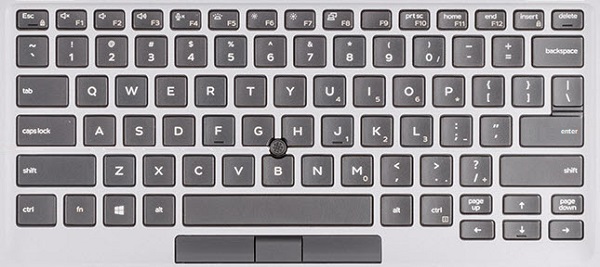
(Figure.1 Latitude 5410 US Keyboard Layout)
Cause
| Keys | Primary behavior | Secondary behavior (Fn + Key) |
|---|---|---|
| Fn + Esc | Escape |
Toggle Fn-key lock |
| Fn + F1 |
Mute audio |
F1 |
| Fn + F2 |
Decrease volume |
F2 |
| Fn + F3 |
Increase volume |
F3 |
| Fn + F4 |
Mute microphone |
F4 |
| Fn + F5 |
Turn on/off keyboard backlight |
F5 |
| Fn + F6 |
Decrease brightness |
F6 |
| Fn + F7 |
Increase brightness |
F7 |
| Fn + F8 |
Switch to external display |
F8 |
| Fn + F10 |
Print screen |
F10 |
| Fn + F11 |
Home |
F11 |
| Fn + 12 |
End |
F12 |
| Fn + Ctrl |
Open application menu |
-- |
Résolution
 Visit our Keyboard knowledge base for additional resources and information.
 For additional articles and information visit our Touchpad support page.
 Additional articles and information can also be found on our Mouse support page.
Produits touchés
Latitude 5410Propriétés de l’article
Numéro d’article: 000133658
Type d’article: Solution
Dernière modification: 29 avr. 2026
Version: 7
Obtenez des réponses à vos questions auprès d’autre utilisateurs de Dell
Services de soutien
Vérifiez si votre appareil est couvert par les services de soutien.